THIS EXCEL TO TALLY SOFTWARE HELP YOU TO EXPORT EXCEL DATA INTO TALLY ERP OR OTHER VERSION OF TALLY LIKE TALLY 7.2, TALLY ERP 9, TALLY ERP, OR GST READY TALLY THROUGH EXCEL SHEET. IT IS VERY USEFUL SOFTWARE AND SAVE YOUR LOTS OF TIME. NO RENEWAL REQUIRED- USE LIFETIME WITH MULTI COMPUTER, NOW WITH VERY SIMPLE FORMAT. NOW WITH UPDATED VERSION YOU CAN GENERATE –
a) LEDGER MASTER : – NOW IMPORT LEDGER MASTER IN TALLY WITH FULL ADDRESS, GST DETAILS , OPENING BALANCE WITH MULTI BILL WISE REFERENCE AND WITH OWN GROUP.
b) COST-CENTER MASTER :- NOW IMPORT COSTCENTER IN TALLY WITH YOUR OWN GROUP
c) GROUP CREATION :- WITH THIS SHEET YOU CAN CREATE SUB GROUPS UNDER MAIN GROUPS AND ALSO UNDER SUB GROUPS
VOUCHERS : – IT HAS MULTIPLE SHEETS TO IMPORT VOUCHERS IN TALLY. YOU CAN USE ACCORDING TO YOUR DATA. YOU CAN IMPORT ALL TYPE ACCOUNTING VOUCHERS WITH EVERY SHEET.
IT HAS BELOW VOUCHER IMPORT SHEETS WITH THERE ADVANCE FEATURES:
1.All in One VOUCHER : WITH THIS VOUCHER SHEET YOU CAN GENERATE ALL VOUCHER TYPE (SALES, PURCHASE, PAYMENT, RECEIPT, CONTRA, JOURNAL ETC. OR YOUR OWN CREATED VOUCHER TYPES) WITH MULTIPLE DR. CR. LEDGERS AND MULTIPLE BILLWISE REFERENCE AND MULTIPLE COSTCENTER DETAILS WITH COST CATYEGORY. ALSO THIS SHEET HAS DUAL NARRATION SYSTEM (AUTO OR MANUAL NARRATION). DIRECT COPY PASTE FROM YOUR DATA. DO FAST ENTRIES WITH MULTI REFERENCES AND COSTERCENTERS. YOU CAN USE ALL TYPE VOUCHERS WITHOUT STOCK ITEMS.
2.AS VOUCHER : WITH THIS VOUCHER SHEET YOU CAN GENERATE ENTRIES WITH SIMPLE FORMAT. DIRECT COPY PASTE FROM YOUR DATA. DO FAST ENTRIES WITH MULTI REFERENCES AND COSTERCENTERS. YOU CAN USE ALL TYPE VOUCHERS WITHOUT STOCK ITEMS.
3.AS INVOICE :WITH THIS VOUCHER SHEET YOU CAN GENERATE ENTRIES WITH SIMPLE FORMAT. DIRECT COPY PASTE FROM YOUR DATA. CONSIGNEE DETAILS, BUYERS DETAILS, CREDIT NOTE AND DEBIT NOTES WITH GST NORMS, DISPATCH DETAILS, WITH SINGLE AND MULTI BILL WISE REFERENCES AND COSTERCENTERS. WITH TAX CLASSIFICATION DETAILS. YOU CAN USE ALL TYPE VOUCHERS WITHOUT STOCK ITEMS.
4.S-C VOUCHER : THIS SHEET IS SPECIALIST FOR JOURNAL VOUCHER. ALSO CAN USE FOR OTHER VOUCHERS. IT CAN IMPORT YOUR EXCEL DATA IN TO TALLY WITH MULTI BILL WISE REFERENCES AND MULTI COSTCENTERS FOR EVERY LEDGER IN ONE VOUCHER.
5.BANK VOUCHER: WITH THIS BANK VOUCHER SHEET YOU CAN GENERATE ENTRIES OF BANK LIKE, PAYMENT, RECEIPT AND CONTRA WITH MULTI BILL WISE REFERENCE AND COSTCENTER. ALSO YOU CAN RECONCILE YOUR BANK ENTRIES AT ENTRY TIME. YOU CAN GENERATE ENTRIES WITH CHEQUE NUMBER / INSTRUMENT NUMBER, CHEQUE DATES, RECONCILIATION DATES. AND ALSO CAN USE RECEIPT, PAYMENT, CONTRA VOUCHERS AT A TIME.
6.M-TH VOUCHER :WITH THIS VOUCHER SHEET CAN GENERATE MULTI VOUCHER TYPE WITH THOUSANDS OF LEDGER IN ONE VOUCHER. (FOR EXAMPLE IF YOU GO TO TAKE ENTRIES FOR JOURNAL, SALES, PURCHASE, RECEIPT, CONTRA, PAYMENT, DR. NOTE, CR. NOTE ETC AT A TIME AND YOUR ONE VOUCHER HAS MANY LEDGERS LIKE HUNDRED OR THOUSANDS LEDGERS IN ONE VOUCHER, YOU CAN USE THIS SHEET).
*NOW FILL COST CENTERS WITH THERE OWN COST CATEGORY IN REFERENCE SHEET FOR ALL TYPE VOUCHERS. *NOW WITH MULTI LEDGER VOUCHERS WITH MULTIPLE COSTCENTERS. *NOW WITH ROUND OFF COLUMNS.
NOTE : – ALL SHEETS CAN BE USE FOR ANY VOUCHER CREATION. ALL SHEETS HAS SIMPLE FORMAT. IF YOU WANT ANY CHANGES ACCORDING TO YOUR DATA, WE WILL CHANGE FREE OF COST. YOU CAN USE THIS SOFTWARE IN YOUR ANY COMPUTER. PAY ONCE USE LIFETIME.
EVERYTIME WE NEED SOMETHING SPECIAL TO DO PROPER WORK AND TRACK OUR BUSINESS. IN THIS SEGMENT I HAVE SOMETHING SPECIAL FOR YOU.
DOWNLOAD THIS TALLY TDL FILE AND RELAX IN BUSINESS AND LIFE.
WITH THIS TALLY ERP 9 TDL YOU CAN SEE COLUMNAR STOCK ITEMS DETAILS WITH THERE GROUP, UNIT, OPENING AND CLOSING STOCK WITH QUANTITY WITH VALUE , STANDARD COST, SELLING COST, AND MRP DETAILS WITH ONE CLICK. ALSO CAN EXPORT REPORTS IN EXCEL AND PDF FORMAT WITH FILTERED ITEMS. AND ALSO CAN EDIT STOCK ITEMS DETAILS BY PRESSING CTRL+ ENTER
[#Menu:Gateway of Tally] Add:Key Item:before:@@locQuit:Item List:I:Display:LEARNWELLItems [Report: LEARNWELLItems] Use : DSP Template Form : LEARNWELLItems [Form: LEARNWELLItems] Use : DSP Template Part : LEARNWELLItemsTT, LEARNWELLItemsRR Width : 100% Screen Background:Stone Wash Bottom Part : LW Note Bottom Toolbar Buttons: BottomToolBarBtn8,BottomToolBarBtn9,BottomToolBarBtn10 [Part : LEARNWELLItemsTT] Line : LEARNWELLItemsTT [Line : LEARNWELLItemsTT] Use : LEARNWELLItemsRR Local : Field : LWsrn: Set as : “Srn” Local : Field : LWItmName: Set as : “Item Name” Local : Field : LWItmGrp: Set as : “Item Group” Local : Field : LWItmUnit: Set as : “Item Unit” Local : Field : LWPrCst: Set as : “STRD.COST” Local : Field : LWSlCst: Set as : “SELL RATE” Local : Field : LWMrp: Set as : “MRP” Local : Field : LWItmGstOP: Set as : “Opening Qty.” Local : Field : LWOpValue: Set as : “Opening Value” Local : Field : LWClsQty: Set as : “Closing Qty.” Local : Field : LWClsValue: Set as : “Closing Value” Border : Column Titles Option: Alter On Enter [Part : LEARNWELLItemsRR] Line : LEARNWELLItemsRR Repeat : LEARNWELLItemsRR: STOCKITEM Scroll : Vertical Common Border : Yes [Line : LEARNWELLItemsRR] Field : LWsrn,LWItmName,LWItmGrp,LWItmUnit,LWPrCst,LWSlCst,LWMrp,LWItmGstOP,LWOpValue,LWClsQty,LWClsValue [Field : LWsrn] Use : Short Name Field Set as : $$Line Style : Normal Width : 4 Align : Centre [Field : LWItmName] Use : Name Field Set as : $NAME Width : 40 Style : Normal Bold Border : Thin Left Alter:StockItem [FIELD:LWItmGrp] USE:Simple Field SET AS:$Parent Width : 20 Style : Normal Border : Thin Left [FIELD:LWItmUnit] USE:Simple Field SET AS:$BaseUnits Width : 8 Style : Normal Border : Thin Left [FIELD:LWPrCst] USE: SIMPLE FIELD SET AS: $STANDARDCOST Width : 12 Style : Normal Border : Thin Left [FIELD:LWSlCst] USE: SIMPLE FIELD SET AS: $STANDARDPRICE Width : 12 Style : Normal Border : Thin Left [FIELD:LWMrp] Use : Name Field Set As : $MRPDetails[Last].MRPRateDetails[Last].MRPRate Width : 12 Style : Normal Border : Thin Left [Field : LWItmGstOP] Use : Simple Field Set as : $OpeningBalance Width : 12 Style : Normal Border : Thin Left [Field : LWOpValue] Use : Simple Field Set as : $OpeningValue Width : 12 Style : Normal Border : Thin Left [Field : LWClsQty] Use : Name Filed Set as : $ClosingBalance Width : 12 Style : Normal Border : Thin Left [Field : LWClsValue] Use : Name Filed Set as : $ClosingValue Width : 12 Style : Normal Border : Thin Left [Part : LW Note] Line : LW Note
[Line : LW Note] Field : LW Note
[Field : LW Note] Set as : “Ctrl+Enter to Edit Item – Always Take Backup – www.Learnwells.com” Color : Red Style : Large bold Fullwidth : yes [ Collection : LEARNWELLItemsRR] Type : Stockitem
FOLLOW THE BELLOW INSTRUCTIONS TO LOAD TDL FILE IN TALLY:
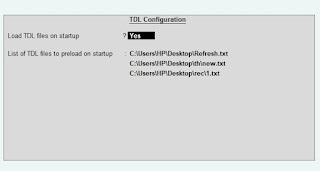
1. Copy the code and paste in a Text file. 2. Save the text file into your computer. 3. Copy the text file path including Name and extension (as – C:UsersHPDesktoprecParty Detail.txt) 4. Open Tally ERP9 5. Press F12 and goto Product and Features 5. Press F4 (to open a Box) 6. Load TDL file on Startup – Yes 7. Paste The path in blank space 8. Press enter and save
If you are a businessman or accountants or CA and use Tally ERP 9 Accounting software, then you are in right place. I have something special for you. I have Tally TDL for you to do all your work smoothly and time. TDL files play an important role in Tally software.
With this Tally ERP9 TDL you can track Stock Item Details and analyse it’s details like group, opening , closing , last sale and purchase amount with there dates. This Tally TDL will be very helpful to control your business and its profits.
[Button : Item Analysis]
Key : Ctrl+9
Title : “Item Analysis”
Action : Display Collection : Stock Items
[#Menu : Main Menu]
Add : Top Button : At Beginning : Item Analysis
[#Menu : default]
Add : Top Button : At Beginning : Item Analysis
[#form : default]
Add : Top Button : At Beginning : Item Analysis
[#form : voucher]
Add : Top Button : At Beginning : Item Analysis
[Collection:Stock Items]
Title:”LearnWell Items”
Type:Stock Item
Trigger:LWPriceList
Variable:SVStock Item List
Report:StockItemDetails
Format:$Name,20
Format:$Parent,15
Format:$OpeningBalance,12
Format:$ClosingBalance,12
Format:$LastSalePrice,12
Format:$LastSaleDate,12
Format:$LastPurcPrice,12
Format:$LastPurcDate,12
Sub Title:”Name”,”Group”,”Opening”,”Closing”,”Last Sale Price”,”Last Sale Date”,”Last Purc Price”,”Last Purc Date”
[Report:LWPriceList]
Title:Stock Item-Learnwells.com
Form:LWPriceList
[Form:LWPriceList]
Part:LWPriceList
Vertical Align:Top
Horizontal Align:Center
[Part:LWPriceList]
Line:TLWPriceList,LWPriceList
[Line:TLWPriceList]
Field:TLWPriceList
Space Bottom:1
[Field:TLWPriceList]
Info:”Stcok Item Name”
Align:Center
Width:50
Style:Normal bold
Border:Thin bottom
[Line:LWPriceList]
Field:LWPriceList
[Field:LWPriceList]
Table:Stock items
Show Table:Always
Modifies:SVStock Item List
Width:50
Max:251
[Report:StockItemDetails]
Title:”LearnWell:” + ##SVStockItemList
Form:StockItemDetails
Object:Stock Item :##SVStockItemList
[Form:StockItemDetails]
Part:StockItemDetails
[Part:StockItemDetails]
Line:StockItemDetails
[Line:StockItemDetails]
Field:StockItemDetails
[Field:StockItemDetails]
Set as:”www.Learnwells.com”
Style:bold
Color:red
[Variable:SVStock Item List]
Type:String
[System:Variable]
SVStock Item List:””
FOLLOW THE BELLOW INSTRUCTIONS TO LOAD TDL FILE IN TALLY:
1. Copy the code and paste in a Text file. 2. Save the text file into your computer. 3. Copy the text file path including Name and extension (as – C:UsersHPDesktoprecParty Detail.txt) 4. Open Tally ERP9 5. Press F12 and goto Product and Features 5. Press F4 (to open a Box) 6. Load TDL file on Startup – Yes 7. Paste The path in blank space 8. Press enter and save
TDL (Tally Definition Language) are nerves system of Tally. With TDL files we can modify tally asper our requirement. In this segment I have something very special for you.
With this Tally ERP9 TDL you can control your business by adding selling and purchase price amount in stock item and prevent billings beyond this.. Also can see last purchase and last selling price at voucher entry time.
[#Part: STKI Batch]
Add:Line:At End:LWminprice,LWmaxprice
[Line:LWminprice]
Space Top:0.1
Field:Medium Prompt,LWminprice
Local:Field:Medium Prompt:Set as:”Min Purc Price”
[Field:LWminprice]
Use:Rate Price Field
Set Always:Yes
Width:10
Storage:iteminsaleprice
[Line:LWmaxprice]
Space Top:0.1
Field:Medium Prompt,LWmaxprice
Local:Field:Medium Prompt:Set as:”Max Sell Price”
[Field:LWmaxprice]
Use:Rate Price Field
Set Always:Yes
Width:10
Storage:itemaxsaleprice
[System:UDF]
itemaxsaleprice:Rate:5628
iteminsaleprice:Rate:6523
[#Field:VCHBATCH rate]
Control:ValidityofPrice:if ($$Value < $iteminsaleprice:Stockitem:$StockItemName or $$Value > $itemaxsaleprice:StockItem:$StockItemName)then Yes else No
[#Field: VCH rate]
Control:ValidityofPrice:if ($$Value < $iteminsaleprice:Stockitem:$StockItemName or $$Value > $itemaxsaleprice:StockItem:$StockItemName) then Yes else No
[System:Formulae]
ValidityofPrice:”Please enter rate between minimum and maximum price as mentioned in stock item”
[*Collection: Vch Stock Item Extract]
Use: ExtractAlias Collection
Source Collection: Stock Item Src
Collection: StockItem PartNo With Closing
Title : $$LocaleString:”List of Items Stock Qty LastSale Price LastPurc Price”
FOLLOW THE BELLOW INSTRUCTIONS TO LOAD TDL FILE IN TALLY:
1. Copy the code and paste in a Text file. 2. Save the text file into your computer. 3. Copy the text file path including Name and extension (as – C:UsersHPDesktoprecParty Detail.txt) 4. Open Tally ERP9 5. Press F12 and goto Product and Features 5. Press F4 (to open a Box) 6. Load TDL file on Startup – Yes 7. Paste The path in blank space 8. Press enter and save
THIS EXCEL2TALLY-Eco SOFTWARE (E-COMMERCE SPECIALIAST) HELP YOU TO EXPORT EXCEL DATA INTO TALLY ERP OR OTHER VERSION OF TALLY LIKE TALLY 7.2, TALLY ERP 9, TALLY ERP, OR GST READY TALLY .. IT IS VERY USEFUL SOFTWARE AND SAVE YOUR LOTS OF TIME. NO RENEWAL REQUIRED- USE LIFETIME WITH MULTI COMPUTER.
NOW YOU CAN GENERATE XML FOR TALLY OF YOUR E COMMERCE EXCEL DATA (FLIPKART, AMAZON,SHOPCLUES,MEESHO ETC) AND ALOS FOR OTHER EXCEL SHEET DATA WITHIN A SECOND WITH BELOW DETAILS:
LEDGER MASTER – WITH GST NUMBER, FULL ADDRESS, FULL CONTACT DETAILS, OPENING BALANCE, SET CREDIT LIMITS, SET INTEREST, AND WITH BILL WISE OPENING DETAILS, INTEREST CALCULATION, AND CONTACT DETAILS.
STOCK MASTER – WITH HSN CODE, ALIAS, OPENING, MRP RATES, STANDARD RATES, BATCH DETAILS.
M.i.i VOUCHER : – WITH THIS MULTIPLE INVOICE, MULTIPLE INVENTORY, MULTIPLE VOUCER, MULTIPLE TAX RATES VOUCHER SHEET YOU CAN GENERATE ENTRIES WITH SIMPLE FORMAT. DIRECT COPY PASTE FROM YOUR DATA. CONSIGNEE, BUYERS DETAILS. WITH SINGLE BILL WISE REFERENCE. WITH MULTIPLE STOCK UNIT VOUCERS, SUITABLE FOR SALES, PURCHASE VOUCHERS AND CREDIT NOTE , DEBIT NOTES, VOUCHERS WITH YOUR OWN CREATED VOUCHER AS PER GST NORMS WITH MULTIPLE STOCK ITEMS, DETAILS INCLUDING GODOWN, BATCHES FOR EVERY STOCK ITEMS IN SAME SHEET.
SETTELMENT VCH- WITH THIS SHEET YOU CAN IMPORT YOUR SETTELEMENT TYPE VOUCHERS (RECEIPT, PAYMENT, JOURNAL, ETC) WHO HAS MULTI LEDGERS IN EVERY VOUCHERS. THIS SHEET IS MOST FAVOURABLE FOR AMAZON, FLIPKART TYPE E COMMERCE PAYMENT SETTELMENTS WITH SINGLE AND MULTI BILLWISE REFERENCES
ALL IN ONE VOUCHER SHEET – WITH THIS SHEET YOU CAN IMPORT YOUR ALL VOUCHERS – SALES, PURCHASE, RECEIPT, PAYMENT, CONTRA, JOURNAL ETC WITH MULTIPLE BILL WISE REFERENCE AT A TIME.
THIS EXCEL2TALLY-REGULAR SOFTWARE HELP YOU TO EXPORT EXCEL DATA INTO TALLY ERP OR OTHER VERSION OF TALLY LIKE TALLY 7.2, TALLY ERP 9, TALLY ERP, OR GST READY TALLY .. IT IS VERY USEFUL SOFTWARE AND SAVE YOUR LOTS OF TIME. NO RENEWAL REQUIRED- USE LIFETIME WITH MULTI COMPUTER.
NOW YOU CAN GENERATE XML FOR TALLY OF YOUR EXCEL SHEET DATA WITHIN A SECOND WITH BELOW DETAILS:
LEDGER MASTER– WITH GST NUMBER, FULL ADDRESS, FULL CONTACT DETAILS, OPENING BALANCE, SET CREDIT LIMITS, SET INTEREST, AND WITH BILL WISE OPENING DETAILS.
STOCK MASTER – WITH HSN CODE, ALIAS, OPENING, MRP RATES, STANDARD RATES, BATCH DETAILS.
A.S-I VOUCHER : – WITH THIS VOUCHER SHEET YOU CAN GENERATE ENTRIES WITH SIMPLE FORMAT. DIRECT COPY PASTE FROM YOUR DATA. CONSIGNEE DETAILS, BUYERS DETAILS. , DISPATCH DETAILS, WITH SINGLE BILL WISE REFERENCE. WITH TAX CLASSIFICATION DETAILS. SUITABLE FOR ADVANCE SALES , PURCHASE VOUCHERS AND CREDIT NOTE , DEBIT NOTES, RECEIPT NOTE, DELIVERY NOTES, SALES ORDER, PURCHASE ORDER VOUCHERS AS PER GST NORMS WITH STOCK ITEM DETAILS INCLUDING GODOWN, MULTIPLE BATCHES FOR EVERY STOCK ITEMS, WITH ITEM DESCRIPTION AND WITH ORDER TRACKING SYSTEM FOR EVERY STOCK ITEM. ALSO CAN USE FOR PHYSICAL STOCK VOUCHERS.
ALL IN ONE VOUCHER SHEET – WITH THIS SHEET YOU CAN IMPORT YOUR ALL VOUCHERS – SALES, PURCHASE, RECEIPT, PAYMENT, CONTRA, JOURNAL ETC WITH MULTIPLE BILL WISE REFERENCE AT A TIME.
.
A.A.-VC H– WITH THIS SHEET YOU CAN IMPORT SALES, PURCHASE, DEBIT NOTE, CREDIT NOTE ETC ENTRIES WITH BILL WISE DETAIL AND WITHOUT INVENTORY WITH SIMPLE FORMAT.
M-TH VOUCHER : – WITH THIS VOUCHER SHEET CAN GENERATE MULTI VOUCHER TYPE WITH THOUSANDS OF LEDGER IN ONE VOUCHER. (FOR EXAMPLE IF YOU GO TO TAKE ENTRIES FOR JOURNAL, SALES, PURCHASE, RECEIPT, CONTRA, PAYMENT, DR. NOTE, CR. NOTE ETC AT A TIME AND YOUR ONE VOUCHER HAS MANY LEDGERS LIKE HUNDRED OR THOUSANDS LEDGERS IN ONE VOUCHER, YOU CAN USE THIS SHEET).
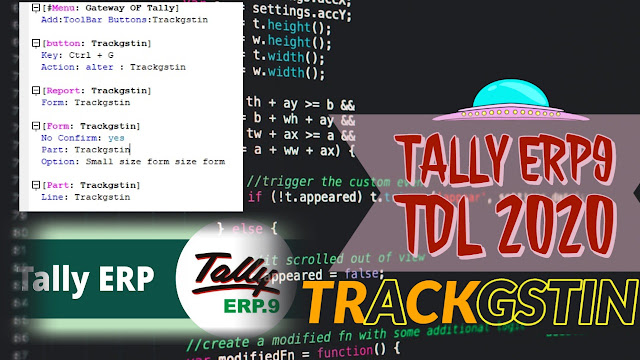
TDL (Tally Definition Language) are very useful for Tally Accounting Software. Today I have something special for your tally software. This is GSTIN Tracker. Now you can Search Party GST No. with one click. Just select party name and find GST number of Customer.
The TDL Code is as under :
[#Menu: Gateway OF Tally] Add:ToolBar Buttons:Trackgstin [button: Trackgstin] Key: Ctrl + G Action: alter : Trackgstin [Report: Trackgstin] Form: Trackgstin [Form: Trackgstin] No Confirm: yes Part: Trackgstin Option: Small size form size form [Part: Trackgstin] Line: Trackgstin [Line: Trackgstin] Field: Ledgersselect,Short Name field Local: Field:Short Name field: Set as: $PartyGSTIN:ledger:#Ledgersselect [Field: Ledgersselect] Use: Short Name field Table: Ledger Show Table: Always
FOLLOW THE BELLOW INSTRUCTIONS TO LOAD TDL FILE IN TALLY:
1. Copy the code and paste in a Text file. 2. Save the text file into your computer. 3. Copy the text file path including Name and extension (as – C:UsersHPDesktoprecParty Detail.txt) 4. Open Tally ERP9 5. Press F12 and goto Product and Features 5. Press F4 (to open a Box) 6. Load TDL file on Startup – Yes 7. Paste The path in blank space 8. Press enter and save
TDLs are very useful if you use Tally accounting software. With TDL (Tally Definition Language) files we can modified Tally software and it’s reporting according to our needs. So today I have something special for you.
Sometime when we take ledger print or mail to our debtors or creditors for outstanding collection or payments, we need to fill closing balance in word form also. So this Tally TDL file will help you to add party closing balances in words. The code is as under : [System: Formulae] IfAmtthenOnlystring : If @@VchClg = 0 Then “” Else $$String:” Only” [#Line: DSP VchClAmt] Add : Left Field : ClBalinWord Local : Field : Default: Style: normal bold Local : Field : Default: Background: lily white Local : Field : Default: Color: Blue Border: Thin Top Bottom:($$LineNumber = $$LastLineNumber ) AND $$InPrintMode [#Line: LV FCthree] Add : Left Field:ClBalinWord1 Local : Field : Default: Style: normal bold Local : Field : Default: Background: lily white Local : Field : Default: Color: Blue Border: Thin Top Bottom:($$LineNumber = $$LastLineNumber ) AND $$InPrintMode [Field: ClBalinWord] Set as: $$InWords:@@VchClg + @@IfAmtthenOnlystring Color: Blue Style: Large Bold ;;www.learnwells.com [Field: ClBalinWord1] Set as:$$InWords:@@BalanceVchDrCrAmt + ” Only “ Color: Blue Style: Large Bold Print FG:Red Indent:10 Width:50% Screen Lines:0
FOLLOW THE BELLOW INSTRUCTIONS TO LOAD TDL FILE IN TALLY:
1. Copy the code and paste in a Text file. 2. Save the text file into your computer. 3. Copy the text file path including Name and extension (as – C:UsersHPDesktoprecParty Detail.txt) 4. Open Tally ERP9 5. Press F12 and goto Product and Features 5. Press F4 (to open a Box) 6. Load TDL file on Startup – Yes 7. Paste The path in blank space 8. Press enter and save
WITH THIS TALLY TDL FILE YOU CAN SEE ITEM WISE SALE SUMMARY AND PARTIES VOUCHER WISE TRANSACTION REPORTS. IT WILL BE VERY USEFUL FOR OUTSTANDING COLLECTION AND FOR STOCK SUMMARY. [#Menu: Display Menu] Add: Item: Unique Sale Summary : Menu: Unique Sale Summary [Menu: Unique Sale Summary] Key Item: ITEM WISE : T : Display : ProductwiseRpt Item : Blank Key Item: LEDGER SUMMARY : S : Display Collection: TransVchLedgerColl Item : Blank [Report: LWLL] Use : DSP Template Form : LWLL Variable : DoSetAutoColumn, PName Repeat : PName Set : DoSetAutoColumn : Yes Set : DSPRepeatCollection : “LEARN Party” Set : SVFromDate : $$MonthStart:##SVCurrentDate Set : SVToDate : $$MonthEnd:##SVCurrentDate [Form: LWLL] Use : DSP Template Parts : LWLL Background : White, Light Orange Option : Set Auto Vch Option : ##DoSetAutoColumn AND $$SetAutoColumns:PName [!Form: Set Auto Vch Option] [Part: LWLL] Lines : LWLL Title, LWLL Details BottomLines : LWLL Total Repeat : LWLL Details : Smp Stock Item Scroll : Vertical CommonBorder: Yes Total : LWLL Party, LWLL Col Total [Line: LWLL Title] Use : LWLL Details Local : Field : Default : Type : String Local : Field : Default : Align : Center Local : Field : LWLL Name : Set as : “Particulars” Local : Field : LWLL Name : Widespaced: Yes Local : Field : LWLL Party : Set as : ##PName Local : Field : LWLL Party : Lines : 0 Local : Field : LWLL ColTotal : Set as : “Total” Border : Flush Totals [Line: LWLL Details] Fields : LWLL Name, LWLL Party, LWLL Col Total Repeat : LWLL Party Total : LWLL Party [Field: LWLL Name] Use : Name Field Set as : $IName Display : Stock Vouchers Variable : Stock Item Name [Field: LWLL Party] Use : Qty Primary Field Set as : $$ReportObject:$$CollectionFieldByKey:$BilledQty:@MyFormula:LEARNSummVoucher MyFormula : ##PName + #LEARNRepName Format : “NoZero” Border : Thin Left [Field: LWLL Col Total] Use : Qty Primary Field Set as : $$Total:LEARNRepParty Border : Thin Left [Line: LWLL Total] Fields : LWLL Name, LWLL Party, LWLL Col Total Repeat : LWLL Party Local : Field : Default : Type : String Local : Field : Default : Align : Center Local : Field : LWLL Name : Set as : “Total” Local : Field : LWLL Name : Widespaced: Yes Local : Field : LWLL Party : Set as : $$Total:LEARNRepParty Local : Field : LWLL ColTotal : Set as : $$Total:LEARNRepColTotal Border : Thin Top [Collection: LEARN Voucher] Type : Voucher Filter : IsSalesVT [Collection: LEARN Summ Voucher] Source Collection : LEARN Voucher Walk : Inventory Entries By : PName : $PartyLedgerName By : IName : $StockItemName Aggr Compute : BilledQty : SUM : $BilledQty Search Key : $PName + $IName [Collection: Smp Stock Item] Source Collection : LEARN Voucher Walk : Inventory Entries By : IName : $StockItemName Aggr Compute : BilledQty : SUM : $BilledQty Filter : NonEmptyQty [Collection: LEARN Party] Source Collection : LEARN Voucher Walk : Inventory Entries By : PName : $PartyLedgerName Aggr Compute : BilledQty : SUM : $BilledQty Filter : NonEmptyQty [Variable: PName] Type : String Repeat : ##DSPRepeatCollection [System: Formula] IsSalesVT : $$IsSales:$VoucherTypeName NonEmptyQty : NOT $$IsEmpty:$BilledQty [Report: ProductwiseRpt] Use : DSP Template Form : ProductwiseRpt Title : “Product-wise Sales Summary Report” [Form: ProductwiseRpt] Use : DSP Template Parts : ProductwiseRptHdr, ProductwiseRpt Height : 100% Screen Width : 100% Screen Delete : Buttons : ExplodeFlag Delete : Bottom Buttons : DSPAutoColumns, BudgetAnalysis, ReportConfig [Part: ProductwiseRptHdr] Lines : ProductwiseRptHeader [Line: ProductwiseRptHeader] Field : Name Field Right Field : DSP MainDateTitle Local : Field : Name Field : Set as : $$LocaleString:”Inventory Details” Local : Field : Name Field : Style : Normal Bold Space Bottom: 1 [Part: ProductwiseRpt] Lines : ProductwiseRptTitle, ProductwiseRptInfo Repeat : ProductwiseRptInfo : SummaryColl Scrolled : Vertical Common Borders : Yes Border : Thin Bottom Float : No [Line: ProductwiseRptTitle] Use : ProductwiseRptInfo Local : Field : Default : Type : String Local : Field : Default : Lines : 0 Local : Field : Default : Style : Normal Bold Local : Field : ProductTotalAmt : Align : Centre Local : Field : ProductMaxRate : Align : Centre Local : Field : ProductMinRate : Align : Centre Local : Field : ProductName : Set as : “Particulars” Local : Field : ProductTotalAmt : Set as : “Total Quantity” Local : Field : ProductMaxRate : Set as : “Maximum Rate” Local : Field : ProductMinRate : Set as : “Minimum Rate” Border : Thin Column Titles [Line: ProductwiseRptInfo] Fields : ProductName Right Fields : ProductTotalAmt, ProductMaxRate,ProductMinRate Local : Field : Default : Style : Normal [Field: ProductName] Use : Name Field Set as : $StockItemName Display : Stock Vouchers Variable : Stock Item Name [Field: ProductTotalAmt] Use : Qty Primary Field Set as : $StkTotalQty Border : Thin Left Right Width : 10 [Field: ProductMaxRate] Use : Rate Field Set as : $StkMaxRate Border : Thin Right Width : 10 [Field: ProductMinRate] Use : Rate Field Set as : $StkMinRate Border : Thin Right Width : 10 [Collection: SalesVouchersColl] Type : Voucher Filter : OnlySalesCreditNote [Collection: SummaryColl] Source Collection : SalesVouchersColl Walk : Inventory Entries By : StockItemName : $StockItemName Aggr Compute : StkTotalQty : Sum : $BilledQty Aggr Compute : StkMinRate : Min : $Rate Aggr Compute : StkMaxRate : Max : $Rate Keep Source : No Sort : Default : $StockItemName [System: Formula] OnlySalesCreditNote : $$IsSales:$VoucherTypeName OR $$IsCreditNote:$VoucherTypeName [Collection: TransVchLedgerColl] Use : Ledger Report : Transact Report Trigger : Ledger Name Variable : Ledger Name [Report: Transact Report] Use : DSP Template Form : TransVchReport Variable : Ledger Name [Form: TransVchReport] Use : DSP Template Part : LV Title, TransVchTitle, TransVchBody Width : 100% Screen Height : 100% Screen Delete : Buttons : ExplodeFlag Delete : Bottom Buttons : DSPAutoColumns, BudgetAnalysis, ReportConfig Local: Line : LV Title : Local : Field : LV Title : Local : Field: Simple Prompt : Info : $$LocaleString:”Ledger” Local: Line : LV Title : Local : Field : LV Title : Local : Field: Name Field : Set as : #LedgerName [Part: TransVchTitle] Lines : TransVchTitle [Line: TransVchTitle] Use : TransVchLedDetail Local : Field : Default : Type : String Local : Field : Default : Align : Centre Local : Field : Default : Style : Normal Bold Local : Field : TransVchTypeName : Set as : “Voucher Type Name” Local : Field : TransVchDrAmt : Set as : “Debit Amt” Local : Field : TransVchCrAmt : Set as : “Credit Amt” Border : Thin Top Bottom [Part: TransVchBody] Lines : TransVchLedDetail Bottom Lines: TransVchLedTotal Repeat : TransVchLedDetail : TransVchSummaryColl Scroll : Vertical CommonBorder: Yes Total : TransVchDrAmt, TransVchCrAmt [Line: TransVchLedDetail] Fields : TransVchTypeName Right Fields : TransVchDrAmt, TransVchCrAmt Local : Field : Default : Style : Normal [Field: TransVchTypeName] Use : Name Field Set as : $TransVchName [Field: TransVchDrAmt] Use : Amount Forex Field Set as : $TransVchDrAmt Border : Thin Left Right [Field: TransVchCrAmt] Use : Amount Forex Field Set as : $TransVchCrAmt Border : Thin Right [Line: TransVchLedTotal] Use : TransVchLedDetail Local : Field : Default : Style : Normal Bold Local : Field : TransVchTypeName : Set as : “Total” Local : Field : TransVchDrAmt : Set as : $$Total:TransVchDrAmt Local : Field : TransVchCrAmt : Set as : $$Total:TransVchCrAmt Border : Thin Top Bottom [Collection: TransVchColl] Type : Voucher [Collection: TransVchSummaryColl] SourceCollection: TransVchColl Walk : Ledger Entries By : TransVchName : $VoucherTypeName By : TransVchLed : $LedgerName Aggr Compute : TransVchDrAmt : Sum : If $$IsDr:$Amount then $Amount else “” Aggr Compute : TransVchCrAmt : Sum : If NOT $$IsDr:$Amount then $Amount else “” Filter : TransVchFilter ;; Filtering done here to retrieve only values pertaining to the requested Party [System: Formula] TransVchFilter : #LedgerName = $TransVchLed TransVchOpBal : $OpeningBalance:Ledger:#LedgerName TransVchClBal : $ClosingBalance:Ledger:#LedgerName ;;WWW.LEARNWELLS.COM
FOLLOW THE BELLOW INSTRUCTIONS TO LOAD TDL FILE IN TALLY:
1. Copy the code and paste in a Text file. 2. Save the text file into your computer. 3. Copy the text file path including Name and extension (as – C:UsersHPDesktoprecParty Detail.txt) 4. Open Tally ERP9 5. Press F12 and goto Product and Features 5. Press F4 (to open a Box) 6. Load TDL file on Startup – Yes 7. Paste The path in blank space 8. Press enter and save
Every business maintain bank, and if we do accounting in Tally Software we all need this TDL file.
TDL (Tally Definition Language) files used to modify Tally Software according to your uses. TDL files are very useful to simplify your work.
With this TDL you can see your bank daybook with narration and its cheque number.Also can edit at a time.It is very nice TDL file for Tally and must have tdl for tally. [#Menu : Gateway of Tally] Add : Item : Bank Daybook : Display : BankDaybookd [Report:BankDaybookd] Use : DSP Template Set : SVfromDate :##SVfromDate Set : GroupName : ##GroupName Variable : IsMultiPage, InNewPages Set : IsMultiPage : yes Set : InNewPages : yes Set : SVToDate : ##SVCurrentdate Set : SVfromDate : $BooksFrom:Company-:##SVCurrentCompany Variable : BankName : string Set : BankName : “” [Form: BankDaybookd] Button : PrintButton, ExportButton, F2 ChangePeriod, SelectBank Parts :LWBnkDetails, BankLDetails Height : 100% screen Width : 100% screen Background : Light Surf Green [Button : SelectBank] Title : “Select Bank” Key : Alt + B Action : Alter : BankSelection [Report : BankSelection] Form :BankSelection ;Title : BankSelection” [Form : BankSelection] Parts : BankSelection Option : Small Size Form Full Width : No Space Left : 0.5 Space Right : 0.5 [Part : BankSelection] Lines : Form SubTitle, BankSelection Local : Field : Form SubTitle : Info : “Bank Selection” [Line : BankSelection] Fields : Long Prompt, BankSelection Local : Field : Long Prompt : Set as : $$String:”Bank Selection:” Local : Field : Default : width: 15 [Field : BankSelection] Use : Name field Table : BankAccounts, End of List Show Table : Always Sort : Yes Modifies : BankName :Yes Variable :BankName [Variable:BankName] Type : String Persistent : Yes [System:Variables] BankName:”” [Collection : BanknameColl] Type : Ledger Include : Group:$$GroupBank, Group:$$GroupBankOD Belongsto : yes Format : $BankName, 15 Fetch : Name Title : “List of Bank” FullHeight : No Filter: Filterbank [System: Formulae] Filterbank:$Ledgername = ##BankName or $$IsSysName:##BankName Filterbank:$IsBelongsTo:$$GroupBank OR $$IsBelongsTo:$$GroupBankOD [Part:LWBnkDetails] Line: LWBnkDetails Name, LWStts [Line:LWBnkDetails Name] Field: Form Sub Title Local : Field : Form Sub Title : Set as : @@CmpMailName Local : Field : Form Sub Title : Align : Center Local : Field : Form Sub Title : Fullwidth : yes Local : Field : Form Sub Title : Color : Blue Local : Field : Form Sub Title : Border: Thin Bottom Local : Field : Form Sub Title : Style: Large Bold Italic Space Bottom:0.2 [Line : LWStts] Field:LWStts Space Bottom:0.2 [Field:LWStts] Use :Name field Set as : $$LocaleString:”Period ” + $$String:##SVFromDate + ” to ” + $$String:##SVToDate Align : Center Full Width : Yes Color :Black Style :Small bold Italic Background : Light Surf Green [Part: BankLDetails] Lines : BnkTts, BnkLns, Repeat : BnkLns : paymentColl CommonBorder: Yes Scroll : Vertical Border : Thin Bottom [Line : BnkTts] Use : BnkLns Local : Field : Default : Color : Black Local : Field : Default : Background : Light Grey Local : Field : Default : Type : String Local : Field : Default : Align : Centre Local : Field : Default : Line : 0 Local : Field : LWvchDt : Set as : “Vch Date” Local : Field : LWldNm : Set as : “Particulars” Local : Field : LWLptm : Set as : “Naration” Local : Field : LWChqno : Set as : “Cheque No.” Local : Field : LWDramt : Set as : “Withdrawl.” Local : Field : LWCramt : Set as : “Deposit” Border : column Titles [Line: BnkLns] Fields : LWvchDt, LWldNm, LWLptm, Right Fields : LWChqno ,LWDramt, LWCramt Option : AlterOnEnter [Field:LWvchDt] Use : Short Date Field Set as : $Date Format : Short Date, Separator:”-” Border : Thin Left Width : 8 Align : Right Alter : Voucher : $$IsVoucher [Field:LWldNm] Use : Name Field Set As : $AllLedgerEntries[1].LedgerName Border : Thin Left full width:Yes Align : left [Field :LWLptm] Use : Name Field Set as : $Narration Border : Thin Left Width : 30 Align : left [Field:LWChqno] Use : Name Field Set As : $AllLedgerEntries[-1].BankAllocations.InstrumentNumber Border : Thin Left Width :15 Align : Right [Field:LWDramt] Use : Amount Field Set as : If $$IsDr:$Amount then $Amount else “” Format : “Cr/Dr” Border : Thin Left Width :15 Align : Right [Field:LWCramt] Use : Amount Field Set as : If not $$IsDr:$Amount then $Amount else “” Format : “Cr/Dr” Border : Thin Left Width :15 Align : Right [Collection:paymentColl] Type : Vouchers : Ledger Child Of:##BankName belongs to : Yes Fetch : Date, Vouchernumber, VoucherTypeName, Amount, MasterID, LedgerName, Parent,ParentFullLis, Narration, LWDramt, LWCramt Compute:DrAmt:If $$IsDr:$Amount then $Amount else “” Compute:CrAmt:If not $$IsDr:$Amount then $Amount else “” Filter:MYVCH Sort : Default : $Date, $LedgerName [System : Formula] MYVCH:$$IsPayment:$VoucherTypeName or $$IsReceipt:$VoucherTypeName or $$IsContra:$VoucherTypeName
FOLLOW THE BELLOW INSTRUCTIONS TO LOAD TDL FILE IN TALLY:
1. Copy the code and paste in a Text file. 2. Save the text file into your computer. 3. Copy the text file path including Name and extension (as – C:UsersHPDesktoprecParty Detail.txt) 4. Open Tally ERP9 5. Press F12 and goto Product and Features 5. Press F4 (to open a Box) 6. Load TDL file on Startup – Yes 7. Paste The path in blank space 8. Press enter and save