DISPLAY IMPORTANT THINGS IN GATEWAY OF TALLY


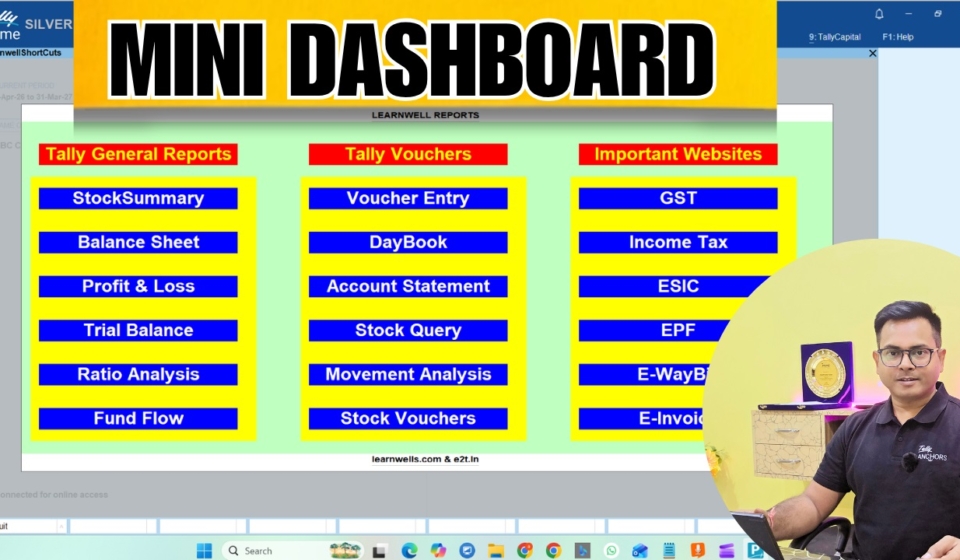
With this TDL file we can see all important reports like Profit and loss, Balance Sheet, Inward – Outward Tracking, Receipt Payments Cash flow details and can browse our important websites like GST portal and other important sites and also can see all type GST reports in one place. This is must have TDL file for your Tally.
With this TDL we do all our work faster and in a perfect way.
It will work in all Tally versions (Tally9, Tally Prime, Tally ERP9 etc). For more detail watch above Video.

TDL Code : 

[#MENU : Gateway of Tally]
title: Learnwell

Add: Key Item : Before : @@locQuit : MyReport: O: Menu : Reports

[Menu: Reports]

INDENT:GENERAL REPORTS
Key Item : Profit & Loss :P:Display :Profit and Loss
Key Item : Balance Sheet :B:Display :Balance Sheet
Key Item : Receipts and Payments :C:Display :Receipts and Payments
Key Item : Cash Flow :W:Display :Cash Flow
Key Item : Stock Summary :S:Display :Stock Summary
Key Item : Reorder Status :R:Display :Reorder Status
Key Item : Materials Requirements :M:Display :MRP
Key Item : Inward Tracking Details :I:Display :Inward Tracking Details
Key Item : Outward Tracking Details :O:Display :Outward Tracking Details
Key Item : Interest :O:Display : Ledger Interest
Key Item : voucher :O:Display : Accounting Voucher
Key Item : Sundry Debtors :O:Display : Sundry Dr
ITEM:BLANK
INDENT:BOOKMARKS
Key Item : GST portal :Action:Browse :”https://www.gst.gov.in/”

Key Item : GST Login :Action:Browse :”https://services.gst.gov.in/services/login”

Key Item : GSTSearch :Action:Browse :”https://services.gst.gov.in/services/searchtp”

Key Item : Youtube :Action:Browse :”https://youtube.com/learnwell”

ITEM:BLANK
INDENT:GST REPORTS


Key Item : GSTR1 :P:Display :GSTR1Trgl
Key Item : GSTR2 :P:Display :GSTR2Trgl
Key Item : GSTR3B :P:Display :GSTR3BTrgl
Key Item : GST COMPUTATION :P:Display :GST Computation
Key Item : GST COM MONTHLY :P:Display :GST Comp Monthlysummary
Key Item : GSTR1 TABLE :P:Display :GSTTrglTablewise Drilldown
Key Item : GSTR2 TABLE :P:Display :GSTR2TrglTablewise Drilldown
Key Item : GST VCH :P:Display :GSTR1Trgl Table VCHdrilldown
Key Item : GST PARTY :P:Display :GSTR2Partywise Drilldown

HOW TO USE ABOVE CODE:

FOLLOW THE BELLOW INSTRUCTIONS TO LOAD TDL FILE IN TALLY:

1. Copy the code and paste in a Text file.
2. Save the text file into your computer.
3. Copy the text file path including Name and extension (as – C:UsersHPDesktoprecParty Detail.txt)
4. Open Tally ERP9  OR Tally Prime
5a. Press F12 and goto Product and Features (for Tally ERP9)
5b. Click on Help and click on TDL & Addon  (for Tally Prime)
5. Press F4 (to open a Box)
6. Load TDL file on Startup – Yes
7. Paste The path in blank space
8. Press enter and save 
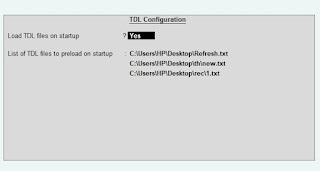

Now your TDL is ready to use.


LEDGER RUNNING BALANCE

With this TDL file we can show Tally Ledgers running balances.
It will work in all Tally versions. For more detail watch above Video.
TDL Code : 

[#Report:Ledger Vouchers]
Set:ShowRunBalance:Yes

HOW TO USE ABOVE CODE:

FOLLOW THE BELLOW INSTRUCTIONS TO LOAD TDL FILE IN TALLY:

1. Copy the code and paste in a Text file.
2. Save the text file into your computer.
3. Copy the text file path including Name and extension (as – C:UsersHPDesktoprecParty Detail.txt)
4. Open Tally ERP9  OR Tally Prime
5a. Press F12 and goto Product and Features (for Tally ERP9)
5b. Click on Help and click on TDL & Addon  (for Tally Prime)
5. Press F4 (to open a Box)
6. Load TDL file on Startup – Yes
7. Paste The path in blank space
8. Press enter and save 


Now your TDL is ready to use.


EXCECL TO TALLY AUTOMATION E- COMMERCE


This is Excel to Tally Automation to Import your E-Commerce Data Entry into Tally wit Easy and quick way. With this software we can import Masters and Vouchers with every detail. It work perfectly with Tally ERP9 and Tally Prime. Support GST and Vat Entries. It holds below features that make it best Excel to Tally E-Commerce Data Import software :
ü Realtime connection with Tally
ü Master and Voucher Creation in Same Sheet
ü Change Tally ledger name and Item name direct from Excel.
ü Import Text, CSV, Excel formats Directly in this sheet

ü Auto Calculation columns of Cell address, Round off, Taxable Value etc with Validate Button
ü Upto 25000 entries with one click
ü Very supportive formats for every type work.
ü Small and supportive file, work with every version of Excel
ü Lifetime Use, No renewal required, 24×7 free support.
Contains below Sheets to powerup Data Entry work:
LEDGER MASTER:
1. OWN GROUP
2. ALIAS
3. FULL ADDRESS WITH CONTACT DETAILS
4. FULL GST DETAILS
5. OTHER DETAIL ENABLING OPTION
6. CREDIT LIMIT
7. LEDGER DESCRIPTION
8. TDS DETAILS
9. BANK DETAILS
10. OPENING BALANCES
STOCK MASTER:
1. OWN GROUP
2. ALIAS
3. BATCH DETAILS
4. GST DETAILS
5. MRP DETAILS
6. STANDERD RATES
7. OPENING BALANCES
UNIT MASTER:
1. FORMAL NAME
2. DECIMAL PLACES
Amazon B2C
1. FULL DETAILED INVENTORY VOUCHER.
2. WITH CLEAR, IMPORT, VALIDATE, POST MASTER NAD POST VOUCHER BUTTONS.
3. GET CSV, TEXT, EXCEL FORMATS DIRECTLY IN TO THE SHEET.
4. AUTO CALCULATION FIELDS TO RELATE VOUCHERS AND ITEMS.
5. SAME AMAZON SHEET FORMAT

6. WITH TCS AND GST EFFECTS
7. NO BOUNDATION FOR DATES, USE LIFETIME
8. MANUAL AND AUTOMATIC VOUCHER NUMBER SUPPORT WITH REFERENCE NUMBER
9. DEBIT CREDIT WILL CALCULATE AUTOMATIC
10. ALL LEDGERS WITH SHIPPING, WRAP, DISCOUNT, GST ,TCS ETC.

11. PARTY STATE AND PLACE OF SUPPLY
12. SUPPORT BILLWISE DETAILS
13. GST DETAIL FOR CREDIT AND DEBIT NOTES

Amazon B2B
1. FULL DETAILED INVENTORY VOUCHER.
2. WITH CLEAR, IMPORT, VALIDATE, POST MASTER NAD POST VOUCHER BUTTONS.
3. GET CSV, TEXT, EXCEL FORMATS DIRECTLY IN TO THE SHEET.
4. AUTO CALCULATION FIELDS TO RELATE VOUCHERS AND ITEMS.
5. SAME AMAZON SHEET FORMAT

6. WITH TCS AND GST EFFECTS
7. NO BOUNDATION FOR DATES, USE LIFETIME
8. MANUAL AND AUTOMATIC VOUCHER NUMBER SUPPORT WITH REFERENCE NUMBER
9. DEBIT CREDIT WILL CALCULATE AUTOMATIC
10. ALL LEDGERS WITH SHIPPING, WRAP, DISCOUNT, GST ,TCS ETC.

11. PARTY STATE AND PLACE OF SUPPLY
12. SUPPORT BILLWISE DETAILS
13. GST DETAIL FOR CREDIT AND DEBIT NOTES
FLIPKART
1. FULL DETAILED INVENTORY VOUCHER.
2. WITH CLEAR, IMPORT, VALIDATE, POST MASTER NAD POST VOUCHER BUTTONS.
3. GET CSV, TEXT, EXCEL FORMATS DIRECTLY IN TO THE SHEET.
4. AUTO CALCULATION FIELDS TO RELATE VOUCHERS AND ITEMS.
5. SAME FLIPKART SHEET FORMAT

6. WITH TCS AND GST EFFECTS
7. NO BOUNDATION FOR DATES, USE LIFETIME
8. MANUAL AND AUTOMATIC VOUCHER NUMBER SUPPORT WITH REFERENCE NUMBER
9. DEBIT CREDIT WILL CALCULATE AUTOMATIC
10. ALL LEDGERS WITH SHIPPING, WRAP, DISCOUNT, GST ,TCS ETC.

11. PARTY STATE AND PLACE OF SUPPLY
12. SUPPORT BILLWISE DETAILS
13. GST DETAIL FOR CREDIT AND DEBIT NOTES
AMAZON SETTLEMENT
1. SPECIAL SETTLEMENT VOUCHER
2. WITH MULTIPLE REFERENCE ENTRY

3. DIRECET GET TEXT FILES INTO THE SHEET
4. AUTOMATIC CALCULATIONS AND SUMMURISED IN SAME SHEET

5. WITH CLEAR, IMPORT, VALIDATE, POST MASTER NAD POST VOUCHER BUTTONS.

6. SAME AMAZON SETTLEMENT FORMAT
RANDOM
1. SIMPLE ACCOUNTING VOUCHERS
2. SALES, PURCHASE, RECEIPT, PAYMENT, CONTRA,JOURNAL ETC IN SAME SHEET.
3. YOUR OWN VOUCHER TYPE
4. NO BOUNDATION FOR DATES, USE LIFETIME
5. MANUAL AND AUTOMATIC VOUCHER NUMBER SUPPORT WITH REFERENCE NUMBER
6. SEPARATE DEBIT LEDGERS AND AMOUNT, CREDIT LEDGERS AND AMOUNT
7. SHEET HAS MACRO BUTTONS TO DIRECT POST IN TALLY.

8. SHEET HAS MACRO BUTTONS TO CALCULATE RANDOM DATE AND AMOUNT VOUCHERS.

BANK-VCH:
1. BANK IMPORT WITH SIMPLE BANK FORMAT
2. AUTOMATIC VOUCHER SELECTION
3. SEPARATE CONTRA VOUCHER TYPE
4. NO BOUNDATION FOR DATES, USE LIFETIME
5. ENTRIES DONE WITH RECONCILATION
6. DEBIT AND CREDIT LEDGER OPTION IN SAME COLUMN
7. SHEET HAS MACRO BUTTONS: MASTER CHECK, TALLY LEDGER ALTER, POST IN TALLY.

MULTIPURPOSE SETTLEMENT:
1. IMPORT VOUCHERS WITH UNLIMITED LEDGERS (ONE VOUCHER WITH THOUSANDS OF LEDGER)

2. IDAL FOR FLIPKART SETTLEMENT AND SALARY IMPORT
3. INCLUDE ALL TYPE VOUCHERS- SALES, PURCHASE, JOURNAL, PAYMENT, RECEIPT, CONTRA WITHOUT INVENTORY
4. WITH SINGLE AND MULTIPLE BILL WISE DETAILS

5. WITH COSTCENTER AND COST CATEGORY DETAILS


UTILITY ALSO HAVE HELP SHEET, READ CAREFULLY BEFORE USE.
EVERY BUTTON HAS HELP OPTION WITH IT. RIGHT CLICK ON BUTTONS TO GET HELP.
VIDEO HELP: https://youtu.be/6qL2_eJmfFg

WEBSITE : www.Learnwells.com and E2T.in
EMAIL : <Learnwells@outlook.com> and <ssonu@live.com> (Personal Email id)
YOUTUBE : https://www.youtube.com/learnwell/c
FACEBOOK: https://www.facebook.com/learnswell/
CONTACT NO. +91-9131810293 (ASHISH SINGH)

 DOWNLOAD LINK: https://imojo.in/45qf9w

DETAILED VOUCHER TDL


NOW WORK WILL BE DONE EASILY AND WITH EVERY DETAILS.

In this segment I have special TDL file for your Detailed Voucher. With this you can add BATCH, HSN, GODOWN in your Invoice Vouchers at one place with every Stock Items.

Copy below code and follow instructions

;;……….www.Learnwells.com…….
[#Line : EI ColumnOne]
Option : LWBatchT
[!Line : LWBatchT]
add : fields: after:VCH ItemTitle : LearnWellBatch
[field :LearnWellBatch]
use : name field
Info: “Batch No”
Align : Centre
width :40
Skip:Yes
[#Line : EI InvInfo]
Option : LWBatchD
[!Line : LWBatchD]
add : fields:after: VCH StockItem : LearnWellBatchD
[field : LearnWellBatchD]
Use:VCHBatchName
Set as : $BATCHNAME
Width : 20
Skip:Yes
[#Line:EI ColumnOne]
Add:Field:After:VCH ItemTitle:Learnwells
[Field:Learnwells]
Setas:$$LocaleString:”HSN/SAC”
Width:30
SKIP:YES
[#Line:EI invinfo]
Add:Field:After:VCH StockItem:LearnwellsHSN
[Field:LearnwellsHSN]
Use:Short prompt
Setas:$(StockItem,$stockitem).GSTDetails[Last].HSNCode
[#Line:EI ColumnOne]
Add : Right Field : Before : VCH QtyTitle: Learnwells1
[Field:Learnwells1]
Setas:$$LocaleString:”GODOWN”
Width : 30
SKIP:YES
[#Line:EI invinfo]
Add : Right Field : Before : VCHBilledQty :LearnwellsGDN
[Field:LearnwellsGDN]
Use:Short prompt
Setas:$BatchAllocations[1].GodownName
Width : 30

;;……….www.Learnwells.com…….


FOLLOW THE BELLOW INSTRUCTIONS TO LOAD TDL FILE IN TALLY:

1. Copy the code and paste in a Text file.
2. Save the text file into your computer.
3. Copy the text file path including Name and extension (as – C:UsersHPDesktoprecParty Detail.txt)
4. Open Tally ERP9 
5. Press F12 and goto Product and Features
5. Press F4 (to open a Box)
6. Load TDL file on Startup – Yes
7. Paste The path in blank space
8. Press enter and save 


Now your TDL is ready to use.

Also you can download it with below download button


LIST IN INVOICE


NOW MAKE YOUR OWN LISTS (SALESMAN, SALE  TYPE ETC.) IN VOUCHERS

[#Part: VCHTitle2right]
Option: SaleType:@@IsSales or @@IsPurchase
[!Part :SaleType] 
Add : Line:AtEnd:SaleType
[Line : SaleType]
Field : Medium Prompt,LWSaleType
Local : Field:Medium Prompt:Info:”Sale Type:”
Local : Field:Medium Prompt:Width: 8% Page

[Field:LWSaleType]
Use : Name Field
Storage:SalesTypeLw
Width : 15
Table : LWtbl
[Table : LWtbl]
Title : $$LocaleString:”Types of Sale”
List Name : Counter Sale,Marketing Sale, Campaign Sale, SalesMan Sale, � Not Applicable
Format : $Name

[System: UDF]
    SalesTypeLw:String:1000


FOLLOW THE BELLOW INSTRUCTIONS TO LOAD TDL FILE IN TALLY:

1. Copy the code and paste in a Text file.
2. Save the text file into your computer.
3. Copy the text file path including Name and extension (as – C:UsersHPDesktoprecParty Detail.txt)
4. Open Tally ERP9 
5. Press F12 and goto Product and Features
5. Press F4 (to open a Box)
6. Load TDL file on Startup – Yes
7. Paste The path in blank space
8. Press enter and save 


Now your TDL is ready to use.


EXCEL TO TALLY – AUTOMATION

This is Excel to Tally Automation to automate your Data Entry with Tally. It is very helpful to import Excel Data into Tally, easy and quickly. With this software we can import Masters and Vouchers with every detail. It work perfectly with Tally ERP9 and other latest version of Tally. Support GST and Vat Entries. It holds below features that make it best Excel to Tally Data Import software :

ü  Real-time connection with Tally

ü  Match Excel sheet Ledgers and Stock Items direct with Tally and generate uncreated masters list.

ü  Change Tally ledger name and Item name direct from Excel.

ü  Dual Entry System (Direct Oneclick Entry and XML generation also)

ü  Auto Calculation columns of Cell address, Round off, Taxable Value etc with Validate Button

ü  Every time Unlimited Entries with oneclick

ü  Very supportive formats for every type work.

ü  Small and supportive file, work with every version of Excel

ü  Lifetime Use, No renewal required, 24×7 free support.

Contains below Sheets to power-up Data Entry work:

LEDGER MASTER:

1.       OWN GROUP

2.       ALIAS

3.       FULL ADDRESS WITH CONTACT DETAILS

4.       FULL GST DETAILS

5.       OTHER DETAIL ENABLING OPTION

6.       CREDIT LIMIT

7.       LEDGER DESCRIPTION

8.       TDS DETAILS

9.       BANK DETAILS

10.   OPENING BALANCES

STOCK MASTER:

1.       OWN GROUP

2.       ALIAS

3.       BATCH DETAILS

4.       GST DETAILS

5.       MRP DETAILS

6.       STANDERD RATES

7.       OPENING BALANCES

UNIT MASTER:

1.       FORMAL NAME

2.       DECIMAL PLACES

F-D-Invt-VCH

1.       FULL DETAILED INVENTORY VOUCHERS

2.       ITEMS WITH BATCH, GODOWN, DESCRIPTION, MFG-EXPIRY DATES

3.       UNLIMITED STOCK ITEMS WITH EVERY VOUCHER

4.       AUTOMATIC CELL ADDRESSES TO RELATE ITEMS WITH VOUCHER

5.       TAXABLE LEDGER FOR EVERY ITEM FOR ITEM ALLOCATION

6.       YOUR OWN VOUCHER TYPE

7.       NO BOUNDATION FOR DATES, USE LIFETIME

8.       MANUAL AND AUTOMATIC VOUCHER NUMBER SUPPORT WITH REFERENCE NUMBER

9.       NO DEBIT CREDIT OPTION (IT WILL CALCULATE AUTOMATIC)

10.   22 LEDGERS IN ONE VOUCHER TO SUPPORT ALL GST RATES WITH EXEMPTED (IT MAY INCREASE)

11.   INCLUDE TRANSPORTING CHARGE, OTHER CHARGE, DISCOUNT, ROUND OFF LEDGERS.

12.   SUPPORT BILLWISE DETAILS

13.   GST DETAIL COLUMNS FOR CREDIT AND DEBIT NOTES

14.   CONSINGEE AND BUYER DETAILS WITH GST TYPE, GST NUMBER, PLACE OF SUPPLY ETC.

15.   FULL DESPATCH DETAILS.

16.   TAX CLASSIFICATION DETAIL COLUMN

17.   SHEET HAS MACRO BUTTONS : MASTER CHECK, TALLY LEDGER ALTER, TALLY STOCK ITEM ALTER, VALIDATE, DIRECT POST IN TALLY WITH XML GENERATE

F-D-VCH:

1.       FULL DETAILED VOUCHERS

2.       YOUR OWN VOUCHER TYPE

3.       NO BOUNDATION FOR DATES, USE LIFETIME

4.       MANUAL AND AUTOMATIC VOUCHER NUMBER SUPPORT WITH REFERENCE NUMBER

5.       DEBIT CREDIT OPTION FOR EVERY LEDGER

6.       22 LEDGERS IN ONE VOUCHER TO SUPPORT ALL GST RATES WITH EXEMPTED (IT MAY INCREASE)

7.       INCLUDE TRANSPORTING CHARGE, OTHER CHARGE, DISCOUNT, ROUND OFF LEDGERS.

8.       SUPPORT BILLWISE DETAILS

9.       GST DETAIL COLUMNS FOR CREDIT AND DEBIT NOTES

10.   CONSINGEE AND BUYER DETAILS WITH GST TYPE, GST NUMBER, PLACE OF SUPPLY ETC.

11.   FULL DESPATCH DETAILS.

12.   TAX CLASSIFICATION DETAIL COLUMN

13.   SHEET HAS MACRO BUTTONS : MASTER CHECK, TALLY LEDGER ALTER, VALIDATE, POST IN TALLY.

M-B-Invt-VCH:

1.       MULTI BATCH INVENTORY VOUCHER

2.       FULL DETAILED INVENTORY VOUCHERS

3.       ITEMS WITH MULTIPLE BATCHES, GODOWN, DESCRIPTION, MFG-EXPIRY DATES ETC.

4.       UNLIMITED STOCK ITEMS AND UNLIMITED BATCH FOR EVERY ITEM WITH EVERY VOUCHER

5.       AUTOMATIC CELL ADDRESSES TO RELATE ITEMS WITH VOUCHER AND BATCHES WITH ITEMS

6.       YOUR OWN VOUCHER TYPE

7.       NO BOUNDATION FOR DATES, USE LIFETIME

8.       MANUAL AND AUTOMATIC VOUCHER NUMBER SUPPORT WITH REFERENCE NUMBER

9.       NO DEBIT CREDIT OPTION (IT WILL CALCULATE AUTOMATIC)

10.   SUPPORT BILLWISE DETAILS

11.   GST DETAIL COLUMNS FOR CREDIT AND DEBIT NOTES

12.   SHEET HAS MACRO BUTTONS : MASTER CHECK, TALLY LEDGER ALTER, TALLY STOCK ITEM ALTER, VALIDATE, DIRECT POST IN TALLY.


SMPL-Invt-VCH:

1.       SIMPLE INVENTORY VOUCHERS

2.       ITEM NAME, UNIT, RATE, AMOUNT

3.       YOUR OWN VOUCHER TYPE

4.       NO BOUNDATION FOR DATES, USE LIFETIME

5.       MANUAL AND AUTOMATIC VOUCHER NUMBER SUPPORT WITH REFERENCE NUMBER

6.       SEPARATE DEBIT LEDGERS AND AMOUNT, CREDIT LEDGERS AND AMOUNT

7.       SHEET HAS MACRO BUTTONS : MASTER CHECK, TALLY LEDGER ALTER, TALLY STOCK ITEM ALTER, VALIDATE, DIRECT POST IN TALLY.


SMPL-VCH:

1.       YOUR OWN VOUCHER TYPE

2.       NO BOUNDATION FOR DATES, USE LIFETIME

3.       MANUAL AND AUTOMATIC VOUCHER NUMBER SUPPORT WITH REFERENCE NUMBER

4.       DEBIT LEDGERS, CREDIT LEDGERS AND THERE AMOUNT

5.       SHEET HAS MACRO BUTTONS: MASTER CHECK, TALLY LEDGER ALTER, POST IN TALLY.


BANK-VCH:

1.       BANK IMPORT WITH SIMPLE BANK FORMAT

2.       AUTOMATIC VOUCHER SELECTION

3.       SEPARATE CONTRA VOUCHER TYPE

4.       NO FOUNDATION FOR DATES, USE LIFETIME

5.       ENTRIES DONE WITH RECONCILIATION

6.       DEBIT AND CREDIT LEDGER OPTION IN SAME COLUMN

7.       SHEET HAS MACRO BUTTONS: MASTER CHECK, TALLY LEDGER ALTER, POST IN TALLY.

UTILITY ALSO HAVE HELP SHEET, READ CAREFULLY BEFORE USE.

EVERY BUTTON HAS HELP OPTION WITH IT. RIGHT CLICK ON BUTTONS TO GET HELP.

VIDEO HELP: https://youtu.be/f6bReb0fuR4

WEBSITE : www.Learnwells.comand E2T.in

EMAIL :     Learnwells@outlook.com  and ssonu@live.com(Personal Email id)

YOUTUBE : https://www.youtube.com/learnwell/c

FACEBOOK: https://www.facebook.com/learnswell/

CONTACT NO. +91-9131810293 (ASHISH SINGH)

AUTO IMPORT – PAYROLL | EXCEL2TALLY

THIS IS EXCEL2TALLY- Auto Import – Payroll
WITH THIS WE CAN UPLOAD SALARY/PAYROLL DATA FROM EXCEL TO TALLY WITH ALL DETAILS WITH EMPLOYEE MASTER, ATTENDANCE, PAYROLL VOUCHERS.

MAINTAIN YOUR SALARY SHEET AND IMPORT EVERY TIME IN TALLY WITH ONE CLICK WITH EMPLOYEE MASTER, ATTENDANCE , PAYROLLS.

WITH THIS AUTO IMPORT SOFTWARE NOW YOU CAN UPLOAD ENTRIES WITH BELOW FEATURES:


* EMPLOYEE MASTER :  WITH ALIAS, ADDRESS, ALL GENERAL INFORMATION, BANK DETAILS, STATUTORY DETAILS, MULTIPLE PAYHEADS WITH THERE AMOUNT.


* ATTENDANCE VOUCHER : NOW TAKE ATTENDANCE WITH UNLIMITED EMPLOYEES WITH ALL DETAILS (AS WITH – WORKING DAYS, WORKING HOURS OR ANY OTHER FORM OF WORK THAT YOU WANT TO TAKE WITH ATTENDANCE VOUCHER.) NOW WITH AUTO CELL ADDRESSFOR MULTIPLE VOUCHERS WITH MULTIPLE EMPLOYEES.


* PAYROLL VOUCHER : VOUCHER WITH UNLIMITED EMPLOYEE, MULTI PAY HEADS, MULTI DEDUCTION HEADS, WITH COST CATEGORY, UPLOAD UNLIMITED VOUCHERS AT A TIME. PAYSLIPS WILL BE GENERATED AUTOMATICALLY. NOW WITH AUTO CELL ADDRESS FOR MULTIPLE VOUCHERS WITH MULTIPLE EMPLOYEES


* GENERATE SINGLE OR MULTIPLE PAYSLIPS WITH ALL DETAILS.


* WE CAN ALSO USE IT FOR PAYMENT OR JOURNAL OR OTHER VOUCHERS THAT NEED TO FILL COST CENTER/EMPLOYEE NAME. JUST CHANGE VOUCHER NAME.
*  NOW WITH MULTI COST CATEGORY.
*  MULTI VOUCHERS IN ONE SHEET.
*  AUTO ENTRY IMPORT WITH ONE BUTTON IN SAME SHEET

*  UNLIMITED ENTRIES AT A TIME
*  VERY SIMPLE FORMAT AS PER YOUR SHEET.


YOU CAN USE THIS UTILITY IN ALL TALLY VERSIONS AND FOR LIFETIME.

VIDEO : https://youtu.be/Ac2saE9EEfo

MO.NO. +91-9131810293

EMAIL : learnwells@outlook.com
OTHER SITE: E2T.in

Daily Collection TDL – Tally Prime TDL 2021

WITH THIS TALLY ERP9 TDL YOU CAN SEE DAILY SALES, DAILY PURCHASE AMOUNT , CONTACT NO. AND CONTACT PERSON AT INVOICE TIME AND CONTACT DETAILS AND GST NUMBER IN LEDGER ACCOUNT.
IT WILL BE VERY HELPFUL TO SEE DAILY BUSINESS AND OUTSTANDING COLLECTION


[#Line : LV Title]
Add : Field : After : LEDMailName : LWContGST

[Field : LWContGST]
Use : Name Field
Set as : $$String:”Contacts: ” + $$LocaleString:($ledgermobile:Ledger:##LedgerName)+ ” ” + $$LocaleString:($LedgerContact:Ledger:##LedgerName) +” – Gstin: ” + $$LocaleString:($Partygstin:Ledger:##LedgerName)
Color : Red
Width:50
Background:Light yellow

[#Line: EI PartyLimit]

Add : Field : After : EI CurrentBalance : TotSales 

[Field : TotSales]

Invisible : NOT ##CurBalanceFlag or NOT @@IsSales
Field : Simple Prompt, Amount Field
Local : Field : Simple Prompt : Info : $$LocaleString:”Today’sTotal Sale:”
Local : Field : Simple Prompt : Width : 14
Local : Field : Amount Field : Set as : @@TrsTotSales
Local : Field : Amount Field : Format : “Symbol,DrCr”
Local : Field : Amount Field : Set always : Yes
Local : Field : Amount Field : Color : Blue

[System : Formula]

TrsTotSales : $$FromValue:$Date:$$ToValue:$Date:$CreditTotals:Group:$$GroupSales 

 ;;……….www.Learnwells.com………;;


[#Line: EI PartyLimit]

Add : Field : After : EI CurrentBalance : TotPurch 

[Field : TotPurch]

Invisible : NOT ##CurBalanceFlag or NOT @@IsPurchase
Field : Simple Prompt, Amount Field
Local : Field : Simple Prompt : Info : $$LocaleString:”Today’s Total Purchase:”
Local : Field : Simple Prompt : Width : 14
Local : Field : Amount Field : Set as : @@TrsTotPurch
Local : Field : Amount Field : Format : “Symbol,DrCr”
Local : Field : Amount Field : Set always : Yes
Local : Field : Amount Field : Color : Blue

;;……….www.Learnwells.com………;;

[System : Formula]

TrsTotPurch : $$FromValue:$Date:$$ToValue:$Date:$DebitTotals:Group:$$GroupPurchase 


[#Line: EI PartyLimit]

Add : Field : After : EI CreditLimit : LWContact

[Field : LWContact]
Invisible : NOT ##CurBalanceFlag 
Field : Simple Prompt, Name Field
Local : Field : Simple Prompt : Info : $$LocaleString:”Contacts:”
Local : Field : name Field : Set as : $LedgerMobile:Ledger:#EIConsignee  + ” ” + $LedgerContact:Ledger:#EIConsignee 


;;……….www.Learnwells.com………;;

FOLLOW THE BELLOW INSTRUCTIONS TO LOAD TDL FILE IN TALLY:

1. Copy the code and paste in a Text file.
2. Save the text file into your computer.
3. Copy the text file path including Name and extension (as – C:UsersHPDesktoprecParty Detail.txt)
4. Open Tally ERP9 
5. Press F12 and goto Product and Features
5. Press F4 (to open a Box)
6. Load TDL file on Startup – Yes
7. Paste The path in blank space
8. Press enter and save 


Now your TDL is ready to use.
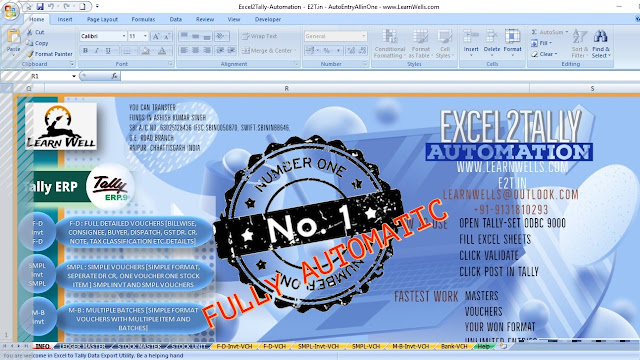


EXCEL2TALLY-MASTERS IMPORT

THIS EXCEL2TALLY_MasterImport SOFTWARE HELP YOU TO IMPORT EXCEL DATA INTO TALLY ERP OR OTHER VERSION OF TALLY WITH HELP OF  XML. IT IS VERY USEFUL SOFTWARE AND SAVE YOUR LOTS OF TIME. NO RENEWAL REQUIRED- USE LIFETIME WITH MULTI COMPUTER. ALSO CAN UPDATED OLD MASTERS WITH NEW DETAILS.
NOW IMPORT STOCK ITEMS and LEDGER MASTERS IN TALLY WITH BELOW FEATURES :
STOCK MASTER:
1. WITH OWN GROUP
2. WITH FULL GST DETAILS (HSN, GST RATES)
3. WITH ALIAS
4. WITH PART NO.
5. WITH OPENING BALANCES.
6. OPENING WITH MULTIPLE BATCHES
7.OPENING WITH MULTIPLE GODOWNS
8. OPENING WITH MULTIPLE RATES
9. WITH STANDARD COST AND STANDARD SALE RATE
10. WITH MRP DETAIL

11. WITH MULTI UNIT AND WITH CONVERSION ENTRY 
12. WITH 2500 STOCK ITEM ENTRY AT A TIME

LEDGER MASTERS:
1. WITH ADDRESS, PIN, STATE
2. WITH GST TYPE AND GST NUMBER
3. WITH OWN GROUPS
4. OPENING BALANCES WITH BILLWISE DETAILS
5. ENABLE BILLWISE, COST CENTERS, INTEREST, CREDIT LIMITS ETC.
6. SET CREDIT PERIOD
7. SET CREDIT LIMITS
8. WITH LEDGER NOTES AND DESCRIPTION
9. WITH ADVANCE INTEREST CALCULATION
10. WITH FULL CONTACT DETAIL – PHONE NO, MOBILE NO, EMAIL ID, CONTACT PERSION
11. WITH TDS DETAIL AND PAN NUMBER
12. WITH PARTY BANK DETAILS.

YOU CAN USE IT LIFETIME.
YOU CAN UPDATED YOUR OLD MASTERS ALSO
CLICK ON GENERATE BUTTON TO CREATE XML TO IMPORT IN TALLY.

Email: learnwells@outlook.com
Website: www.Learnwells.com
Contact: +91-9131810293

COLUMNAR GST DETAIL WITH ITEM

WITH THIS TALLY ERP9 TDL YOU CAN SEE SALES, PURCHASE COLUMNAR REPORTS WITH ITEM GST DETAILS LIKE HSN CODE, TAXABLE LEDGER, AND TAX DETAILS.
IT WILL HELP YOU TO FILE GST RETURNS AND OTHER GST RELATED OR BUSINESS RELATED WORKS.


   ;;WWW.LEARNWELLS.COM;; 
[#Collection: Columnar Vouchers of Company]

    Fetch :    AllInventoryEntries.GSTLedItemIGSTRateEx, AllInventoryEntries.GSTItemHSNCodeEx, AllInventoryEntries.GSTEntryLedgerName


[#Line: DSP ColVchTitle]
    Add: Field    : After: DBC GSTIN:LearnWellHSN
    Add: Field    : After: DBC GSTIN:LearnWellldg
    Add: Field    : After: DBC GSTIN:LearnWellRT
    Local : Field:LearnWellHSN : Set as     : $$LocaleString:”HSN”
    Local : Field:LearnWellldg : Set as     : $$LocaleString:”TAXABLE LEDGER”
    Local : Field:LearnWellRT : Set as     : $$LocaleString:”GST Rate”

[#Part: DBC QtyDetails]
    Local :  Field  :   LearnWellldg :  Set as    : $GSTEntryLedgerName

[#Line: DSP ColVchDetail]

    Add: Field    : After: DBC GSTIN:LearnWellHSN
    Add: Field    : After: DBC GSTIN:LearnWellldg
    Add: Field    : After: DBC GSTIN:LearnWellRT

[Field: LearnWellHSN]

        Use            : Short Name Field
        Set as        : $GSTItemHSNCodeEx
        Width       : 0
        Style       : Normal
        Bound       : 8,15
        Invisible    : NOT (##LearnWellSAC AND @@IsGSTOn)
        Scroll     : Yes
        Border         : Thin Left
    
[Field: LearnWellldg]

        Use            : Short Name Field
        Set as        : $GSTEntryLedgerName
        Width       : 0
        Style       : Normal
        Bound       : 8,15
        Invisible    : NOT (##LearnWellLDG AND @@IsGSTOn)
        Scroll     : Yes
        Border         : Thin Left

[Field: LearnWellRT]

        Use            : Short Name Field
        Set as        : $GSTLedItemIGSTRateEx
        Width       : 0
        Style       : Normal
        Bound       : 8,15
        Invisible    : NOT (##LearnWellRT AND @@IsGSTOn)
        Scroll     : Yes
        Border         : Thin Left
        Alignment    : Centre

;;WWW.LEARNWELLS.COM;;


FOLLOW THE BELLOW INSTRUCTIONS TO LOAD TDL FILE IN TALLY:

1. Copy the code and paste in a Text file.
2. Save the text file into your computer.
3. Copy the text file path including Name and extension (as – C:UsersHPDesktoprecParty Detail.txt)
4. Open Tally ERP9 
5. Press F12 and goto Product and Features
5. Press F4 (to open a Box)
6. Load TDL file on Startup – Yes
7. Paste The path in blank space
8. Press enter and save 


Now your TDL is ready to use.