

 Cart is empty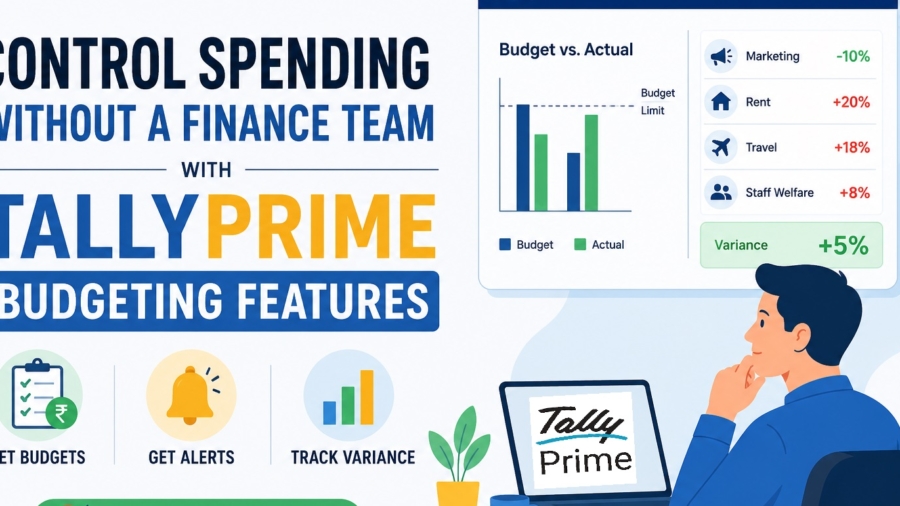
TL;DR
How Businesses Without a Finance Team Use TallyPrime’s Budgeting Features to Control Spending? You don’t need a massive finance department to keep your business from “running on empty.” TallyPrime allows you to set firm “spending ceilings” for your expenses, triggers alerts when you’re nearing them, and shows you exactly where the leaks are through Variance Reports. By using these built-in controls, you get the discipline of a CFO without the heavy payroll.
Introduction: The “Blind Spending” Problem
In my 20 years of acting as a “Business Doctor” for manufacturers and dealerships, I’ve seen a recurring sickness: money leaves the business faster than it is tracked. Most entrepreneurs operate in a state of “blind spending.” They only realize the engine is overheating when the bank balance hits zero at the month’s end.
TallyPrime’s Budgeting feature is the cure. Think of it as a virtual financial controller standing guard over your ledgers. While the big players hire expensive CFOs to plug the leaks in their tanks, you can use TallyPrime to set your own limits and ensure every rupee follows your orders.
How Do I Set Up a Budget Without Being an Accountant?
Setting up a budget isn’t about complex math; it’s about putting a lid on the jar. If you’re used to the old Tally.ERP 9 way of doing things, TallyPrime has made this much more intuitive. Here is how you set your guardrails:
- Skip the F11 Settings: In the latest TallyPrime versions, budgets are enabled by default. You do not need to activate them in the F11 features menu.
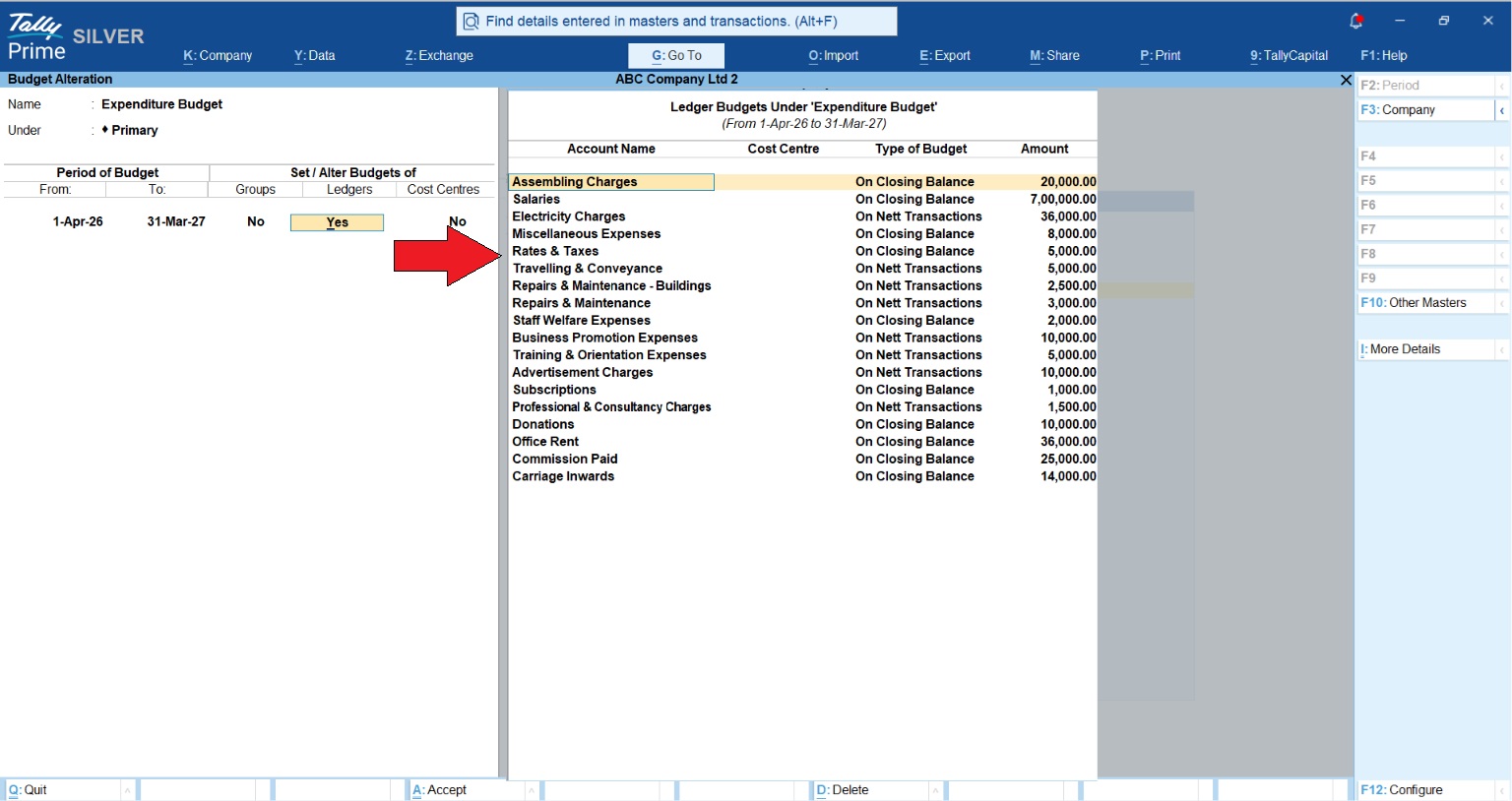
- Create the Budget: Go to Gateway of Tally > Create > Budgets. (If you don’t see it, click on Show More).
- Set the Basics: Give your budget a name and specify the date range (e.g., April 1st to March 31st).
What can you put under a “ceiling”?
- Groups: Set a limit for a whole category, like all “Indirect Expenses.”
- Ledgers: Control specific “leaky” taps like Marketing, Rent, or Staff Welfare.
- Cost Centers: Assign a budget to a specific campaign or department.
- Credit Limits: You can also define credit periods and limits for parties to ensure you aren’t just controlling what you spend, but also managing the risk of what others owe you.
Tracking Projects: The “National Handicrafts” Strategy
In the shop-floor world, we know that one bad project can sink the whole ship. Take a business like National Handicrafts. They handle complex export orders and deal in USD. For them, a project isn’t just about labor; it’s about fluctuating exchange rates.
By using Cost Centers, they can set a dedicated budget for a specific export project. They track “Conveyance” or “Staff Welfare” against that project specifically. Because they export in foreign currency, TallyPrime allows them to see their project health while accounting for Forex rates. This prevents that “month-end heart attack” where a project looked profitable on paper but actually drained the company’s cash because daily spends weren’t capped.
Read Multi-Currency Accounting for Export Businesses on TallyPrime
How Do I Know When I’m Crossing My Limit? (The Variance Report)
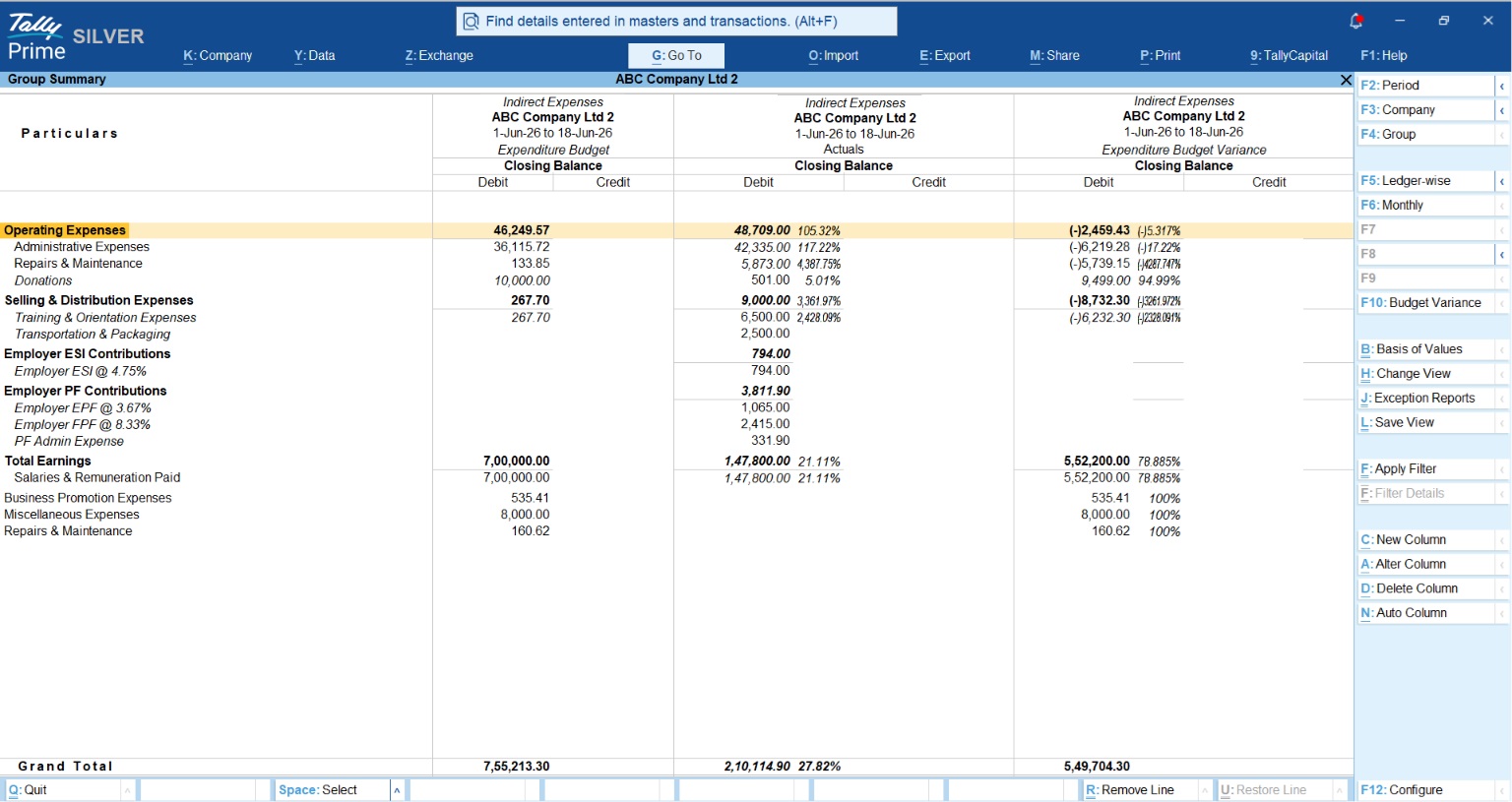
TallyPrime doesn’t just hide your budget in a drawer; it compares every single voucher your team enters against your targets.
To see your “health check,” look at the Budget vs. Actual performance in the Budgets and Variances report. In my practice, I tell owners to ignore the raw numbers first and look at the Percentage.
- A 10% Variance is a common cold, keep an eye on it.
- A 50% Variance is an emergency, you need to stop spending immediately.
This report shows you exactly how much you are over or under-spent in a format even a non-accountant can read in two minutes.
Also Read Budget Management in TallyPrime
“What-If” Planning: Scenario Management
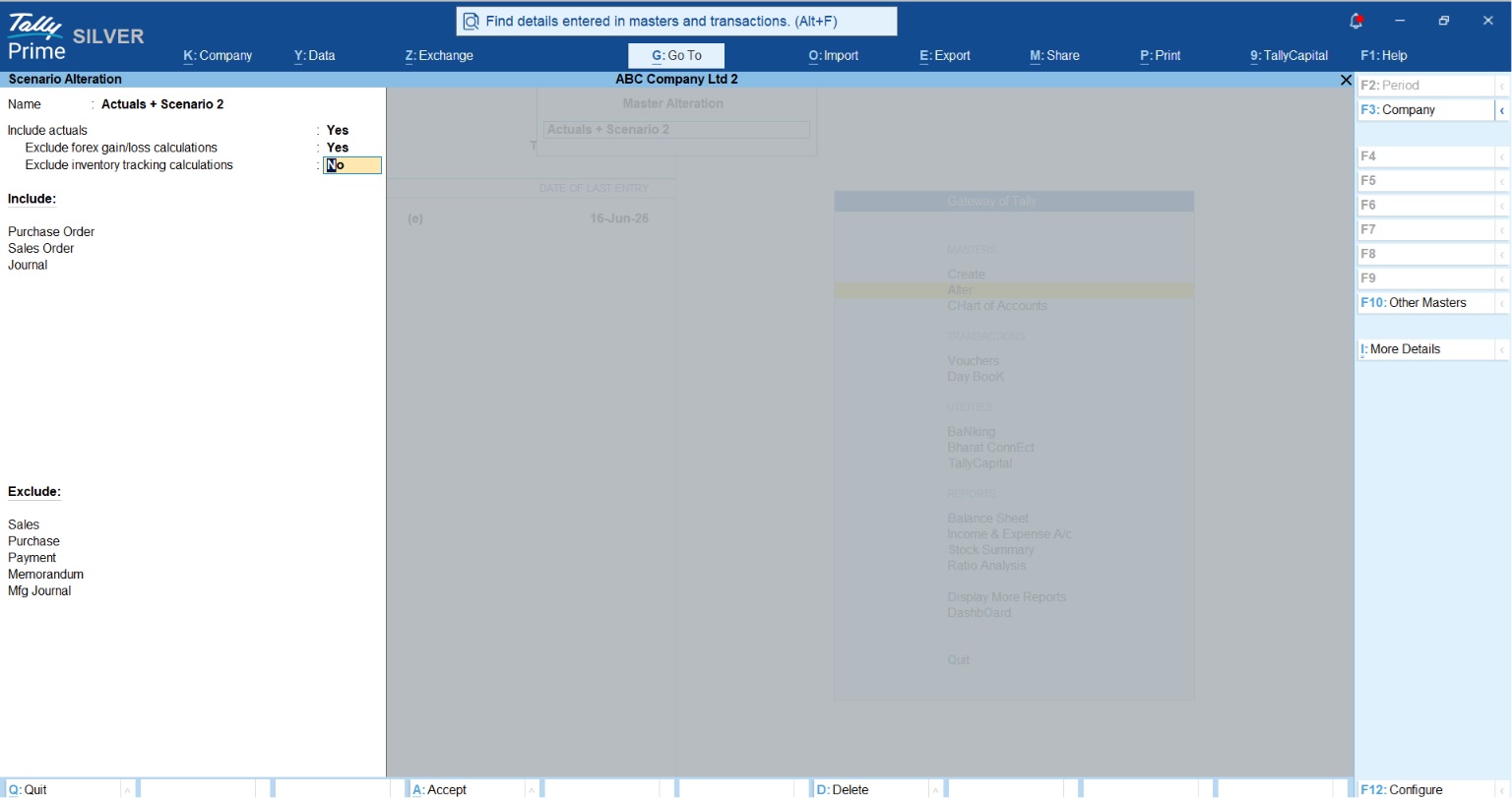
Business is unpredictable, especially when you’re dealing with Forex. Scenario Management is your forecasting tool. It lets you create “possible sets of events” without messing up your real books.
By using Optional Vouchers and Reversing Journals, you can see a provisional Profit & Loss report.
- Sales Forecasting: Enter 12 months of optional sales vouchers to see your projected growth.
- The “Real” Profit Check: A great tip for exporters like National Handicrafts is to set “Exclude Forex Gains/Losses Calculations” to Yes in their Scenario settings. This allows the owner to see the operational profit of the business without the “noise” of currency fluctuations.
The Business Doctor’s “3-Step Budget Discipline”
You don’t need to be a math genius. Just follow this weekly rhythm to keep the cash tank full:
- Set the Ceiling: At the start of the month, define budgets for your top 5 highest expenses.
- Monitor the Gap: Every Friday, check the Variance report. If you’ve hit 90% of your travel budget by the 15th, it’s time to cancel the next trip.
- Adjust the Course: Use Scenario Management to see how a major machinery purchase today will affect your year-end cash flow.
Conclusion & Monday Morning Checklist
Shifting from reactive accounting to proactive management is how a small shop becomes a big enterprise. Stop wondering where the money went and start telling it where to go.
- Enable Budgeting and Optional Vouchers Features.
- Set a Budget for your top 3 highest expenses (usually Marketing, Rent, and Utilities).
- Review the Variance report every Friday afternoon before you head home.
“A budget tells your money where to go, instead of wondering where it went, TallyPrime makes sure it follows orders.”
FAQs
Q1: Can I create budgets for both groups and ledgers?
Yes. You can set a broad limit for a Group (like “Administrative Costs”) or a pinpoint limit for a single Ledger (like “Stationery”).
Q2: Does TallyPrime support my local language for these reports?
Absolutely. TallyPrime is a concurrent multilingual software supporting approximately 10 languages. You can maintain accounts in one language and print reports in another.
Q3: Do I need a full license for these features?
You can practice everything in Educational Mode, but it has restrictions for instance, you can’t enter transactions for every day of the month. For live business monitoring, you’ll need the licensed version.
Q4: Can I change a budget if my business plans change?
Yes. Use the Alter path (Gateway of Tally > Alter > Budget) to adjust your ceilings as your business grows.
Q5: Can I hide Forex fluctuations from my forecasts?
Yes. When creating a Scenario, set “Exclude Forex Gains/Losses” to Yes. This gives you a “clean” view of your business performance.

[…] The ROI Calculation: An annual software investment of approximately ₹16,756 (including GST) yields over ₹6.3 Lakhs in savings a staggering 3,810% ROI.Also read How Businesses Without a Finance Team Use TallyPrime’s Budgeting Features to Control Spending […]