

 Cart is empty
TL;DR:
- Speed: TallyPrime’s desktop-first, keyboard-native design gives it zero page-load latency, ideal for high-volume voucher entry. Zoho Books, being browser-based, is subject to standard web loading times that can slow down repetitive, high-frequency data entry.
- Customisation: TallyPrime’s open architecture lets you deeply modify voucher entry, complex inventory workflows (like multi-level BOM), and CA-ready reports. Zoho Books allows surface-level customisation — custom fields, templates, trigger-based automation but restricts changes to its core accounting and inventory logic.
- AI Automation: TallyPrime’s Connected Services, including Docs by Ira for AI-based invoice extraction, cut manual data entry while keeping an accountant in control of validation reducing workload without giving up statutory accuracy.
Introduction: Why Your Choice Impacts Your Bottom Line
Selecting accounting software isn’t just about the interface; it is a strategic decision that determines your team’s efficiency and your statutory safety. In my 20 years as a Senior Accountant managing books for clients in the Pharmacy, Manufacturing, and Automobile sectors, I’ve found that the “modern” cloud look can often mask high “hidden” technical costs.
If your business processes hundreds of transactions daily, whether it’s managing a complex Bill of Materials (BOM) in a factory or tracking Batch-wise inventory in a pharmacy, every second spent waiting for a web page to load is a drain on your bottom line. While Zoho Books appeals to businesses looking for cloud-only solutions, TallyPrime continues to dominate environments where speed, hybrid architecture – offline reliability with optional cloud access, customization efficiency, and technical independence are the primary requirements for growth.
TallyPrime vs Zoho Books: What You Can Customise?
The fundamental difference lies in how deeply you can modify the software to fit your specific business processes, rather than forcing your business to adapt to the software.
Customising TallyPrime:
Tally’s open architecture provides unmatched flexibility, allowing you to engineer virtually any business logic directly into the software.
- Voucher & Invoice Redesign: Completely redesign invoice printing formats to match industry-specific requirements or add custom fields directly into daily voucher entry screens.
- Complex Workflows: Build customized manufacturing workflows (like multi-level Bill of Materials) or specific inventory batch tracking that standard accounting tools don’t support.
- Targeted Reporting: Create highly specific MIS reports or CA-compliant GST data exports tailored exactly to what your management or accountant needs.
Customising Zoho Books:
Zoho’s customization stops at the surface.
- Restricted Core Logic: While it allows adding basic custom fields to standard templates, altering the core double-entry mechanics, deep inventory behavior, or the actual layout of voucher screens is strictly prohibited. You are ultimately renting a fixed workflow.
- Trigger-Based Automation: It excels at simple, external automations like sending email notifications, payment reminders, or connecting to third-party cloud apps but completely lacks the ability to structurally modify how the software processes heavy, complex business workflows internally.
Are TallyPrime’s Connected Services Features Enough to Run a Modern Business?
Yes, these features are more than enough. TallyPrime has shifted from a standalone desktop tool to a robust “Connected Services” ecosystem. It provides the flexibility of the cloud without sacrificing the reliability of local data control.
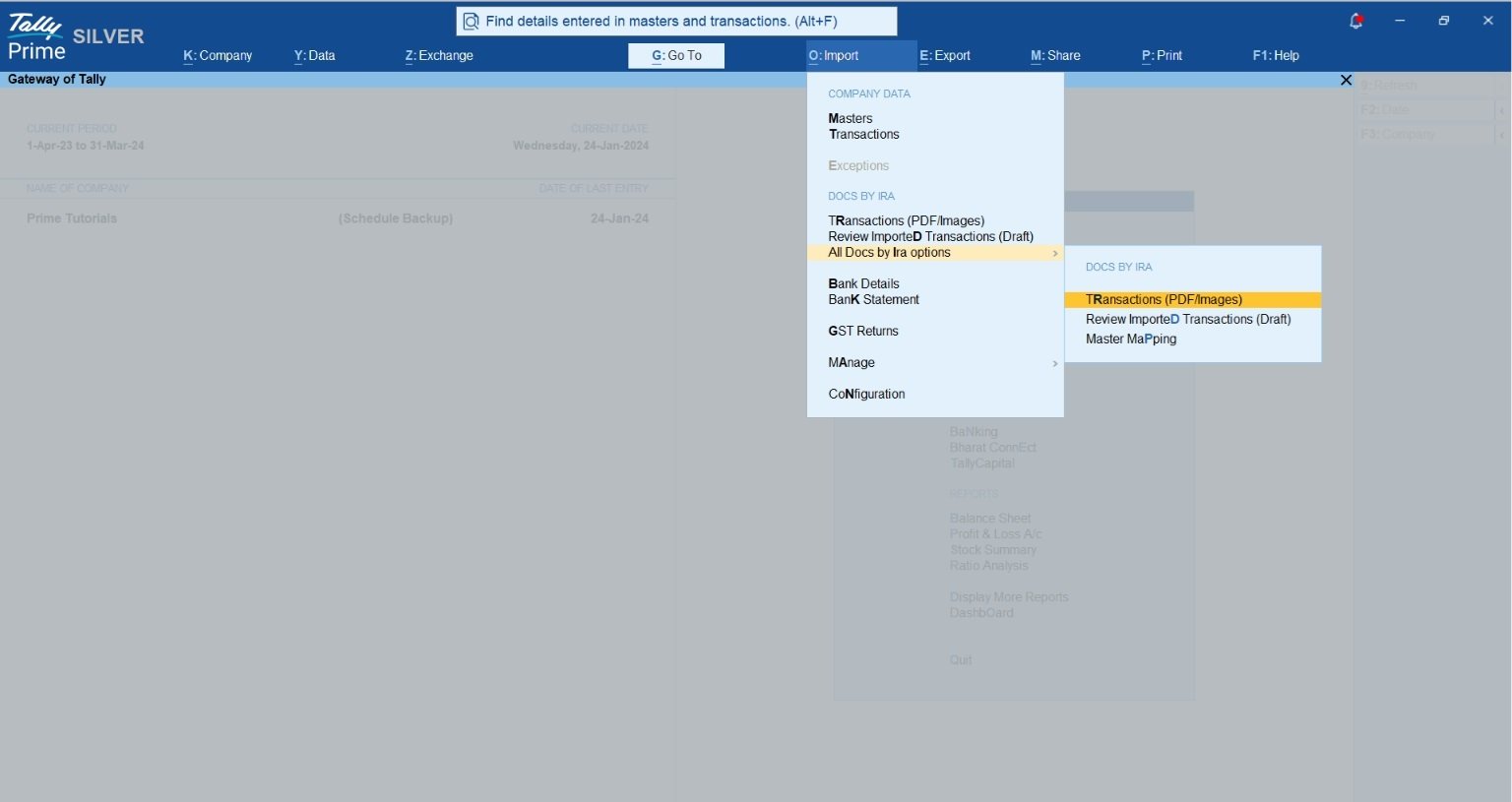
- Docs by Ira (AI Invoice Processing): This is a game-changer for reducing manual data entry. It automatically extracts Party Name, Invoice Number, Date, Amount, GST, and Line Items. Crucially, it features “Smart Mapping” that remembers your corrections for future entries, keeping the human in control.
- TSS (Tally Software Services): Ensures your system stays updated with the latest statutory changes and enables data synchronization across multiple locations.
- TallyPrime Cloud Access: Access your data anywhere via a web browser while maintaining the high performance of a desktop application.
- WhatsApp Integration: Send invoices, ledger statements, and reminder letters directly from Tally to your customers’ WhatsApp.
- TallyDrive: A secure storage solution for backing up and managing your business data with ease.
Which System Wins on Speed and Daily Navigation?
In a high-volume Indian office, “keyboard-native” efficiency is what defines productivity.
- TallyPrime: Designed for the power user. It offers zero page-load latency and is built entirely around keyboard shortcuts. For anyone processing hundreds of vouchers, Tally’s responsive architecture is significantly faster than other tools.
- Zoho Books: While it boasts a clean UI, it is subject to the inherent lags of web browsers. Navigation and report generation can be 80% slower than more responsive platforms, and it lacks the shortcut-heavy efficiency required for rapid data entry.
In my experience, TallyPrime’s shortcut speed still beats Zoho Books when you’re racing against a GST filing deadline.
Real-World Example: From Chaos to Control
I recently consulted for an Indian automobile dealership struggling with a mountain of supplier invoices. They were spending nearly 40 hours a week on manual entry, and mismatched GST values were creating a nightmare for their CA during reconciliation.
The Solution: We implemented Docs by Ira for AI extraction of Invoices from PDFs. This drastically sped up the data entry process by converting complex PDF invoices into structured data in seconds.
The Outcome: The dealership reduced their manual workload by 80%. Because the AI creates “draft vouchers,” the accountant only has to validate the exceptions before posting. They achieved speed without sacrificing the human oversight required for statutory accuracy.
Read TallyPrime vs Zoho Books for GST Billing and Filing: A Comparison for Small Businesses
Conclusion & Actionable Takeaways
Before deciding which software is best for customisations, consider the below points:
- CA Compatibility: Does my Chartered Accountant require GST compliance data in a Tally-compatible format?
- Tailored Workflows: Which software allows you to easily customise reports, dashboards, and vouchers to perfectly match how your business actually operates.
- Personalized Invoices: Can you personalise and modify invoices based on your specific business size and industry?
- AI Automation: Does the software allow you to implement AI (like TallyPrime’s Docs by Ira) for intelligent document processing and seamless data entry.
- Lower Cost & Effort: Can you achieve all of these custom setups at a fraction of the cost and with far less technical effort than the other software?
Final Takeaway: Choose TallyPrime if you prioritize entry speed, multiple customisation options, AI automation, and statutory depth.
“The true cost of accounting software isn’t the license fee; it’s the time your team spends waiting for pages to load or paying developers to fix rigid, procedural workflows.”
FAQs:
Is TallyPrime easier to customise than Zoho Books?
Yes, specifically for core accounting, inventory, and manufacturing workflows, TallyPrime allows deeper and more direct modifications than Zoho Books, which restricts changes to its underlying structure.
Does Zoho Books require technical expertise for advanced custom workflows?
Yes, advanced workflows in Zoho Books typically require Deluge scripting, API authentication setup, and webhook management.
Which software is better for businesses whose processes evolve over time?
TallyPrime’s unified architecture supports ongoing changes, like adding inventory parameters or adjusting batch tracking, without disrupting existing historical data.
Can I customise invoices and reports in TallyPrime without programming?
Yes. TallyPrime’s built-in configuration options allow you to customise invoice formats, enable/disable specific fields, and tailor dashboards and reports to your liking without writing a single line of code.

[…] Also read: Customising TallyPrime vs Zoho Books: Which Delivers More Value for Indian Businesses? […]