

 Cart is empty
TL;DR
TallyPrime turns the dreaded Bank Reconciliation Statement (BRS) from a multi-hour manual chore into a 2-minute automated task. By importing bank statements directly and using smart auto-matching, you eliminate human error, ensure your GST Input Tax Credit (ITC) is 100% accurate, and gain real-time visibility into your cash flow. Whether you are an SME or a CA managing multiple clients, this is the shortcut to an error-free “hisab.”
Introduction: Why Am I Writing This?
In my years as a Senior Accountant and advisor, I’ve seen too many business owners hunched over their desks late at night, eyes blurring as they try to figure out why their internal “hisab” (books) doesn’t match the Bank Statements. This late-night stress is a rite of passage no one asked for.
When I talk about Bank Reconciliation (or BRS), I’m talking about the vital process of ensuring every single entry in your bank statement is reflected in your company records. If you are still doing this by hand, you are living in the past. TallyPrime’s bank reconciliation module automates the matching of ledger entries with bank statements, letting you close your books faster and with the kind of precision that makes auditors smile.
What Makes Manual Reconciliation So Hard?
If you haven’t switched to automation yet, you’re likely struggling with:
- The Time Sink: Spending hours checking line-by-line, which is simply not sustainable in a fast-paced market.
- Human Error: One misplaced decimal or a typing error during manual entry can throw off your entire balance.
- The “Hidden” Entries: Missing those small bank charges, processing fees, or interest credits that only appear on the bank’s side.
- GST Compliance Risk: Mismatched data leads to incorrect GST filings. If your books don’t match your bank, your Input Tax Credit (ITC) claims are on shaky ground.
How Does TallyPrime Do the Hard Work for You?
TallyPrime’s Auto Bank Reconciliation is designed to act like a digital assistant. It doesn’t just store data; it thinks for you.
- Automatic Import: Support for over 145+ banks means you can import statements in Excel, CSV, MT940, .xml, or delimited formats. No more manual typing.
- Smart Matching & Duplicate Prevention: Tally matches transactions based on amount and instrument numbers. Crucially, the system skips duplicate entries, solving one of the biggest pain points for Indian accountants. Even if instrument numbers are missing, Tally uses “fuzzy matching” to find potential links based on dates and narrations.
- Flagging the Gaps: Tally distinguishes between Unreconciled entries (vouchers exist but aren’t cleared) and Unlinked/Additional entries (bank charges or interest that exist only in the statement).
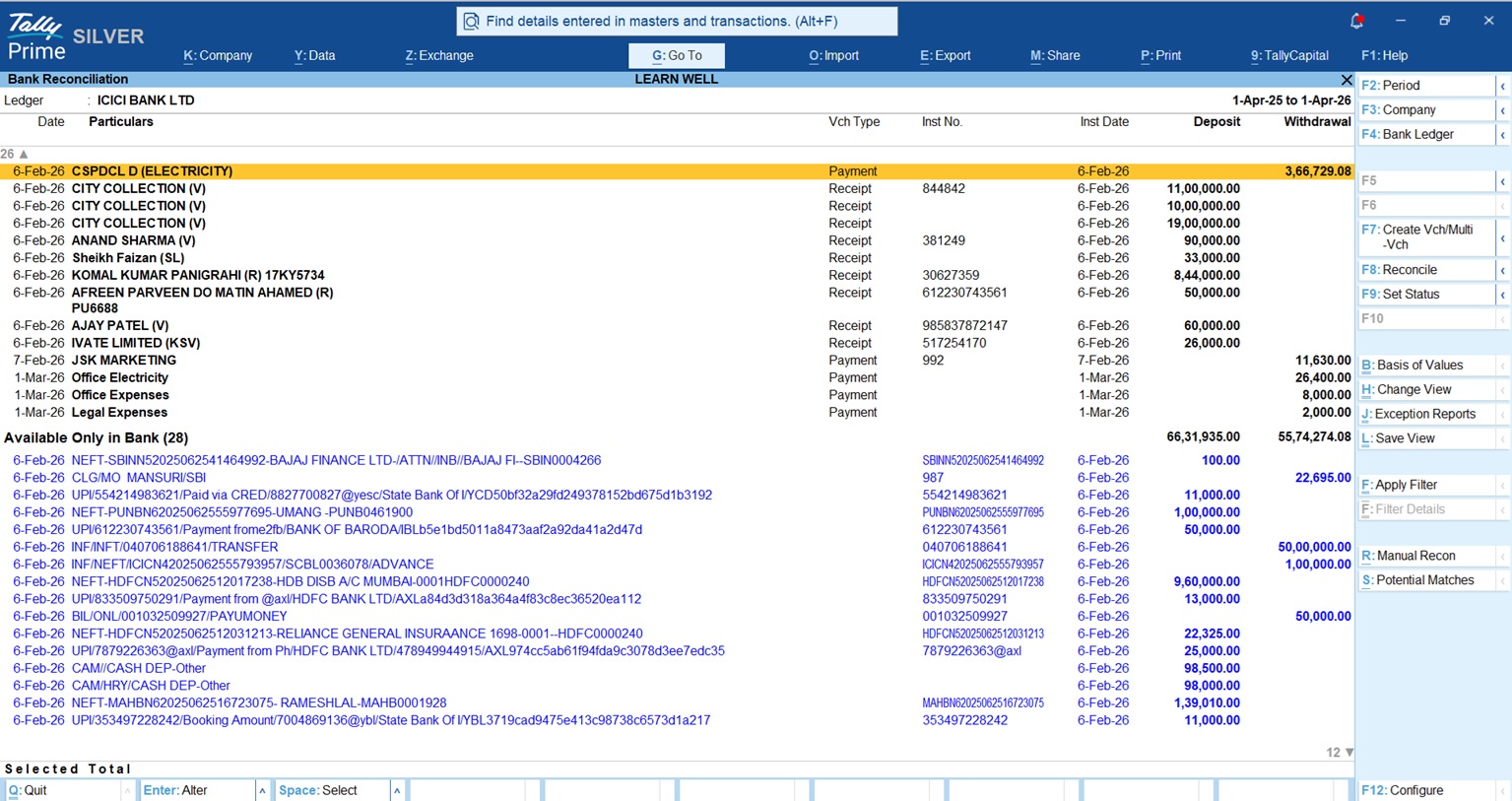
Is “Connected Banking” the Secret Shortcut?
While statement import is great, Connected Banking is the true “shortcut” because it brings the bank directly inside Tally.
Version Requirement: Connected Banking (Direct Statement Fetch) is available from TallyPrime 6.0 and above, while Direct Payments is a feature of Release 7.0 and above.
Top Partner Banks:
- Axis Bank
- ICICI Bank
- Kotak Mahindra Bank
- State Bank of India (SBI)
The Advisor’s Perspective on Perks:
- Live Balances: View your real-time bank balance without leaving your Tally screen.
- Direct Payments: You can settle vendor bills directly from the software.
- Bank-Grade Security: Many owners worry about safety. Connected Banking uses Two-Factor Authentication and robust encryption to ensure your banking credentials never leave the secure login environment.
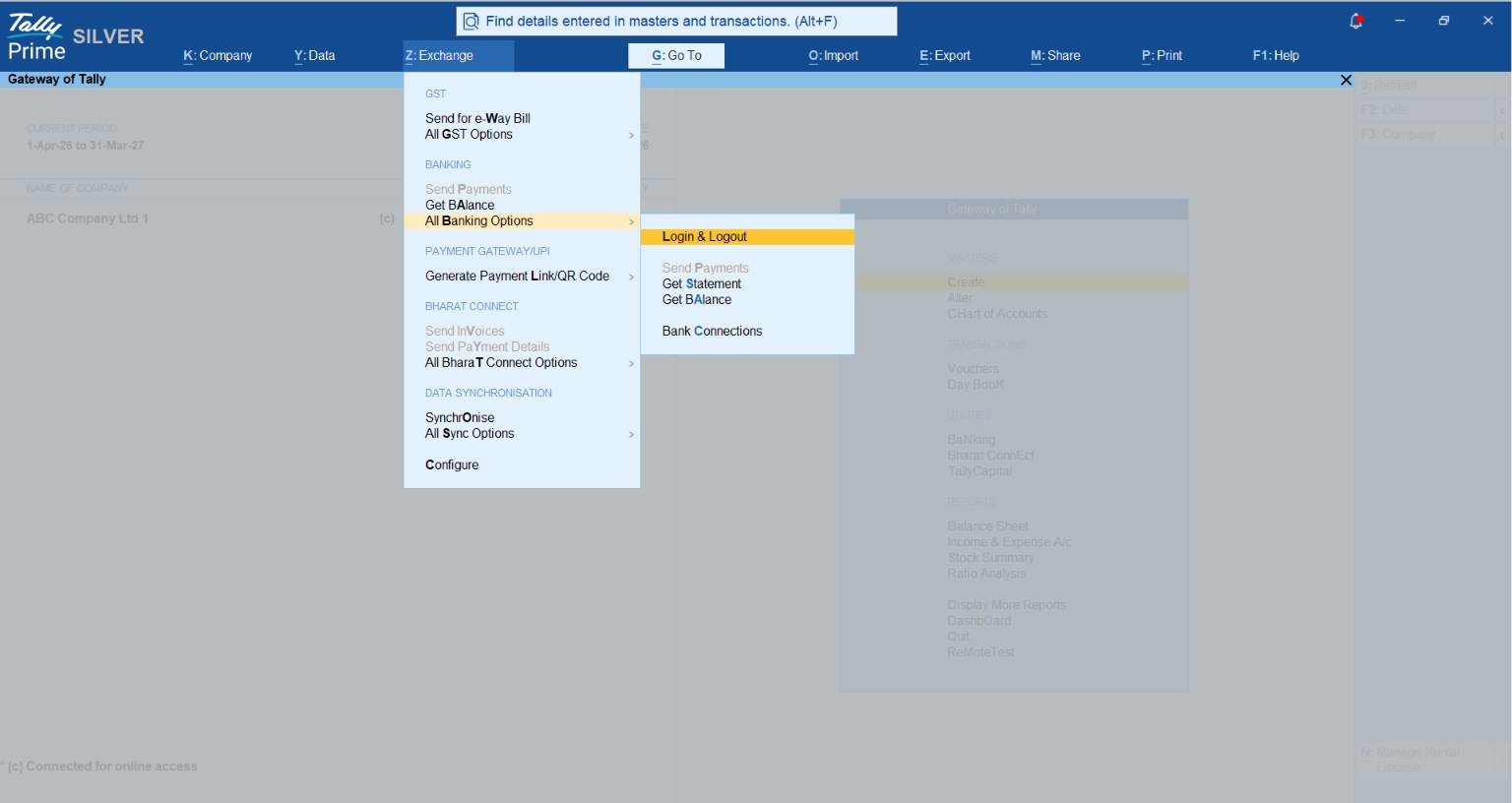
Can I Really Reconcile in Minutes? (The Process)
Here are the “Accountant’s Power Moves” to get your BRS done in record time:
- Step 1: Download your bank statement from your portal (or fetch it instantly via Connected Banking).
- Step 2: In TallyPrime, go to the BRS screen and press Alt+O to import.
- Step 3: Watch Tally match the entries automatically. You’ll see a summary of exact matches immediately.
- Step 4: For those “Additional” bank charges, don’t leave the screen, press Alt+J to create a voucher on the fly.
A Real Story: From Late Nights to Peace of Mind
I once advised Mr. Rohit, the owner of a mid-sized CA firm in Raipur. Rohit’s team was drowning in client bank statements every month-end. One small mismatch led to a major dispute with a client over an unrecorded payment.
After we implemented TallyPrime’s automated BRS, the change was night and day. Statements were auto-imported, and those pesky “unlinked” entries were caught instantly. Rohit moved from being a “data checker” to a “business advisor.” His clients noticed the increased accuracy in their GST ITC claims, and he finally stopped spending his Saturday nights at the office.
My Actionable Tips for You
In my practice, I’ve found that “month-end” doesn’t exist for successful businesses, they reconcile weekly. Here is your Checklist for Success:
- Weekly Imports: Tally makes this a 5-minute coffee-break task. Don’t let the transactions pile up.
- Trust the Smart Match: If an instrument number is missing, don’t panic. Use Tally’s ability to suggest matches based on date and narration.
- Clean the “Unlinked” Immediately: Use Alt+J the moment you see a bank charge. Keeping your books perpetually reconciled is the only way to have true cash flow visibility.
“Automation isn’t just about saving time; it’s about having a clear head to grow your business.”
Conclusion
Moving from manual reconciliation to TallyPrime’s automation is one of the smartest moves an Indian business can make. It transforms a tedious administrative burden into a competitive edge. By spending less time on bookkeeping and more time on business growth, you ensure your company is ready for the fast-paced demands of 2026 and beyond.
Frequently Asked Questions (FAQs)
- Does it work for small businesses? Yes. SMEs benefit most from the increased accuracy and the hours saved that can be redirected toward sales and growth.
- How many banks are supported? TallyPrime supports bank statement imports for over 145 banks.
- What if my bank isn’t on the list? You can write to
support@tallysolutions.comto request a specific configuration for your bank’s format. - Can I still do it manually? Yes, TallyPrime allows for manual entry of bank dates if you prefer the traditional way, but once you try Alt+O, you won’t go back.
- What formats can I import? Excel, CSV, .xml, MT940, and delimited formats are all supported.
- Is my data safe with Connected Banking? Absolutely. It uses bank-grade encryption and two-factor authentication to ensure secure communication between Tally and your bank.

[…] Also read How Indian Small Businesses Reconcile Accounts in Minutes using TallyPrime […]