

 Cart is empty
TL;DR:
Year-end closing in TallyPrime is no longer just a routine of carrying balances forward. In the current regulatory landscape, successful finalization requires navigating MCA-mandated Audit Trails, performing surgical GST reconciliations via the new Invoice Management System (IMS), and mastering the “F7 Journal” adjustments. To start April 1st with a clean, compliant slate, you must verify your Trial Balance, account for accrued expenses, and ensure your books are an exact mirror of the GST portal.
Introduction: The March 31st Panic vs. Reality
In my 20 years of practice with CA’s from the shop floors of manufacturing units to the fast-paced world of e-commerce, I have seen the same “March 31st Panic” play out far too often. Finalization shouldn’t be an emergency; it is a disciplined three-step dance: verifying the Trial Balance for mathematical integrity, posting audit adjustments via Journal Vouchers to reflect the true financial position, and syncing the new year’s opening entries.
Many business owners struggle with data across sectors, but the fundamental goal is universal: transitioning to the new financial year without carrying over errors that lead to qualified audit reports or unwanted tax notices.
Is Your Audit Trail (Edit Log) Ready for the New Financial Year?
Starting April 1, 2023, the Ministry of Corporate Affairs (MCA) mandated that companies abide by the Companies (Accounts) Rules, 2014, requiring accounting software to maintain an unalterable “Audit Trail” or “Edit Log.”
The CA’s Perspective: This isn’t just about compliance; it’s about transparency. The Edit Log records who created a transaction, when it was changed, and what was modified. This level of accountability is exactly what external auditors look for to trust your underlying data.
Navigation in TallyPrime:
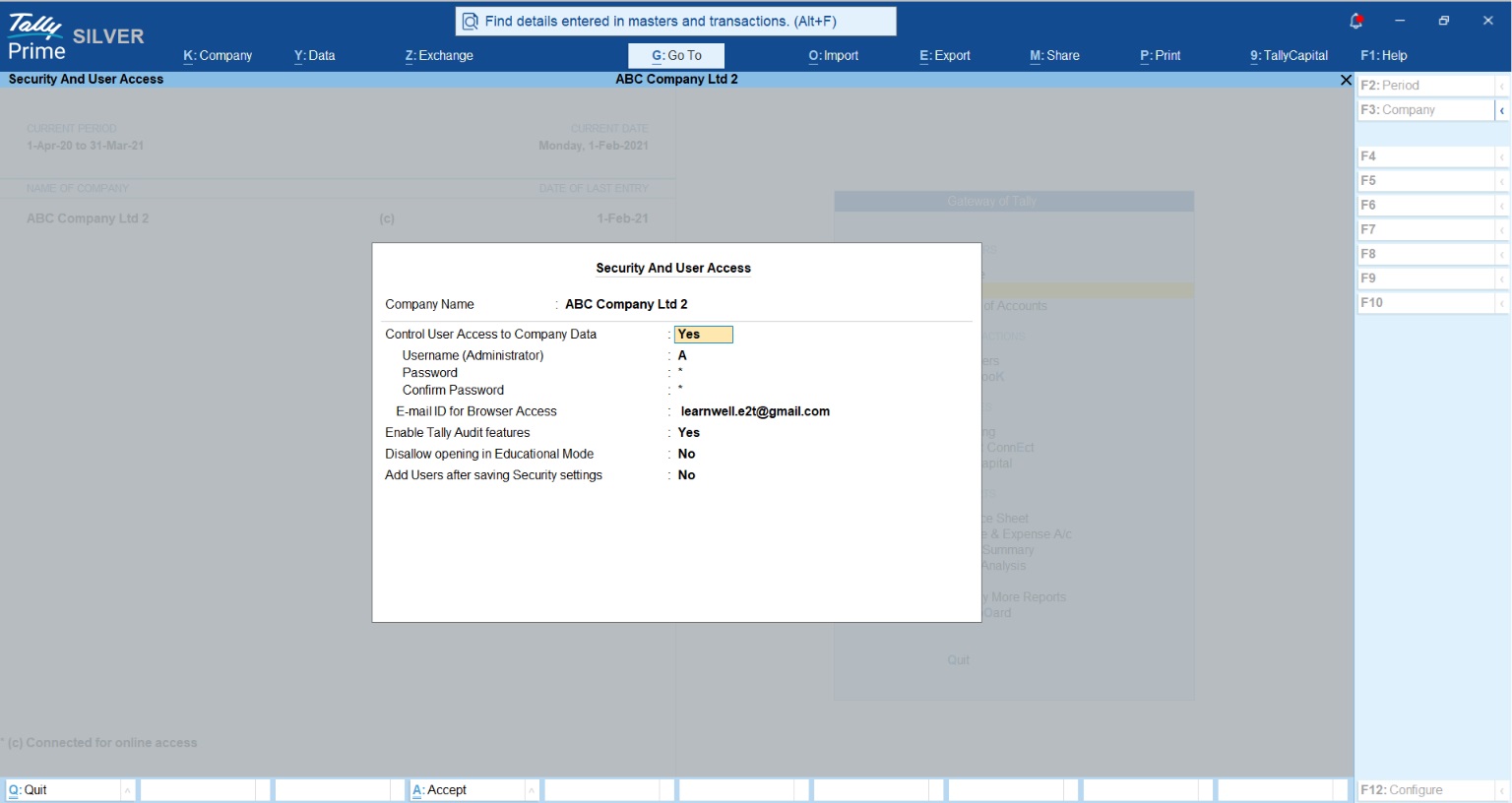
- Check Version: TallyPrime now comes in two versions. In the “TallyPrime Edit Log” version, the trail is always on to meet MCA mandates. In the regular “TallyPrime” version, you can toggle it under
Alt+K (Company) > Securityby setting “Control User Access to Company Data” to Yes. - Viewing the Log: You can view the company-level log by pressing
Alt+K > Edit Log. For individual transactions, useAlt+Qwithin a voucher orCtrl+Bfor a list of configurations.
Download your TallyPrime
How to Handle Year-End Adjustments Without the Headache?
Finalization relies on the Matching Principle: recognizing revenue when earned and expenses when incurred, regardless of cash flow. This is where most “rookie mistakes” happen. For instance, if you accrue an expense (Debit Expense, Credit Payable), you must ensure you aren’t prematurely claiming Input Tax Credit (ITC) on a vendor invoice you haven’t technically received or reconciled.
To decide which accounts to impact, use the “DEALER” Trick:
- Drawings, Expenses, Assets: Debit to increase.
- Liabilities, Equity (Capital), Revenue: Credit to increase.
Common Year-End Journal Entries (F7):
| Scenario / Transaction | Debit Account (Dr.) | Credit Account (Cr.) | Quick Logic / Rule |
| Depreciation Charge | Depreciation Expense A/c | Accumulated Depreciation A/c (or Fixed Asset) | Expensing out the asset’s wear and tear for the year. |
| Accrued Salaries (Outstanding) | Salary Expense A/c | Salaries Payable A/c (Liability) | Recognizing expenses incurred but not yet paid. |
| Prepaid Insurance (Advance) | Prepaid Insurance A/c (Asset) | Insurance Expense A/c | Removing next year’s expense from the current P&L. |
| GST Set-off / Adjustment | Output GST Ledger | Input GST Ledger | Offsetting the tax collected against the tax paid. |
Why is the Trial Balance Your Best Friend During Finalization?
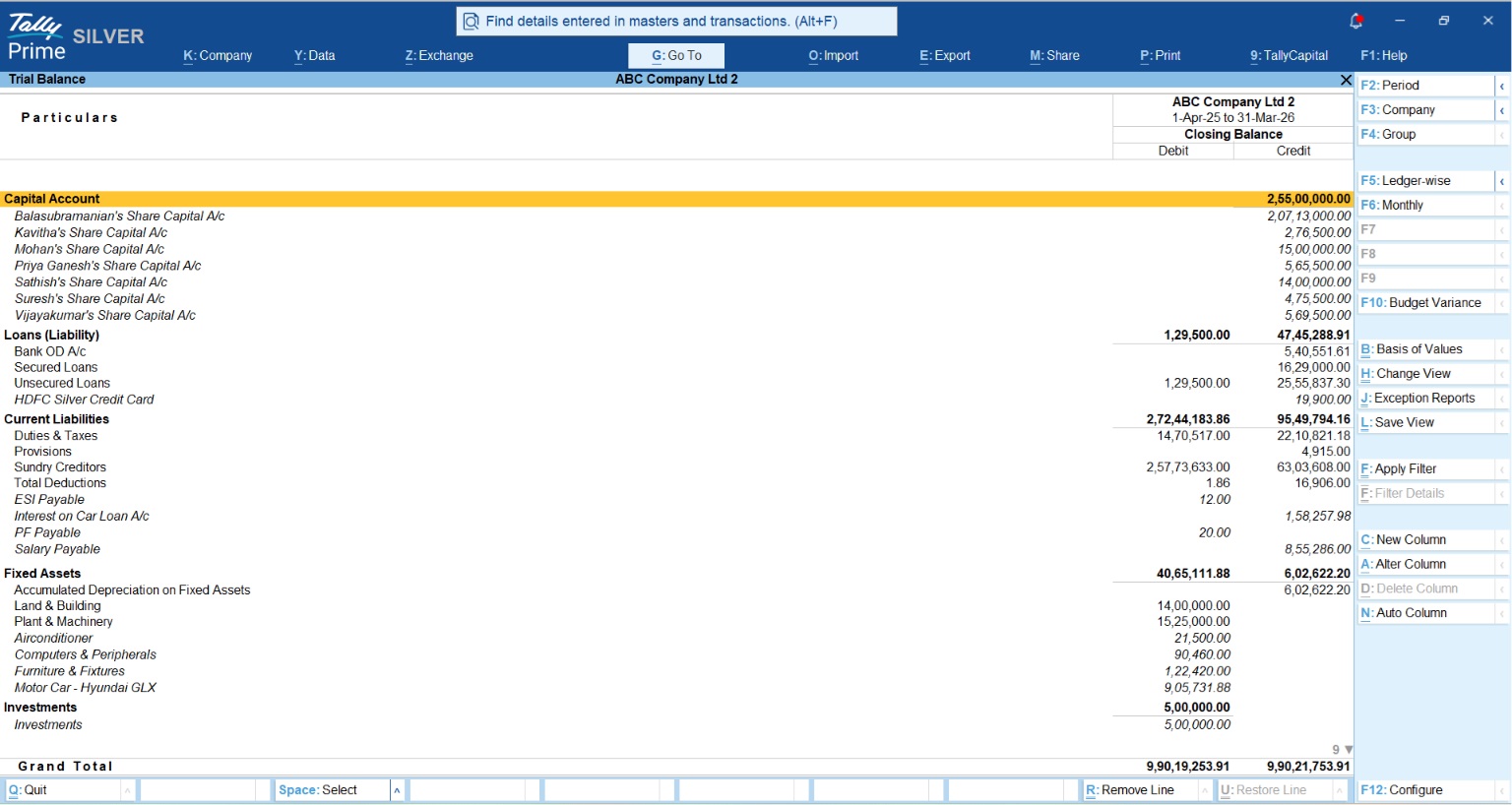
The Trial Balance is your primary tool for spotting mathematical errors. In my experience, a “Difference in Opening Balances” isn’t just a software glitch, it’s a red flag for a botched migration or missing entry that will immediately trigger auditor scrutiny.
Navigation: Gateway of Tally > Display More Reports > Trial Balance.
CA’s Pro-Tips for Analysis:
- Detailed View: Press Alt+F5 to expand all groups. This is essential for catching transactions sitting in the wrong category.
- The “LAWS-PRED” Check: Use this mnemonic to ensure ledgers are grouped correctly:
- Liabilities
- Assets
- Works for both (Branches/Divisions/Misc. Suspense)
- Sundry Debtors
- Purchase Accounts
- Revenue (Income)
- Expenses (Indirect)
- Direct Expenses
The GST Reconciliation: Are Your Books and Portal in Sync?
Mismatches between your books and GSTR-2A/2B lead to lost ITC. TallyPrime’s new Invoice Management System (IMS) Enhancements (Release 2.1 to 7.1 Beta) are game-changers here.
The software now highlights mismatched fields in red, and more importantly, allows for the auto-creation of missing vouchers directly from downloaded portal data. This automates the routine work of manual entry, allowing you to focus on high-value advisory work. Before finalization, use the single review report to verify all auto-created entries.
Step-by-Step: Carrying Forward Balances to the New Year
Once adjustments are posted, you must verify that the opening balances for the new year are surgically accurate.
Opening Transfer Process:
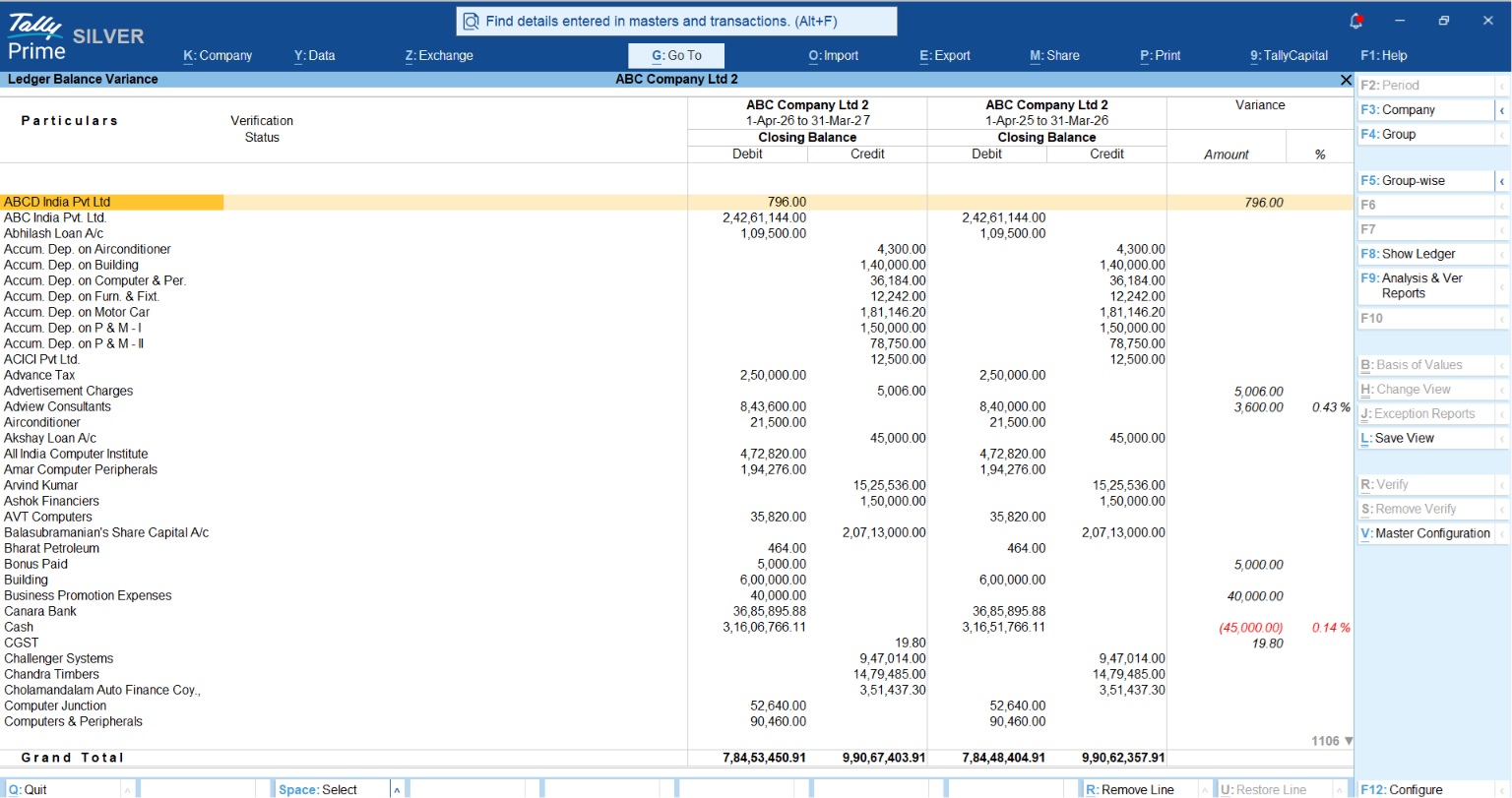
- Load Prior Year: Press Ctrl+F3 (Compare Cmp) to load the company data from the previous year.
- Navigate:
Gateway of Tally > Display More Reports > Analysis & Verification > Data Analysis > Verification of Balances. - Verify: F10 (Balance Variance). Tally will highlight any variances between the closing balance of the previous year and the opening balance of the current year.
- Fix: If differences exist, press Ctrl+Enter on the ledger to adjust the opening balance details directly.
Real-World Example: The “Mehta Traders” Scenario
Consider Mehta Traders, who purchased furniture worth ₹75,000 on credit on November 1, 2025. A common mistake is recording this via a “Purchase” voucher. However, because furniture is a Fixed Asset and not goods for trade.
The Correct Journal Entry (F7):
- Debit: Furniture A/c (Asset increases per DEALER rule)
- Credit: Sharma Enterprises (Liability/Sundry Creditor increases)
If Mehta Traders misses this “non-cash” adjustment before March 31, 2026, their Balance Sheet will understate both assets and liabilities, leading to a flawed audit.
Conclusion: Your Year-End Checklist
To ensure a stress-free finalization, follow this 5-point CA-approved checklist:
- Confirm Edit Log: Verify compliance under
Edit Log. - Reconcile Cash & Bank: Perform a full BRS and check for negative cash balances.
- Post F7 Journals: Record depreciation and accrued expenses using the DEALER logic.
- Audit GST Data: Use IMS enhancements to highlight mismatches in red and auto-create missing purchase vouchers.
- Verify Openings: Use the
F10 (Balance Variance)report to ensure 100% accuracy in balance carry-forwards.
“A clean Opening Balance on April 1st is the result of a disciplined Audit Trail on March 31st.”
Also read How TallyPrime Handles GST, Stock, Invoicing and Payroll Together for Distributors
FAQs
Q: Can I reverse a journal entry if I made a mistake?
A: Yes. Create a new Journal Voucher (F7) with the same accounts but opposite debit/credit values to nullify the original impact.
Q: Why doesn’t my Trial Balance show Closing Stock?
A: Accounting principles dictate that because the value of total purchases is already included in the Trial Balance, including closing stock would double the effect.
Q: Is the Audit Trail mandatory for all small businesses?
A: Yes, it is mandatory for all companies (Public, Private, OPCs, etc.) under the Companies (Accounts) Rules, 2014.
Q: What is the shortcut for ‘Detailed View’ in reports?
A: Use Alt+F5 to expand all levels, which is crucial for spotting grouping errors like “LAWS-PRED” mismatches.
Q: How do I handle a negative cash balance at year-end?
A: In the Verification of Balances report, drill down to the Daily Breakup of the Cash Ledger (F6) and use Alt+X (Exceptions) to identify and correct the specific dates where cash went negative.
