

 Cart is empty
TL;DR
TallyPrime helps Indian businesses reduce repetitive accounting work through built-in automation features. Post-Dated and Optional Vouchers make it easier to manage future and provisional transactions, while Voucher Classes simplify regular entries. Connected Banking, automated bank reconciliation, and voucher creation from bank statements reduce manual banking work. TallyPrime also supports direct e-Invoice and e-Way Bill generation, while AI-powered Docs by Ira helps convert invoices and other business documents into accounting vouchers. Together, these features improve accuracy, save time, and allow accounting teams to focus on more important financial activities.
Introduction: The High Cost of Repetitive Bookkeeping
In my 20 years of accounting experience across manufacturing, pharmacy, retail, construction, automobile dealerships, and e-commerce, I have seen accounting teams spend significant time on repetitive tasks. Recording regular payments, entering supplier invoices, reconciling bank statements, and generating e-invoices can take several hours every week.
TallyPrime offers several features that help businesses simplify these activities. From managing future-dated vouchers and importing bank statements to generating e-invoices and creating vouchers using Docs by Ira, businesses can reduce manual work without changing their accounting software.
Many accounting departments still face three common challenges: manually entering vendor bills, matching bank transactions with accounting records, and generating GST-related documents. These activities become more difficult as transaction volumes increase.
Manual processing also increases the risk of incorrect amounts, duplicate entries, GST mismatches, and delayed financial reports. By using the available automation features in TallyPrime, businesses can maintain more accurate records and complete routine accounting activities faster.
How Can You Automate Predictable Recurring Entries?
Businesses regularly record transactions such as office rent, machinery instalments, software subscriptions, and loan repayments. Entering similar transactions repeatedly takes time and increases the possibility of missed entries.
TallyPrime provides useful features such as Post-Dated Vouchers, Optional Vouchers, and Voucher Classes to simplify these activities.
Post-Dated Vouchers for Known Future Payments
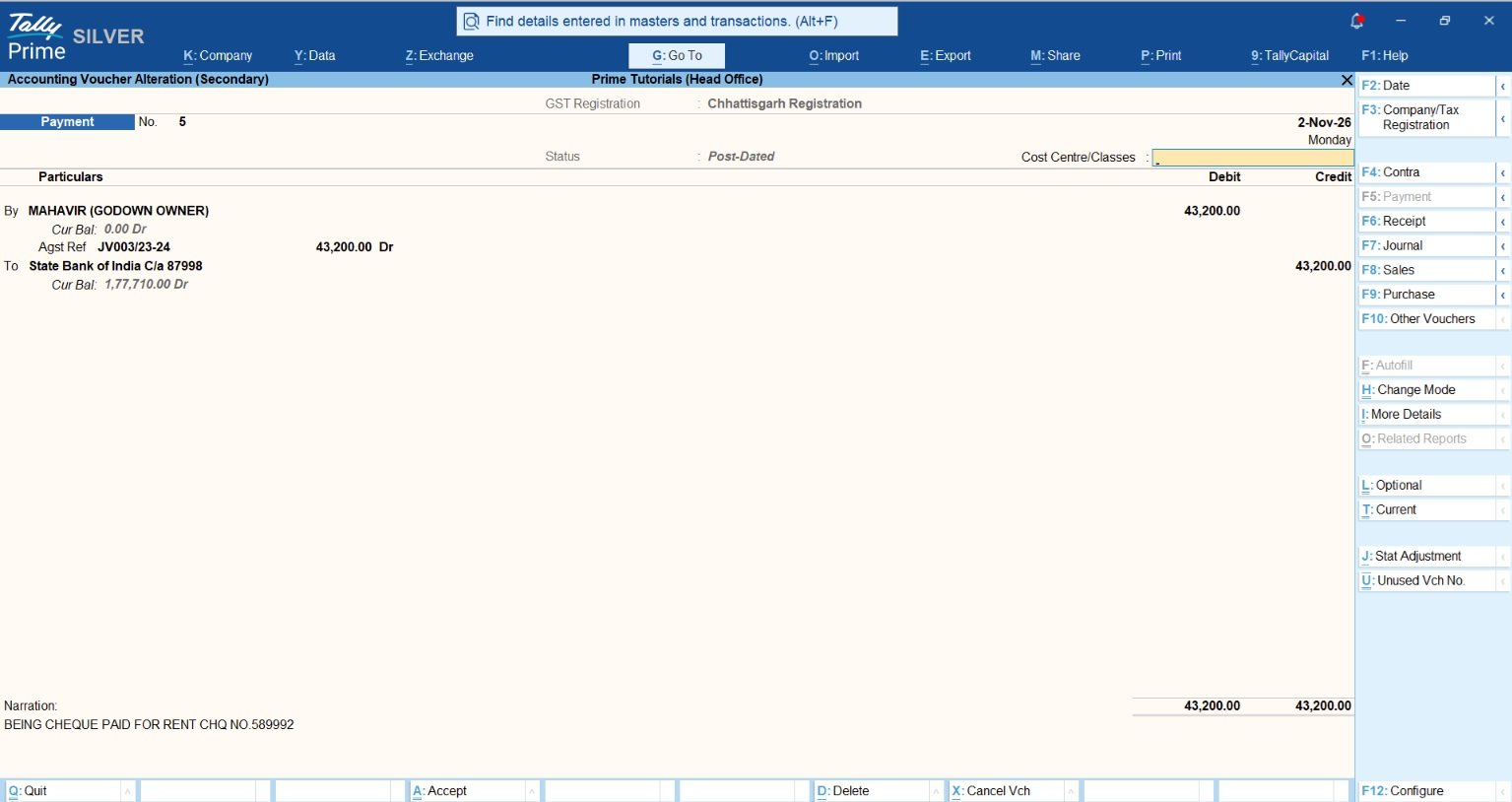
TallyPrime allows users to record future-dated transactions in advance using Post-Dated Vouchers (Ctrl + T). These vouchers remain in the Post-Dated Voucher Register and do not affect regular accounting balances until their specified dates. On the voucher date, the transaction becomes part of the regular books automatically.
Consultant’s Power-User Tip (Notional Bank Ledgers): When businesses receive post-dated cheques but have not yet decided which bank account will be used for deposit, TallyPrime’s Notional Bank feature can help track these cheques separately until they are deposited.
For example, if a business issues 12 post-dated cheques for monthly office rent, the accountant can record them in advance. TallyPrime will account for each transaction on its respective date, reducing the need to enter the same payment every month. However, Post-Dated Vouchers should not be confused with a general automatic recurring-voucher scheduler. They are suitable for transactions whose future dates and details are already known.
Optional Vouchers for Provisional Modeling
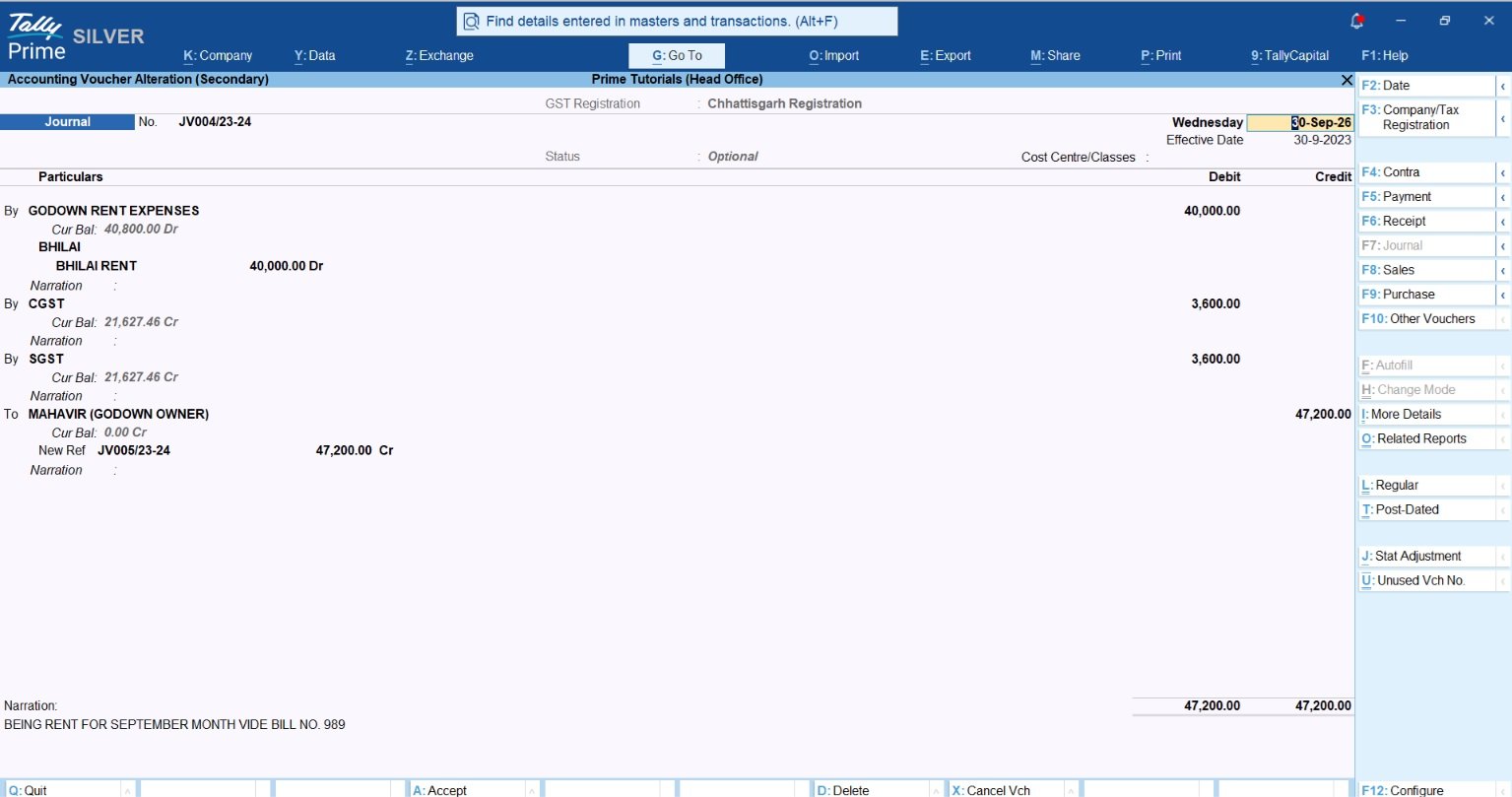
Optional Vouchers (Ctrl + L) are useful when businesses want to record provisional transactions without immediately affecting their regular books. These vouchers remain outside the normal accounting balances until they are converted into regular vouchers.
Provisional Expense Accruals: Businesses can record estimated expenses as Optional Vouchers when preparing internal financial reports. Once the actual invoice is received, the accountant can review the entry and convert it into a regular voucher.
Proforma Invoicing and Scenario Analysis: Optional Vouchers can also be useful for preparing proforma invoices and evaluating possible financial situations. TallyPrime’s Scenario Management feature allows businesses to include selected provisional transactions in reports without changing their regular accounting records.
Voucher Classes for Default Allocations
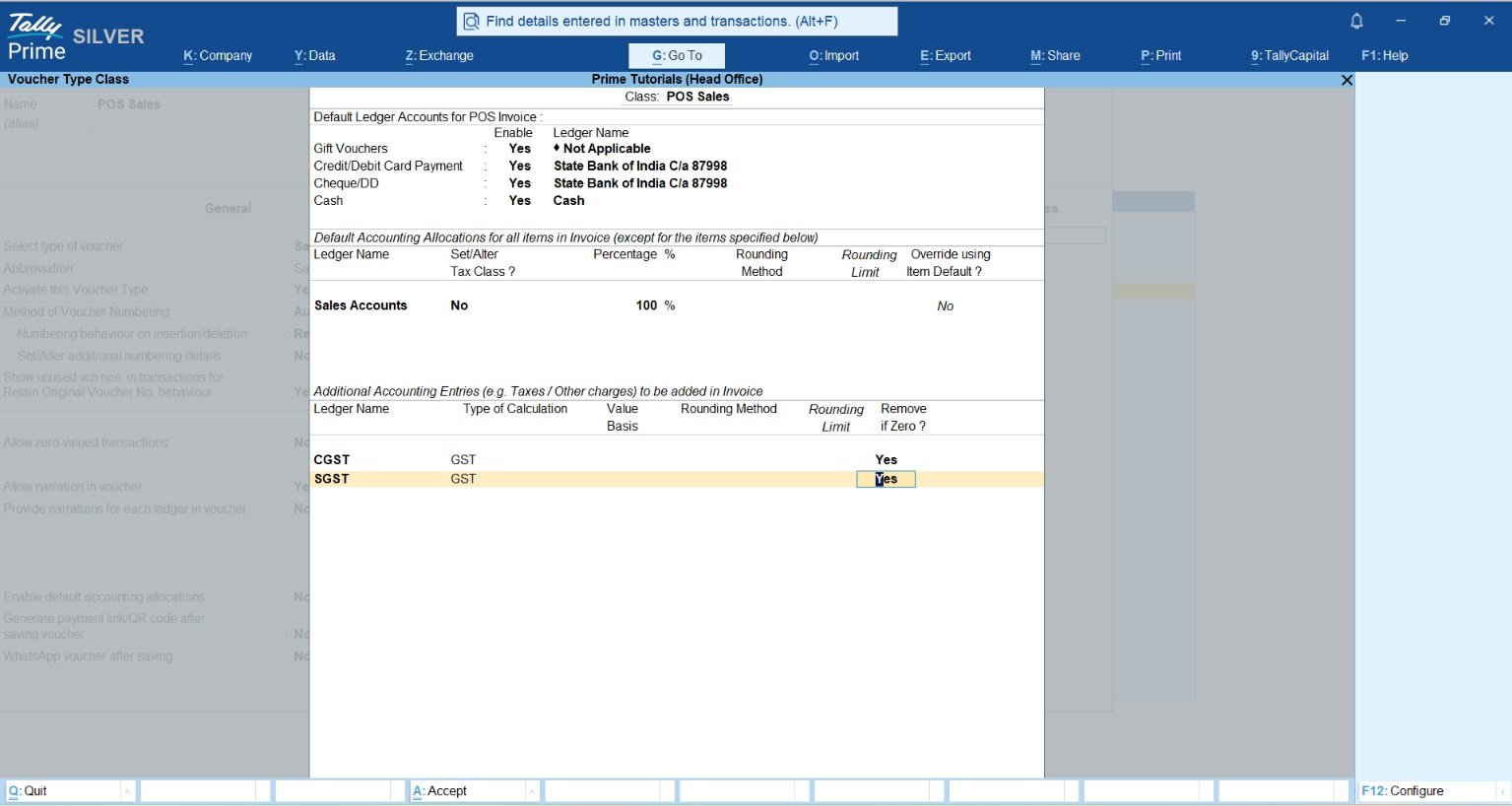
Voucher Classes in TallyPrime help automate commonly used accounting allocations. Businesses can configure predefined ledgers and other settings for specific voucher types.
For example, a retail business can create a POS Voucher Class with payment modes such as cash, debit card, credit card, and other supported payment methods. During billing, the relevant payment ledgers are available according to the configured Voucher Class, reducing repetitive ledger selection.
Accountants can also use keyboard shortcuts to speed up everyday work:
- Alt + C: Create a ledger or other master during voucher entry.
- Ctrl + R: Retrieve narration from an earlier voucher, where applicable.
- Alt + 2: Duplicate a voucher from supported reports.
- Alt + X: Cancel an existing voucher.
These features help reduce repetitive work while keeping accounting entries organized.
Why Match Statements Line-by-Line When Connected Bank Feeds Do It Automatically?
Bank reconciliation is an important accounting activity, but manually comparing bank statements with TallyPrime records can take considerable time. Bank charges, direct customer payments, UPI collections, and other transactions may appear in bank statements before they are recorded in the books.
TallyPrime simplifies this process through Connected Banking, bank statement imports, automated reconciliation, and voucher creation from bank transactions.
Direct API Connected Banking vs. Offline Feeds
TallyPrime supports different methods for accessing bank transactions depending on the bank and the available services.
Direct API Connected Banking: Connected Banking allows users to access bank balances and statements from supported bank accounts within TallyPrime. Currently documented Connected Banking support includes Axis Bank, State Bank of India, and Kotak Mahindra Bank. Connected Payments and other electronic payment capabilities are available according to the bank, TallyPrime release, and service configuration.
Offline Statement Import: Businesses can also download bank statements from their bank portals and import supported Excel or CSV files into TallyPrime. Bank statement imports and automated reconciliation are supported for more than 250 banks, although available formats and features vary by bank.
Both methods help reduce manual data entry and improve the bank reconciliation process.
The Auto-BRS Engine
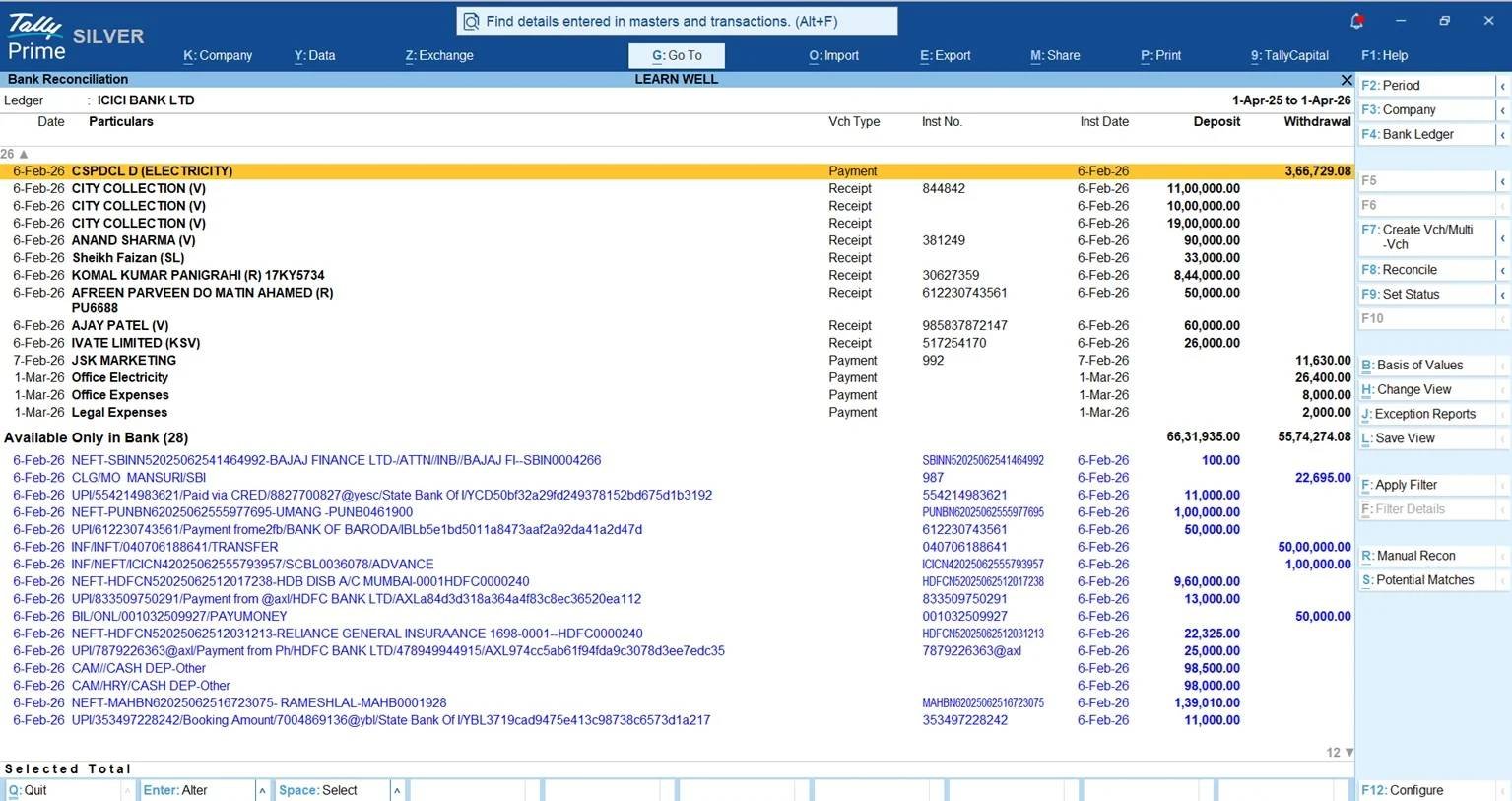
TallyPrime provides an automated Bank Reconciliation Statement (BRS) feature that compares transactions recorded in the books with imported bank statements.
The system identifies matching transactions and helps accountants reconcile them more efficiently.
Exact Matches: When the transaction details match according to the configured reconciliation rules, TallyPrime identifies them as Exact Matches. Accountants can reconcile these entries together or configure automatic reconciliation of exact matches.
Potential Matches: When transactions do not match exactly, TallyPrime suggests possible matches based on details such as amount, instrument number, date, and party. Accountants can review these suggestions and reconcile the correct transactions.
This feature is particularly useful for businesses handling large volumes of NEFT, RTGS, UPI, cheque, and other banking transactions.
Instant Voucher Creation from Bank Statements
Sometimes, a bank statement contains transactions that have not yet been recorded in TallyPrime, such as bank charges, interest credits, direct customer deposits, or supplier payments.
TallyPrime allows users to create accounting vouchers directly from imported bank statement entries.
For example, if a bank deducts ₹500 as bank charges, the accountant can select the transaction and generate a voucher without manually entering all the bank transaction details.
TallyPrime can create single or multiple vouchers from bank statement transactions. These automatically created vouchers are initially marked as Optional, allowing accountants to review and regularize them before including them in the books.
This feature helps businesses save time while maintaining control over accounting entries.
How Does TallyPrime Generate E-Invoices Directly from Sales Vouchers?
Under Indian GST rules, businesses covered by the applicable e-invoicing requirements must generate e-invoices for eligible transactions.
Instead of manually entering invoice information on the Invoice Registration Portal (IRP), businesses can use TallyPrime to generate e-invoices directly from their recorded sales transactions.
Direct API Portal Connectivity
TallyPrime supports online e-invoice generation through its integration with the government Invoice Registration Portal.
Businesses need to enable e-invoicing in TallyPrime, complete the required IRP registration, and create API credentials by selecting Tally (India) Pvt. Ltd. as the GST Suvidha Provider (GSP).
Once configured, eligible invoices can be submitted through TallyPrime without repeatedly entering the same details on the government portal.
Instant IRN and Dynamic QR Code Fetching
The e-invoicing process in TallyPrime is straightforward.
- Voucher Creation: The accountant creates a Sales Voucher using F8 and enters the customer details, GSTIN, items, taxable values, and applicable GST information.
- API Communication: After saving the invoice, TallyPrime can send the required invoice details to the IRP when the user confirms e-invoice generation. Eligible invoices can also be processed in bulk.
- Data Embedding: Once the IRP validates the invoice, it returns the Invoice Reference Number (IRN), acknowledgement details, and signed QR code. TallyPrime stores the returned information against the transaction.
- Instant Printing: Businesses can print or export the invoice with the required IRN and QR code details for sharing with customers.
This reduces manual portal work and helps prevent errors caused by entering the same invoice information multiple times.
Unified E-Way Bills & Integrated Cancellations
TallyPrime also supports e-Way Bill generation for eligible transactions. Businesses can generate e-Way Bills separately or send the required transport details along with e-invoice information when applicable. This helps avoid entering invoice details separately for both processes. TallyPrime also supports cancellation of e-invoices and e-Way Bills through the software, subject to the applicable portal rules and time limits.
For example, when an eligible transaction is cancelled within the permitted period, the user can follow the cancellation process in TallyPrime to update the relevant government portal records. However, cancelling a voucher in the books does not mean that an IRN or e-Way Bill can always be cancelled. Government portal restrictions and statutory timelines must still be followed.
Read What is Invoice Reference Number (IRN) in GST? Meaning, Format & Step-by-Step IRN Generation
How Does AI-Powered Docs by Ira Speed Up Bulk Vendor Voucher Processing?
Manually entering purchase invoices is one of the most time-consuming activities in many accounting departments. Businesses often receive supplier invoices as PDFs, scanned documents, or images, requiring accountants to enter supplier details, invoice numbers, item quantities, rates, and taxes manually.
Docs by Ira helps simplify this process by using AI to extract information from supported documents and prepare accounting vouchers in TallyPrime. Docs by Ira supports nine voucher types: Purchase, Sales, Credit Note, Debit Note, Sales Order, Purchase Order, Delivery Note, Receipt Note, and Journal Voucher. This helps businesses reduce repetitive voucher entry and focus more on verifying transaction details.
Flexible Ingestion Channels & Explicit File Constraints
Docs by Ira allows businesses to import documents from their computers or send documents through the TallyIra mobile app.
Desktop & Batch Folder Imports: Users can import individual PDF or image files, folders, and supported ZIP archives. Individual files can be up to 3 MB, while ZIP files can be up to 15 MB.
Mobile Capture (TallyIra App): Employees can use the TallyIra app to send supported document files to TallyPrime. The mobile app supports files up to 5 MB each and up to 10 files per upload.
For accurate processing, documents should be clear and readable. Each file should contain only one transaction, and bulk imports should contain transactions of the same voucher type. Currently, handwritten documents and documents in languages other than English are not supported.
The 4-Step Draft-to-Posting Workflow
Docs by Ira follows a simple process from document import to voucher creation.
- Scan & Import: Upload supported PDF or image documents through TallyPrime or send them using the TallyIra app.
- AI Extraction & Adaptive Master Mapping: Docs by Ira extracts information such as supplier names, invoice numbers, dates, amounts, item details, and tax values. It also helps map extracted information to existing ledgers and stock items in TallyPrime. Users can correct mappings and create missing masters where required.
- Review & Exception Handling: The imported transactions appear in the Draft Transactions report. Accountants can review the extracted information, resolve missing master details, correct date mismatches, and check possible duplicate invoices before creating vouchers.
- Post with Confidence: Once the details are verified, users can convert ready transactions into accounting vouchers. Multiple eligible draft transactions can also be converted together, reducing repetitive entry work.
This process combines AI-assisted data extraction with accountant review, helping businesses maintain better control over voucher accuracy.
Data Privacy Principle
When using AI-powered document processing, businesses should carefully review how their financial information is handled. Docs by Ira requires users to complete registration and accept the applicable terms and privacy policy before using the service.
Businesses should provide access only to authorized employees, upload necessary transaction documents, and review the applicable data processing and privacy terms. AI-generated accounting information should always be verified before posting, particularly for GST details, invoice amounts, and party ledger mapping.
Real-World Impact: Manual vs. Automated Workflow Framework
| Accounting Area | Manual Bottleneck & Error Risks | TallyPrime Automated Solution | Practical Business Takeaway / Impact |
| Recurring Entries | Repeated manual entries for rent, instalments, and other scheduled payments may lead to missed or incorrect transactions. | Post-Dated Vouchers, Optional Vouchers, and Voucher Classes simplify future-dated and commonly repeated entries. | Reduces repetitive work and helps maintain better control over scheduled transactions. |
| Bank Reconciliation | Manual comparison of bank statements with accounting records takes time and may miss charges or direct payments. | Connected Banking, statement imports, Auto-BRS, and automated voucher creation. | Faster reconciliation, fewer manual entries, and improved visibility into bank transactions. |
| E-Invoicing & Compliance | Manual IRP data entry and copying invoice details can lead to errors and delays. | Direct e-invoice generation, IRN and QR code retrieval, and supported e-Way Bill integration. | Reduces duplicate data entry and simplifies GST e-invoicing compliance. |
| Vendor Bill Entry | Manually entering supplier invoices increases processing time and the possibility of incorrect values. | Docs by Ira extracts document information and prepares draft transactions for review and voucher creation. | Reduces manual entry and improves efficiency while keeping accountants in control of validation. |
Conclusion & Implementation Checklist
Accounting automation is not about replacing accountants. It is about reducing repetitive work so accounting professionals can spend more time on financial analysis, cash flow management, compliance, and business planning.
TallyPrime provides several practical automation features that businesses can adopt without implementing a completely new accounting system. From managing post-dated transactions and reconciling bank statements to generating e-invoices and importing documents using Docs by Ira, these tools help businesses improve efficiency while maintaining control over accounting records.
4-Step Modernization Checklist
- Audit Monthly Cycles: Identify regular payments such as rent, instalments, and other predictable transactions. Use Post-Dated Vouchers for known future-dated entries and Optional Vouchers for provisional transactions.
- Activate Connected Banking: Check whether your bank supports Connected Banking in TallyPrime. Where direct connectivity is unavailable, use supported Excel or CSV bank statement imports and configure automated reconciliation.
- Enable Direct Statutory APIs: Enable e-invoicing and e-Way Bill features where applicable. Complete the required IRP registration, configure the GSP API credentials, and verify invoice details before sending transactions to the government portal.
- Adopt AI Draft Workflows: Use Docs by Ira to import supported vendor invoices and other transaction documents. Review extracted details, resolve exceptions, and convert verified draft transactions into accounting vouchers.
By gradually implementing these features, businesses can reduce manual accounting work, improve accuracy, and make better use of their existing TallyPrime software.
Also read Client Story: How One SME Cut Reconciliation Time in Half Using AI-Assisted Tools
Frequently Asked Questions (FAQs)
Do Post-Dated Vouchers alter my current Balance Sheet figures immediately?
No. Post-Dated Vouchers do not affect regular accounting balances before their specified dates. They become part of the books when the voucher dates arrive.
Is my financial data secure when using AI processing with Docs by Ira?
Docs by Ira requires registration, login, and acceptance of its applicable terms and privacy policy. Businesses should review the data handling terms, restrict access to authorized users, and follow proper security practices when uploading financial documents.
Does TallyPrime auto-post vendor invoices directly into my general ledger without human review?
Docs by Ira prepares extracted transactions for review and conversion into vouchers. Accountants can verify details, resolve exceptions, and save the transactions as draft. Businesses should review AI-extracted information before finalizing accounting entries.
Which banks are supported for direct connected banking e-payments and feeds in TallyPrime?
Connected Banking currently supports Axis Bank, State Bank of India, and Kotak Mahindra Bank for supported banking services. TallyPrime also offers e-Payment facilities for several other banks, depending on their supported payment methods. Bank statement imports and automated reconciliation are available for a much wider range of banks.
How does TallyPrime handle e-invoicing for sales transactions requiring an e-Way Bill?
TallyPrime allows businesses to send e-Way Bill details along with e-invoice information for eligible transactions. This helps generate both documents through the integrated process without entering the same invoice information separately.
What happens if a bank statement feed includes a direct charge not yet recorded in my books?
TallyPrime allows accountants to create vouchers from imported bank statement transactions. The automatically created vouchers can be reviewed as Optional Vouchers and regularized after verifying the details.
Can I import vendor invoices in bulk using Docs by Ira?
Yes. Docs by Ira supports importing multiple PDF or image documents through folders or ZIP files. Each document should contain one transaction, and documents imported together should belong to the same voucher type. The extracted transactions can then be reviewed and converted into accounting vouchers.
