

 Cart is empty
TL;DR
Reconciliation time can be cut in half by moving from a reactive monthly “ticking” exercise to a proactive, end-to-end automated workflow. The secret lies in cleaning data at the point of entry. By combining AI-powered invoice processing (Docs by Ira) with automated bank matching in TallyPrime, SMEs can shift their accounting staff from the slow manual data entry to a rapid, “exception-only” review. This system ensures high-fidelity ledger data, allowing automated engines to achieve auto-match rates of up to 90%.
Introduction: Why is Your Monthly Close Taking So Long?
In my 20 years of consulting for SMEs across the manufacturing and retail sectors, I have spent thousands of hours witnessing the same month-end struggle. Most businesses treat reconciliation as an isolated, retrospective task, a forensic audit of the purchase register performed under the pressure of a closing deadline.
This is a fundamental mistake. Reconciliation efficiency is not determined at month-end; it is determined at the moment the first invoice is entered. If the data entering your ledger is “dirty”, riddled with typos or transposition errors, no amount of effort can make the “ticking and tying” process fast. Clean data going in is the only way to get fast results coming out.
Why Do Bank Entries and Ledger Books Never Seem to Match?
The time it takes to close your books (T_close) is a mathematical function of your process, not a matter of luck:
T_close = T_input+ T_match + T_exception
- T_input: Time spent manually entering data.
- T_match: Time the software takes to match entries.
- T_exception: Time spent investigating and fixing mismatches.
When you rely on manual entry, T_input is high, and the integrity of the ledger is constantly compromised. I have seen accountants spend an entire day performing a forensic search for a ₹9.00 discrepancy in a ₹9,00,000 ledger, only to find a single transposed digit. Common “Upstream Errors” include:
- Transposition Errors: Entering 45,000 as 54,000.
- Typographical Errors: Misplaced decimals or extra zeros (e.g., ₹1,000 becomes ₹10,000).
- Transcription Errors: Incorrectly copying supplier names or GST details from a physical document.
- Misplaced Documents: The month-end scramble to find one missing credit note that is holding up the entire BRS.
A single wrong invoice amount makes automated matching impossible. If your ledger says 54,000 but the bank statement shows 45,000, the system flags an “exception.” This forces your team into a line-by-line manual audit, causing T_exception, the most expensive part of the cycle, to skyrocket.
Client Story: From Days of Work to a Quick Review of Exceptions
I recently advised a mid-sized manufacturing firm whose monthly reconciliation was a three-day ordeal. Their staff was essentially acting as “Data Entry Clerks,” retrospectively auditing their own typing errors.
- The Before: Manual entry led to a high exception rate (E). The accountant spent 15% of their month performing a line-by-line “ticking” of bank statements against an error-prone purchase register.
- The After: They implemented Docs by Ira for all supplier invoices and enabled Connected Banking in TallyPrime. Invoices became structured digital entries at the point of origin.
- The Result: Because the ledger data was now accurate, the automated matching engine cleared 90% of transactions instantly. Reconciliation time was cut in half. More importantly, the accountant shifted from “clerk” to “Financial Analyst,” providing the owner with real-time cash flow visibility that was previously impossible.
The Strategic Benefits Beyond Time Savings
- Cash Flow Visibility: Ensuring the “Source of Truth” in your ERP matches your bank balance every single day.
- Fraud Detection: Spotting unauthorized bank charges or duplicate payments in real-time, rather than weeks later.
- Audit Readiness: Maintaining a digitized, timestamped trail where every Tally voucher is linked to the original digital invoice.
- Staff Well-being: Eliminating the high-stress “month-end scramble” and reducing the burnout of manual ticking.
How Can “Docs by Ira” Clean Up Your Data Before It Reaches the Ledger?
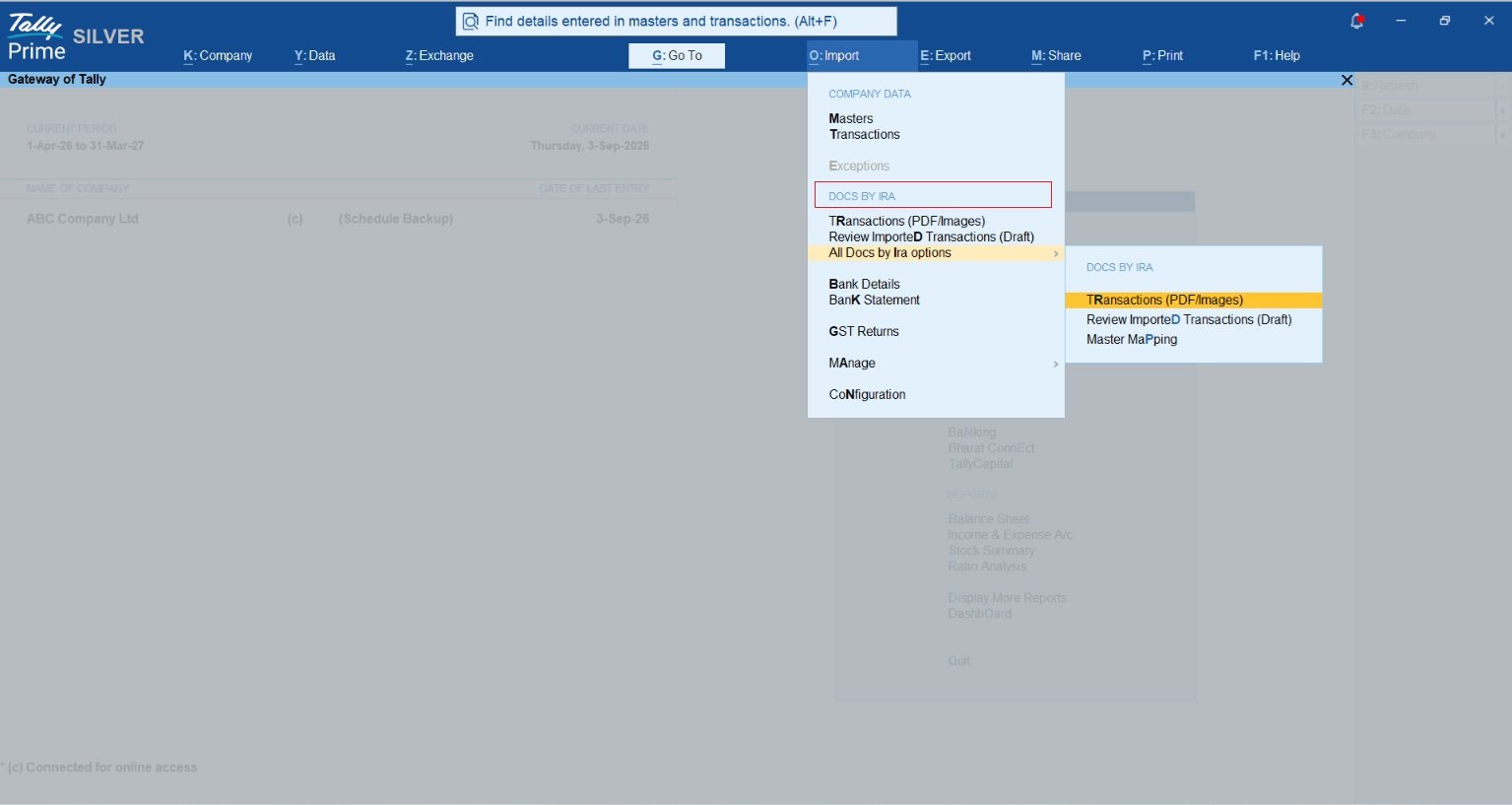
To eliminate these errors, Docs by Ira acts as an AI-powered ingestion engine. Instead of manual typing, you scan or upload invoices via a mobile app or bulk-import PDF, JPEG, JPG, or ZIP files directly into TallyPrime.
| Metadata Field | AI Action | Impact on Bank Reconciliation Statement ( BRS ) |
| Party Name | Maps to existing masters or triggers creation. | Prevents misallocation to the wrong vendor ledger. |
| Invoice Number | Extracts and checks for duplicates. | Eliminates the nightmare of double-reconciling the same payment. |
| Date | Identifies billing dates for period alignment. | Ensures bank clearing dates align with the correct fiscal period. |
| Total Amount | Extracts the exact transaction value. | Eliminates transposition errors that cause auto-match failures. |
| GST & Line Items | Validates tax details and individual values. | Maintains ledger integrity and audit-ready tax credits. |
A critical advantage is Smart Mapping: the AI remembers manual corrections for vendor ledger allocations and applies them to future entries, reducing manual effort by up to 80% over time.
Docs by Ira & Bank Import: The Perfect Duo for Effortless Reconciliation
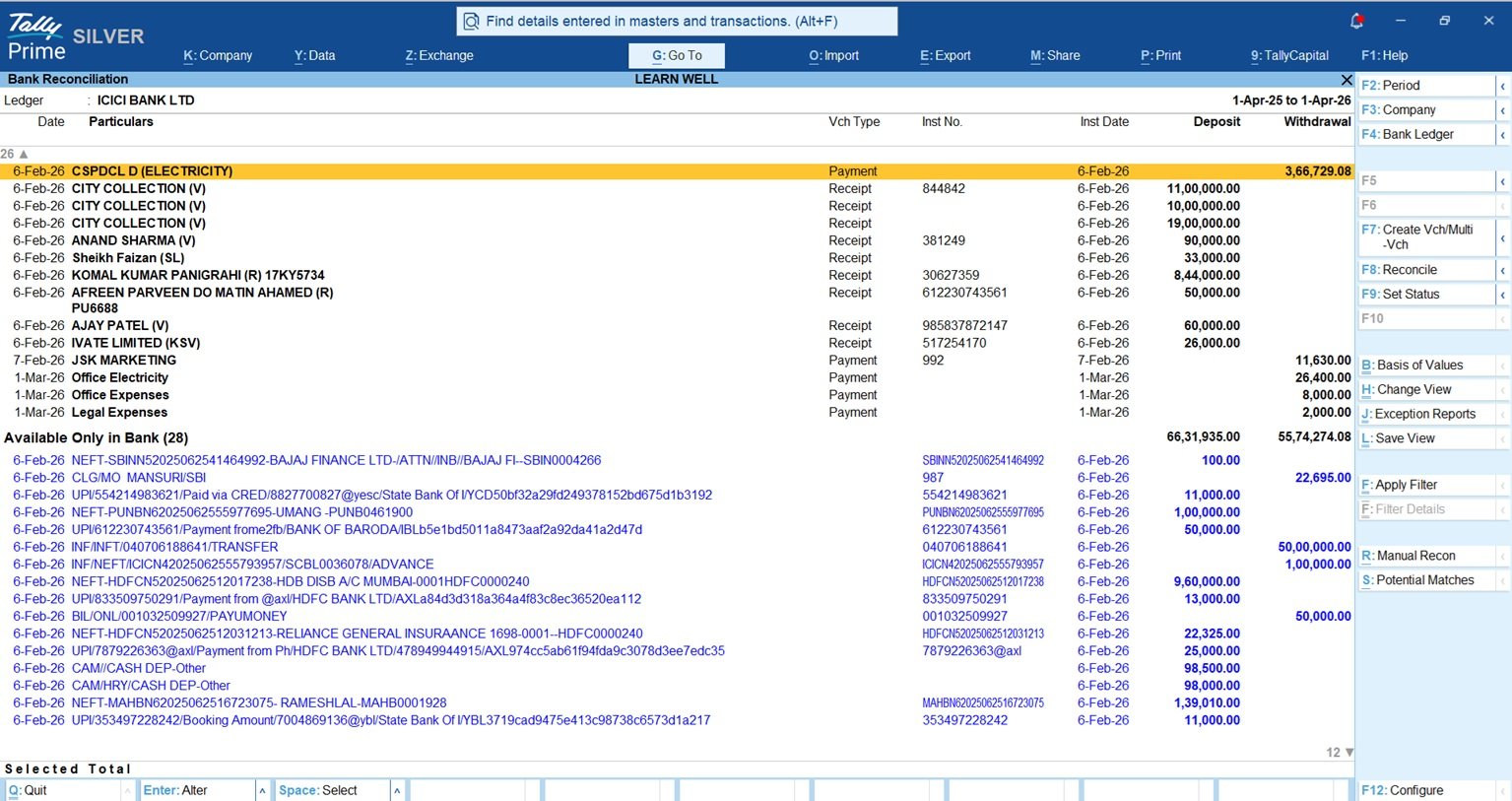
We all know the frustration of bank reconciliation: staring at a screen, trying to figure out why a payment doesn’t match your books. TallyPrime’s automated matching engine is a high-speed processor designed to do this heavy lifting for you.
To achieve its full potential, a matching engine requires high-fidelity, error-free data. That is exactly where the seamless workflow between Docs by Ira and Tally’s Bank Import comes into play, transforming reconciliation from a headache into a breeze.
Flawless Invoice Entry with Docs by Ira
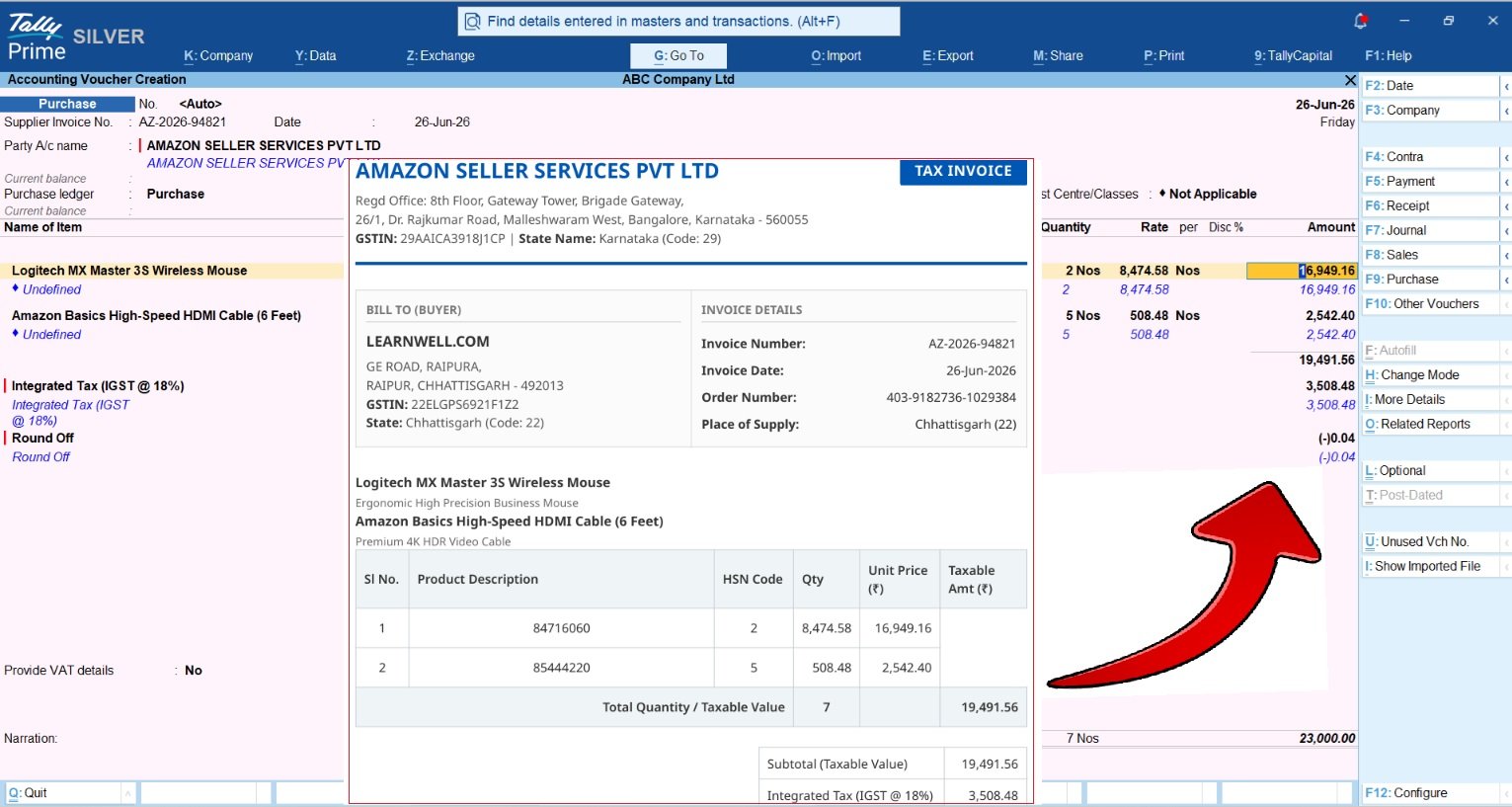
The biggest reason automated matching fails is human error during initial data entry, a simple typo in an amount or date throws the whole system off. Docs by Ira eliminates this completely. As Tally’s AI-powered invoice processing tool, it “reads” your purchase bills and automatically extracts the exact details to generate accurate, ready-to-save vouchers.
Effortless Bank Import
Once your precise vouchers are recorded, bringing your bank data into Tally is just as effortless. You can fetch your statements directly via Connected Banking (supported for Axis, SBI, Kotak, and ICICI Bank) or simply press Alt+O to import your Excel, CSV, or MT940 bank files in seconds.
The Multi-Tier Matching Engine at Work
Now that your upstream data is perfectly clean (thanks to Docs by Ira) and your bank statements are imported, TallyPrime’s multi-tier algorithm can actually do its job:
- Exact Matches: Because Docs by Ira captured the exact invoice amounts, the dates, amounts, and references align perfectly with your bank statement. Tally reconciles these instantly without you lifting a finger.
- Potential Matches: Tally intelligently identifies likely candidates (for example, matching amounts that have slight date variances). You can verify and confirm these with a single keystroke using Alt+S.
- On-the-Fly Vouchers: Notice a bank charge, fee, or interest entry missing from your books? Simply press Alt+J to create the voucher directly from the Bank Reconciliation (BRS) screen.
- Consolidation: If multiple bank entries need to be matched to a single book entry, you can easily handle it by pressing Alt+F7 to create a consolidated voucher.
The Verdict: Automated matching can do the heavy lifting, but only when it is fed the right data. By combining Docs by Ira for flawless invoice entry with Bank Import for seamless statement fetching, you create a closed-loop system where manual errors are eliminated, and reconciliation happens in minutes instead of hours.
Conclusion: Your Actionable Checklist for a Faster Close
You don’t need to be working harder than your software. Follow this consultant’s checklist:
- Standardize Capture: Capture invoices via Tally Ira mobile app at the point of origin to eliminate “misplaced document” syndrome.
- Automate Ingestion: Use AI to extract “Total Amount” and “GST” to kill transposition errors before they reach the ledger.
- Enable Connected Banking: If you bank with Axis, SBI, Kotak, or ICICI, fetch statements directly to ensure real-time accuracy.
- Audit Trail Integration: Link digital source documents to every voucher to ensure your year-end audit is a non-event.
“The most successful businesses aren’t the ones working the hardest; they’re the ones letting their software do the heavy lifting.”
Aslo read TallyPrime Cloud Access in 2026: Remote Access, Real-Time Collaboration and What’s Actually Changed
Frequently Asked Questions (FAQs)
Do I need a specific bank account to use the automated matching feature?
Not at all! While TallyPrime offers Connected Banking for direct statement fetching with specific banks (Axis, SBI, Kotak, and ICICI Bank), you can use the automated matching engine with any bank. Simply press Alt+O to import your bank statements manually using Excel, CSV, or MT940 files.
What happens if the date on the bank statement is slightly different from the voucher date?
Tally’s multi-tier algorithm is smart enough to handle this. Instead of ignoring the entry, it will flag it as a Potential Match. The system groups likely candidates (like matching amounts with slight date variances) so you can easily review them. If it’s the correct transaction, you can confirm it instantly by pressing Alt+S.
Does Docs by Ira post entries automatically?
No. It creates accounting-ready draft vouchers for human review. You maintain complete control over what is posted to your permanent books.
Is my data secure with the AI?
Yes. Docs by Ira is built on strict privacy principles. Your financial documents are used only to process your immediate work and are never used to train models for other entities.
What happens if my bank isn’t on the supported list?
TallyPrime supports over 450 banks via Alt+O import. If your specific bank format is not supported, you can use standard CSV/Excel imports or contact Tally support for custom configuration.
Does the AI learn from my corrections?
Yes. Smart Mapping allows the AI to remember how you map specific vendors or items, making the system more accurate and reducing your workload over time.
