

 Cart is empty
TL;DR
Consolidated group company accounts in TallyPrime provide a virtual reporting layer to view aggregate group performance without merging your physical subsidiary databases. It allows business owners to generate group-level financial statements on demand while keeping individual company data independent for local compliance. Key benefits include:
- Zero manual spreadsheets: Say goodbye to complex, error-prone Excel workbooks.
- Unified reporting: One view for the entire group’s Balance Sheet and P&L.
- Maintained independence: Each subsidiary retains its unique settings and audit trails.
Introduction
How do I see my group’s total performance without jumping between different companies? If you are manually adding up totals from separate entities or switching screens every five minutes, you are struggling with “data silos.”
As businesses expand, often by opening separate branches for different states or launching new product lines, accounting becomes fragmented. In my 20 years of working as a Senior Accountant across manufacturing and retail, I’ve seen finance teams spend days wrestling with Excel just to produce a single group balance sheet. TallyPrime solves this by creating a specialized virtual environment that aggregates your data instantly.
What exactly is a “Group Company” in TallyPrime?
A Group Company is a virtual consolidation layer. It is not a separate physical database where you re-enter transactions. Instead, it is a reporting environment that pulls data from “member” companies on demand.
- Read-Only Nature: You cannot post vouchers or transactions in the Group Company. Every entry must occur within the individual member databases.
- XML-Based Aggregation: TallyPrime compiles data by aggregating separate XML-based files rather than physically merging them. This preserves the operational independence of each subsidiary, a critical requirement for clean statutory audits.
What Are the Non-Negotiables Before You Begin?
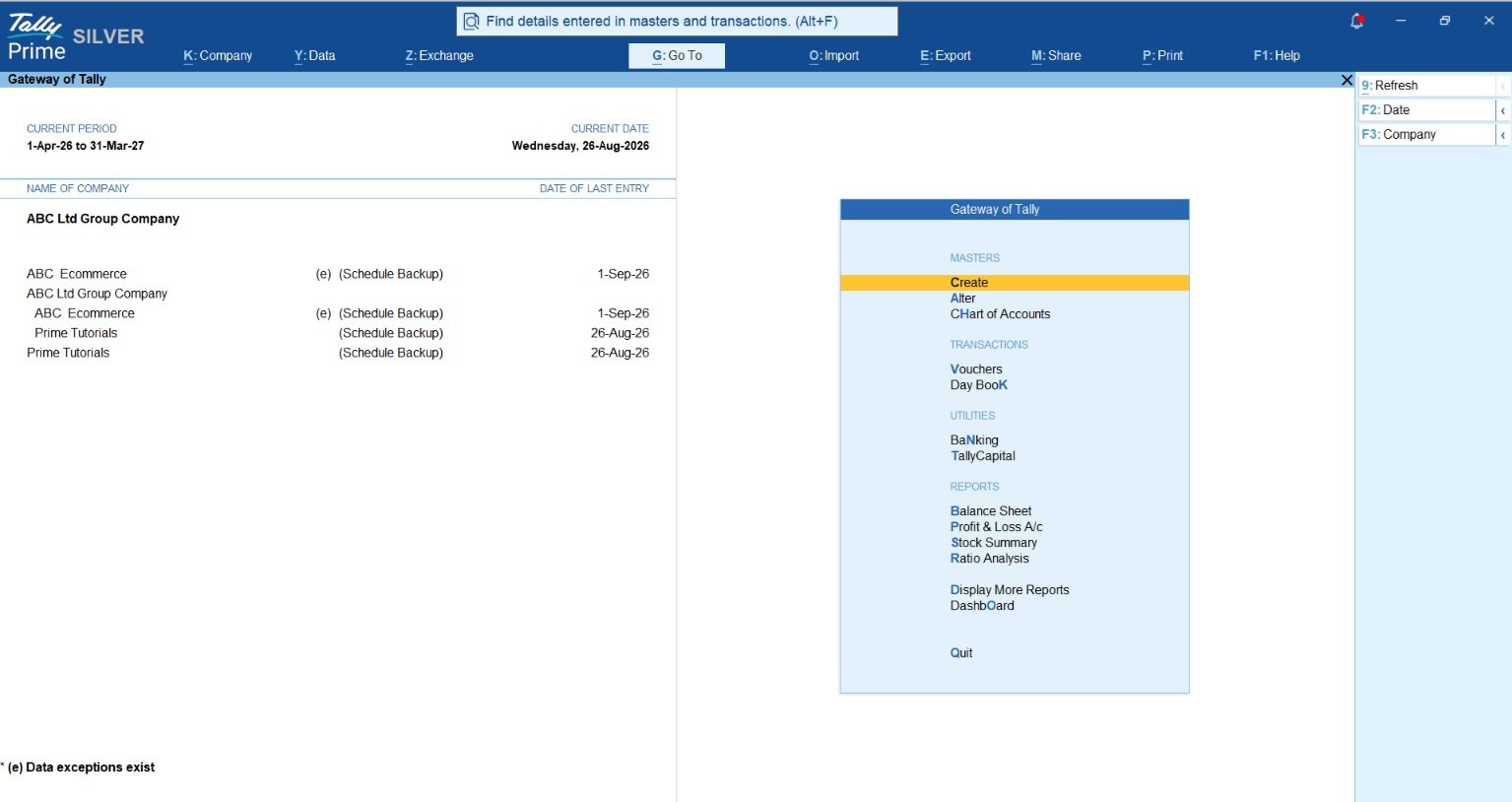
To ensure your consolidated reports are accurate, you must align the structural settings of your subsidiaries. Use this Checklist for Success before creating your Group Company:
- The “Minimum Two” Rule: A Group Company requires at least two member companies to be loaded to function as a consolidation layer.
- Base Currency Alignment: Member companies must use the exact same Base Currency Symbol (e.g., ₹) and Formal Name (e.g., INR).
- Decimal Precision Alignment: The “Number of decimal places” (maximum 4, default 2) must be identical across all companies to prevent rounding mismatches in group reports.
- Unified Chart of Accounts: Ledger names must be identical. If Subsidiary A uses “Sales” and Subsidiary B uses “Domestic Sales,” TallyPrime will display them as separate lines. To merge them, names must match exactly.
- Identical F11 Company Features: Specifically, “Maintain Inventory” and “Integrate Accounts with Inventory” must match across all entities to ensure stock valuations are consolidated correctly.
How Do You Set Up a Group Company? (Step-by-Step Guide)
Setting up the consolidation layer is a simple process once your subsidiaries are aligned:
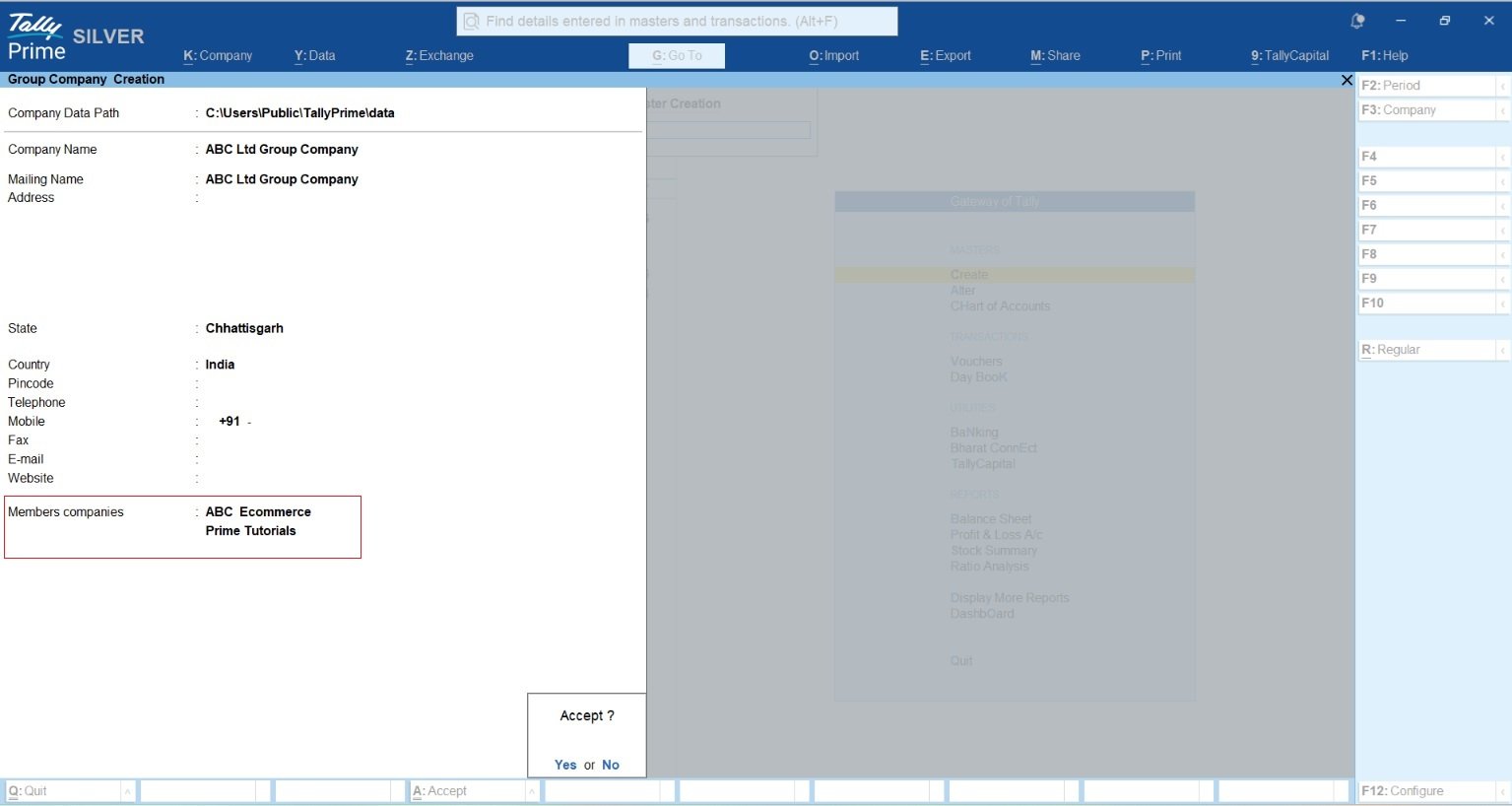
- Load Subsidiaries: Open all member companies you want to group by pressing Alt+F3.
- Access Creation Screen: Press Alt+K (Company) > Create.
- Toggle Group Mode: On the Company Creation screen, press Alt+R to switch to “Group Company” mode.
- Enter Group Details: Input the group name (e.g., Apex Holdings) and address details.
- Select Member Companies: From the list of loaded companies, select the members. Choose ‘End of List’ to finish.
- Save: Press Ctrl+A to finalize.
Pro-Tip: Unified Authentication If you use the same Administrator level username and password across all member companies, TallyPrime allows for a single-click login to the entire group, dramatically speeding up your weekly reporting cycle.
How to View Consolidated Reports in TallyPrime
Once your Group Company is set up and loaded along with its member companies, viewing the aggregated financial health of your entire business group is incredibly straightforward. Because the Group Company acts as a virtual reporting layer, generating these reports happens instantly without any manual data merging.
Follow these simple steps to access your consolidated accounts:
- Activate the Group Company: On the Gateway of Tally, ensure your Group Company is selected as the active company.
- Select the Desired Report: Navigate to the core financial report you want to analyze, such as the Balance Sheet, Profit & Loss A/c, or Trial Balance.
- Analyze the Aggregated Data: The report will automatically open displaying the combined financial totals of all your active member companies.
- Expand for Granular Details: Press Alt+F5 (Detailed) to expand the accounting groups and view the consolidated ledger-level balances.
Dealing with Intercompany “Messiness”: The Elimination Framework
When subsidiaries trade with each other, they record internal revenue and debts. From a group perspective, these must be “eliminated” to avoid inflating your total revenue and assets.
The Adjustment Company Method– In my experience, the best way to handle this is the Adjustment Company Method. You create a “dummy” company specifically for elimination entries. By posting negative journal entries here, you offset intercompany sales and payables. This preserves the audit integrity of your standalone subsidiaries, keeping their books “clean” for statutory auditors while ensuring the Group Company reflects the true external position.
Calculating Unrealized Profit– If Subsidiary A sells goods to Subsidiary B at a profit, and that stock remains in the warehouse at year-end, you must remove the “unrealized profit” from the group’s closing stock.
Use the Unrealized Profit Formula: P_u = V – (V/(1+M/100)) (Where V is the closing stock value and M is the markup percentage.)
Scenario: Subsidiary A sells to Subsidiary B at a 25% markup. Subsidiary B has ₹15,00,000 of this stock in hand.
- Calculation: 15,00,000 – (15,00,000 / 1.25) = 3,00,000.
- Entry: You would debit Consolidated Retained Earnings (P&L A/c) and credit Consolidated Closing Stock by ₹3,00,000 in your Adjustment Company.
| Transaction Type | Subsidiary-Level Posting | Consolidated Elimination Entry (Adjustment Co.) |
| Intercompany Sales | Seller credits Revenue; Buyer debits Purchase | Debit Consolidated Revenue; Credit Consolidated COGS |
| Intercompany Balances | Sub A debits Receivables; Sub B credits Payables | Debit Consolidated Payables; Credit Consolidated Receivables |
| Intercompany Debt | Lender debits Interest Income; Borrower credits Interest Expense | Debit Consolidated Interest Income; Credit Consolidated Interest Expense |
Example: The “Apex Holdings” Scenario
Consider Apex Holdings, which operates a Pharmacy and a Retail shop. On a standalone basis, both entities looked profitable. However, once we loaded the Group Company, the consolidated Balance Sheet revealed a massive intercompany debt: the Retail shop owed the Pharmacy for shared logistics costs that hadn’t been settled for months. This visibility allowed the owners to restructure their internal cash flow before a liquidity crunch hit.
Diagnostic Tip: The Rule of 9– If your consolidated Trial Balance doesn’t match after manual data entry, calculate the difference between total debits and credits. If the difference is divisible by 9, you likely have a digit transposition error (e.g., entering ₹8,900 instead of ₹9,800).
Also read How Indian Small Businesses Reconcile Accounts in Minutes using TallyPrime
Security and Audit: Who Can See What?
In a group environment, data governance is your first line of defense.
- User Access Controls: Restrict transactional staff to their local databases while ensuring only the Group Controller has access to the “Group Company” view.
- The Edit Log: This is a non-negotiable for group governance. Enabling the Edit Log (Alt+K > Alter) tracks every modification, not just to vouchers but also to Masters (Groups and Ledgers). This prevents unauthorized changes to ledger names that could break your consolidation.
- Disallow Educational Mode: In the security settings, set “Disallow opening in educational mode” to Yes. This prevents staff from altering historical group data on unlicensed home systems.
- TallyVault: Use this for encrypting highly sensitive group data, masking the company name in selection lists.
Know more about Security Management in TallyPrime
Conclusion & Actionable Tips
Consolidation isn’t a year-end chore; it’s a strategic tool for real-time visibility. By leveraging TallyPrime’s group company features, financial controllers can instantly gauge the health of their entire enterprise without the friction of manual data merging. This proactive approach not only ensures strict audit readiness but also empowers business owners to make faster, data-driven decisions throughout the financial year.
3-Point Framework for Group Controllers:
- Enforce a Standard Chart of Accounts: Ensure every subsidiary uses identical ledger names to avoid messy “duplicate” lines in group reports.
- Enable the Edit Log Immediately: Maintain accountability for both transaction and Master data changes.
- Run Weekly Reconciliations: Identify intercompany mismatches early to ensure a smooth month-end close.
“Consolidation isn’t just about adding numbers; it’s about seeing the one truth hidden across multiple companies.”
FAQs
Can I post transactions directly inside a Group Company in TallyPrime?
No. A Group Company acts strictly as a virtual reporting layer rather than a physical database. All vouchers and financial transactions must be posted within the individual member company databases.
What happens if my subsidiaries use different decimal settings or base currencies?
TallyPrime requires matching Base Currency symbols, formal names, and identical decimal precision (up to 4 places) across all member companies. Discrepancies will cause rounding mismatches and calculation errors in group reports.
Why are my subsidiary ledgers showing as separate lines instead of combining in the group Balance Sheet?
This occurs due to inconsistent naming conventions in your Chart of Accounts. Ledger names must be spelled and formatted identically across all member companies (e.g., using “Sales” universally) for TallyPrime to merge them automatically.
How do I handle intercompany sales, debt, and balances to avoid inflating my group financials?
Intercompany figures must be eliminated to reflect the true external position. The most effective approach is the Adjustment Company Method, where a separate entity is used to post negative journal entries that offset internal transactions.
How can I secure group company data and track unauthorized modifications?
Restrict standard operational staff to their local databases and grant Group Company access only to senior controllers. Additionally, enable the Edit Log feature to track all changes made to both vouchers and master ledgers.
What is the benefit of the Adjustment Company Method for statutory audits?
It preserves the independent audit trails of your standalone subsidiaries. By keeping internal elimination entries isolated in a separate adjustment entity, local statutory auditors can review clean, unaltered subsidiary books without disruption.
