

 Cart is empty
TL;DR
Income and Expense Budgeting in TallyPrime: How Indian SMEs Plan and Track Financial Performance?
- Establish Financial Guardrails: TallyPrime allows you to set specific spending limits by ledger, group, or cost center, ensuring every rupee aligns with your strategic goals.
- Identify Leaks in Real-Time: Use the F10 (Budget Variance) function to compare actual spend against your plan, catching “unfavourable” variances before they erode your margins.
- Drive Efficiency, Not Just Savings: Move beyond tracking totals by using Efficiency Ratios to ensure your support departments aren’t ballooning relative to your revenue-earning units.
Introduction: The “Silent” Cash Leak in Indian SMEs
In my 20 years as a Senior Accountant, I’ve walked into hundreds of factories and trading houses where the owner is puzzled. Sales are up, yet the bank balance is stagnant. In my experience, these businesses are victims of “silent” leaks. Research shows Indian SMEs lose 5% to 10% of annual revenue to inefficiencies like duplicate payments, processing errors, and unmonitored departmental spend.
I’ve seen “Input Tax Credit (ITC) leakage” and poor expense control lead to unnecessary GST scrutiny that ties up an owner’s time for months. Most SMEs treat accounting as a post-mortem for tax filing. But if you want to scale, you must bridge the gap between simple bookkeeping and strategic financial planning. TallyPrime’s budgeting module is the tool that turns your data into a proactive roadmap.
Why is Budgeting a Struggle for Most SMEs?
Most SMEs rely on disconnected Excel sheets, creating a “visibility lag.” By the time you realize a department has overspent, the cash has already left the building.
| Challenge | Impact on Your Business | TallyPrime Solution |
| Manual Entries | Higher risk of ITC leakage and GST mismatches. | Structured voucher entries that standardize and verify data. |
| Excel Tracking | Fragmented data; difficult to see real-time cash flow. | Integrated platform for accounting, inventory, and budgets. |
| Visibility Lag | Overspending is only caught during month-end “post-mortems.” | Real-time dashboards and F10 Variance reports. |
I’ve seen businesses face heavy late payment penalties or miss out on early payment discounts simply because they lacked a consolidated view of their committed expenditures.
How TallyPrime Cost Centers Transform Your Spending
In TallyPrime, a Cost Center is a functional unit, like Sales, HR, or a specific Project. It allows you to see where your money is going, not just what was bought.
Strategic Metric: The Efficiency Ratio A Senior Accountant doesn’t just look at the total spend; we look at efficiency. Use the formula: Efficiency Ratio = (Revenue-generating spend) / (Total departmental spend) If your “support” costs are rising while your revenue-generating spend is flat, your business is becoming top-heavy.
| Feature | Cost Center (Support Function) | Profit Center (Revenue Unit) |
| Primary Goal | Minimize costs while maintaining service quality. | Maximize net income and contribution margins. |
| Evaluation | Measured by Budget Adherence and Efficiency. | Measured by ROI, revenue growth, and profit. |
| Examples | HR, IT, Maintenance, Legal. | Sales Division, Branch Office, Product Line. |
In my work with a dealership client… we separated “Service Center” costs from “Showroom” costs. We discovered the Service Center’s machinery was causing a massive electricity spike during off-hours. Tagging expenses to the right center saved them lakhs in just one quarter.
Step-by-Step: How Do You Set Up a Budget in TallyPrime?
Setting up a budget is straightforward but requires discipline in how you define your limits.
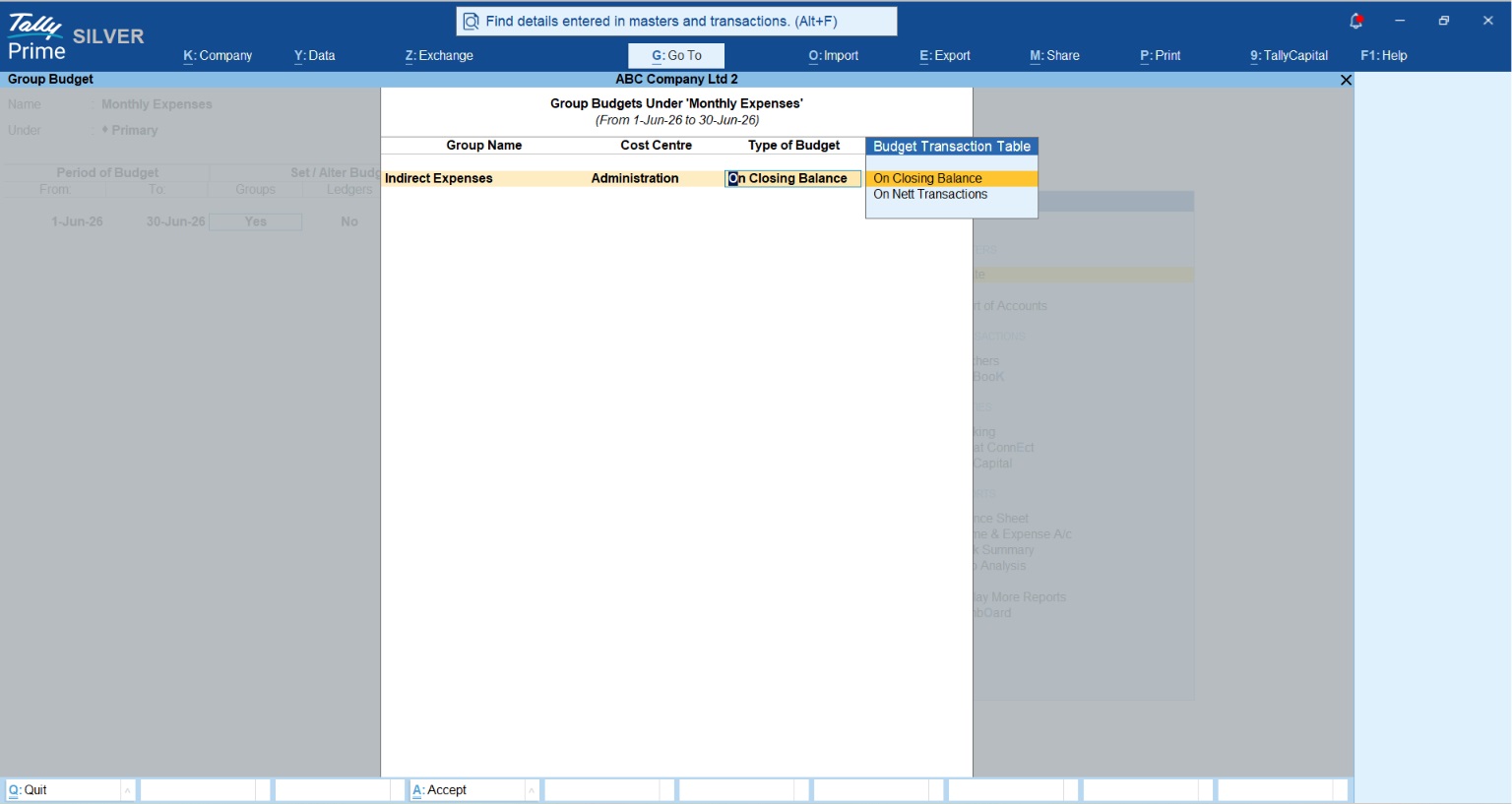
- Gateway of Tally > Create > Budgets: Start here to create your budget master.
- Define Periods: Choose Monthly, Quarterly, or Annual. (Pro-tip: Monthly is best for catching cost spikes early).
- Set Limits for Ledgers/Groups: You can set limits based on:
- On Net Transactions: Monitors the amount spent during the period.
- Closing Balance: Monitors the cumulative balance of the account.
Expert Tip: Adopt Zero-Based Budgeting. Don’t just add 10% to last year’s numbers. Start from zero and require departments to justify every expense. It eliminates “legacy waste”, those recurring subscriptions or vendor contracts that no longer serve you.
The “Variance Analysis” Feature: How Close Are You to Your Goal?
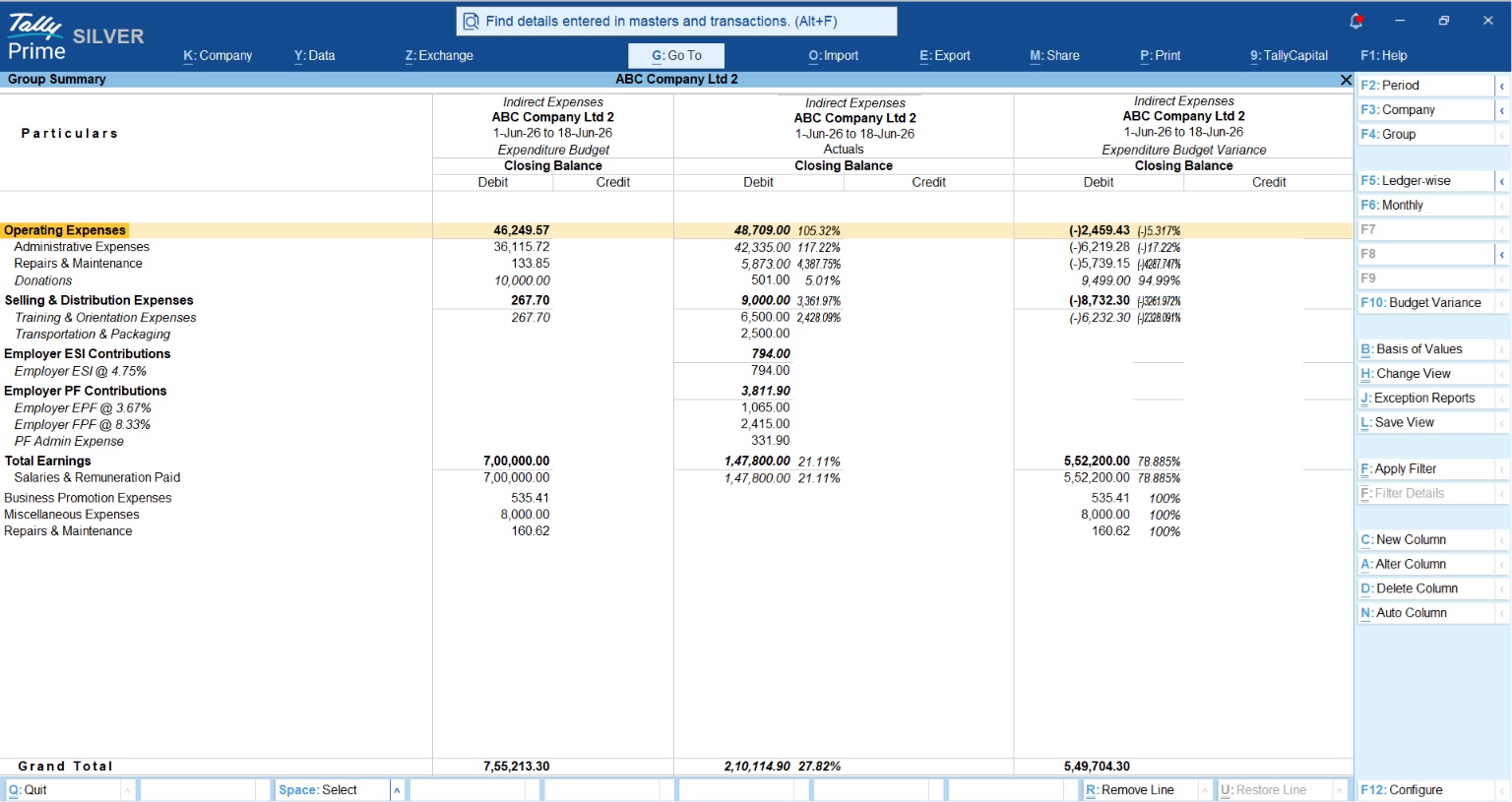
The most powerful tool in TallyPrime is the F10 (Budget Variance) function. While viewing a Trial Balance or Group Summary, pressing F10 shows you:
- Favourable Variance: You spent less than planned (e.g., spending ₹8,000 against a ₹10,000 budget).
- Unfavourable Variance: You overspent (e.g., spending ₹12,000 against a ₹10,000 budget).
A Consultant’s Warning: The “Lag Effect” Don’t panic over every “unfavourable” variance. In my experience, Marketing or R&D spend often has a lag effect—an overspend in January might be the direct cause of a “favourable” revenue jump in June.
Three Triggers for Budget Reassessment:
- Market Spikes: Sudden jumps in raw material or fuel costs.
- Tax Policy Shifts: New GST rates affecting your input costs.
- Materiality Threshold: Any department exceeding their monthly budget by more than 5%.
Pro-Tips: Notifications & Cloud Access in Release 7.0
TallyPrime 7.0 has introduced “safety nets” that every SME owner should use:
- Specific 7.0 Notifications: Look for the “Bell Icon.” You now get critical alerts for TallyDrive storage capacity, Tally Scheduler status, and Company Data Repair alerts (essential for preventing data loss from corruption).
- Cloud Access for Remote Owners: You don’t need to be in the office to catch a leak. TallyPrime Cloud allows you to check your Budget vs. Actual reports from your home or branch securely.
Read 3 TallyPrime Backup Layers to Secure Your Financial Data
“Making business decisions based on real-time data is the difference between strategic growth and expensive guesswork.”
Conclusion: Your Weekend Financial Checklist
I challenge every SME owner to complete this checklist to gain total control:
- Map Existing Chart of Accounts (COA): Ensure every ledger is mapped to a relevant Cost Center.
- Enable Add-On Notifications: Go to F1 (Help) > Settings > Display and enable “Allow Add-Ons to send Notifications.”
- Set 5% Tolerance Limits: Define the “Materiality Threshold” at which you want to be alerted for overspending.
- Schedule a “Random” Audit: Commit to auditing 10% of approved expenses monthly to catch compliance gaps early.
- Review Efficiency Ratios: Check if your support department costs are growing faster than your revenue.
Also read Why Accountants and CAs Prefer TallyPrime for Managing SME Clients
FAQs
- What is the ideal expense-to-revenue ratio? Healthy SMEs usually stay between 15% and 25%. Service firms are often on the lower end, while manufacturing units lean toward the higher side due to overheads.
- Can I use budgeting if I have under 20 employees? Yes. Even micro-teams benefit from TallyPrime’s automation. It reduces processing time and catches errors, like duplicate payments, before they impact your limited cash flow.
- What is the difference between a cost center and a profit center? A cost center tracks only expenses (e.g., HR), whereas a profit center tracks both revenue and expenses (e.g., a specific branch) to measure its net profitability.
- How often should I audit my expense reports? I recommend performing random audits of 10% of approved expenses monthly. This random check is the best internal control to prevent fraud and ensure policy compliance.
- Does TallyPrime work offline for budgeting? Yes. You can record transactions and manage budgets offline. TallyPrime will sync the data once you reconnect for cloud access or other connected services.
