

 Cart is empty
TL;DR
TallyPrime Without a CA? Wholesale business owners no longer need to be tethered to a consultant for routine compliance. With TallyPrime Release 3.0 and the latest 7.1 updates, you can handle GSTR-1 and GSTR-3B filing directly from your desk. The software acts as an automated “Safety Net,” flagging errors before they reach the GST portal, drastically reducing CA dependency.
The Three Pillars of Tally Independence:
- Cost Savings: Eliminate monthly service fees and avoid the high interest on late payments (18% per annum).
- Speed: Shift from a half-day manual ordeal to a 60-minute automated workflow.
- Data Control: Gain real-time visibility into your Input Tax Credit (ITC) without waiting for external reports.
Introduction: The “CA Bottleneck” vs. The Digital Solution
Yes, you can absolutely file your own GST returns. In my 20 years of accounting experience across the manufacturing and automobile sectors, I have seen too many wholesalers lose money because they were “stuck” in the CA bottleneck, waiting for a professional to find time for a simple monthly return while late fees and interest piled up.
By “maintaining books of accounts” directly in a system like TallyPrime, you are no longer just a spectator in your own business. The latest digital tools bridge the gap between your office and the GSTN portal, ensuring your records are “audit-ready” from the moment a voucher is saved.
Is a CA Mandatory for Every Monthly Filing?
It is a common myth that every monthly filing requires a professional sign-off. While a Chartered Accountant is indispensable for year-end audits, complex tax planning, and legal disputes, routine monthly filings (GSTR-1 and GSTR-3B) are now highly automated.
TallyPrime maps your transaction data directly to the current GST portal format. This ensures “accurate data reflection,” meaning the JSON file or direct export generated in your office matches the portal’s logic exactly. You aren’t “doing the math”, the system is.
Step 1: Setting the Foundation (The “GST Setup”)
Independence starts with a clean setup. A common mistake I see is ignoring the “Effective Date” of registration, ensure this date matches your GST certificate to avoid backdated errors.
Navigation: Gateway of Tally > F11 (Features)
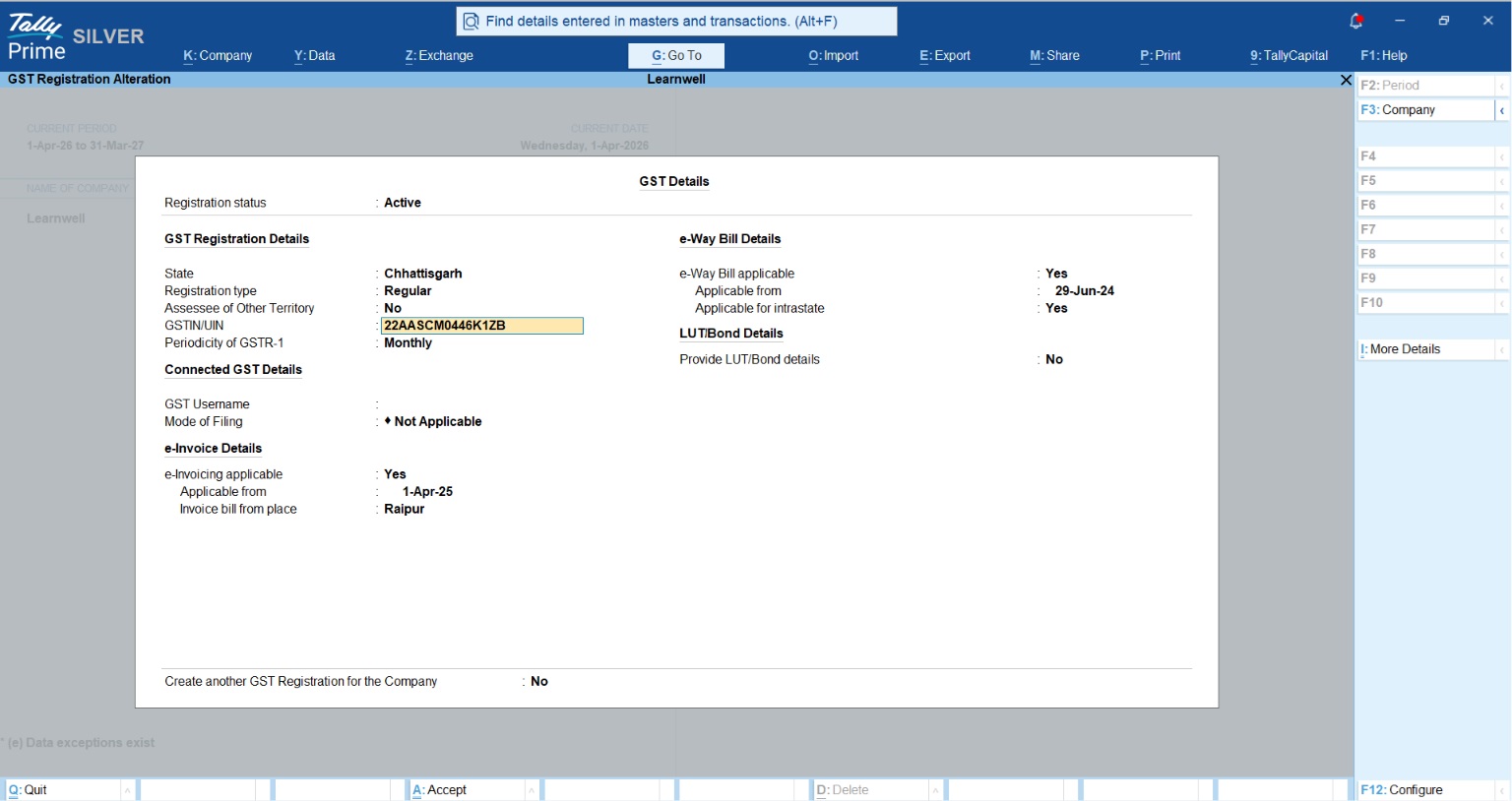
- Enable GST: Set “Enable Goods and Services Tax” to Yes.
- Registration Details: Specify your State, Registration Type (Regular), and your 15-digit GSTIN.
- Configure HSN/SAC: Set these at the stock item level. Expert Tip: Per latest amendments, report HSN rate-wise. Ensure 4-digit codes for turnover up to ₹5 Crores and 6-digit codes for turnover above ₹5 Crores.
- Update Party GSTINs: Navigate to Display More Reports > GST Reports > Update Party GSTIN to validate customer details in bulk.
Step 2: Daily Bookkeeping: The Secret to Stress-Free Filing
Filing is just the final click; the real work happens daily. For wholesalers handling high-volume sales, Voucher Numbering is critical. The GSTN expects unique and sequential numbering (e.g., if a sale is Invoice #101, a subsequent return shouldn’t “break” the numbering sequence). Proper sequencing prevents “Duplicate Invoice” rejections on the portal.
Record your sales, purchases, and credit notes daily. This keeps your GSTR-1 and GSTR-3B reports updated in real-time, allowing you to catch errors as they happen rather than on the 10th of the month.
Step 3: Filing GSTR-1 Without Errors
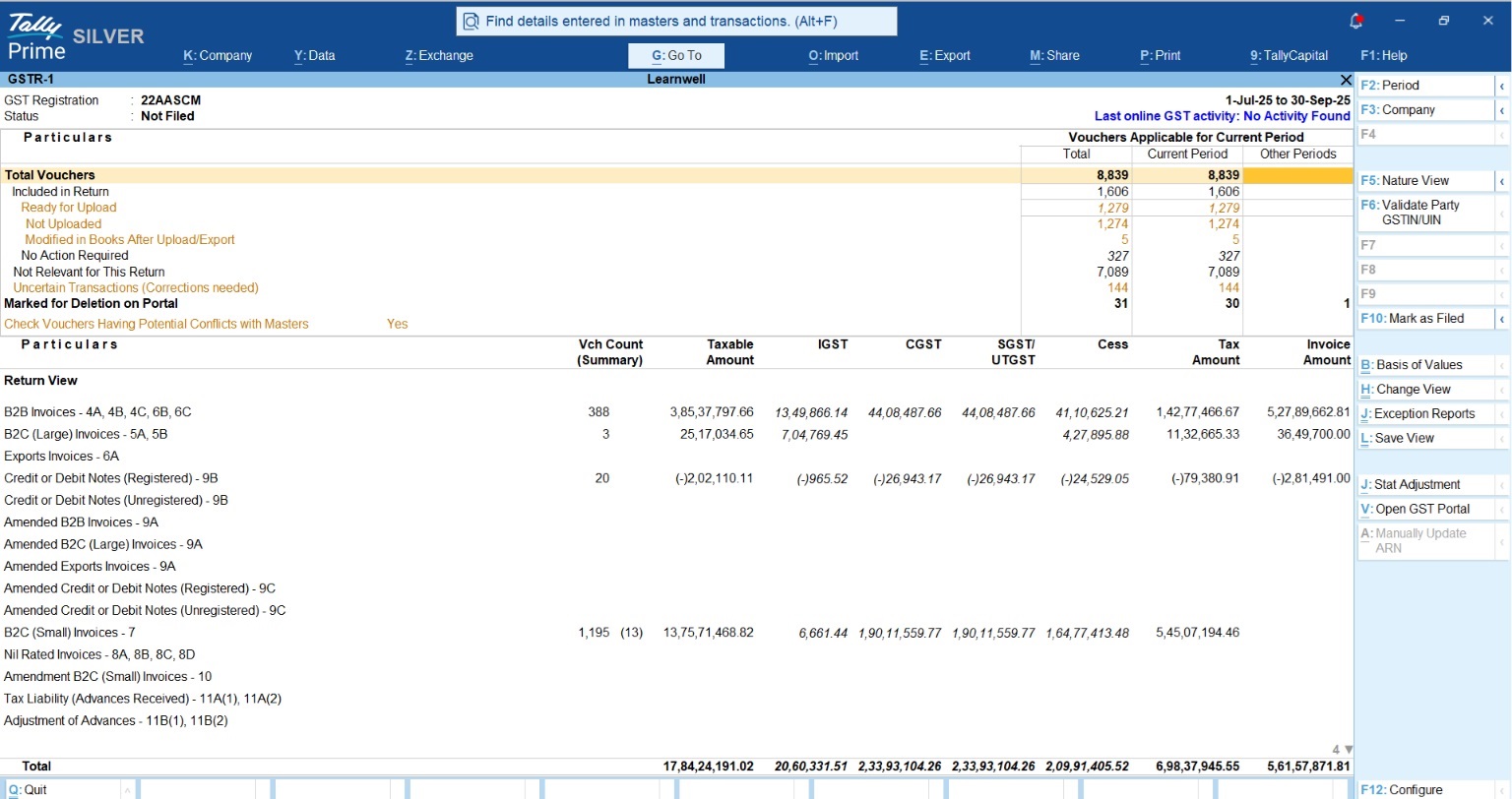
GSTR-1 handles your outward supplies. While you can export a JSON file for manual upload, TallyPrime’s “Direct Export” (available with a valid TSS subscription) is the fastest route.
Navigation: Gateway of Tally > Display More Reports > GST Reports > GSTR-1
Before exporting, check the “Uncertain Transactions” section. This is your internal audit tool.
| Common GSTR-1 Exceptions | The TallyPrime Fix |
| Missing/Invalid GSTIN | Drill down and enter the validated GSTIN directly in the report. |
| HSN/SAC Rate Mismatch | Use the “HSN/SAC Summary” to assign tax rates to items in bulk. |
| Nature of Transaction Mismatch | Correct “Local” vs. “Interstate” supplies if the state code doesn’t match the GSTIN. |
| Voucher Modified After Export | Tally flags these so you can decide to re-export or keep as is. |
Step 4: Filing GSTR-3B & Recomputing ITC
GSTR-3B is your “Tax Payment” return. With TallyPrime Release 7, you must now navigate the Invoice Management System (IMS). If you reject or keep an invoice “Pending” in IMS, you must use the “Recompute GSTR-2B” feature in Tally to ensure your ITC matches the portal’s updated values.
Expert Warning: Interest on short-paid tax is 18%, while interest on excess ITC claimed and used is a staggering 24%. Use the “Download and Reconcile” feature to compare “Books vs. Portal” before filing to ensure you never overclaim.
Read More About IMS in TallyPrime
Case Study: From “Notice Anxiety” to Total Control
Take the example of Balaji Electricals or wholesalers like “Amit” in Raipur. Before implementing TallyPrime’s direct upload workflow, Amit’s team spent half a day every month manually exporting data, logging into the portal, and handling correction loops for rejected invoices.
After switching to a structured TallyPrime 7 environment, the workflow was transformed. By resolving “Uncertain Transactions” daily and using the automated reconciliation tool, their filing time shrank from five hours to just sixty minutes. They transitioned from “Notice Anxiety” to being “Audit-Ready” 24/7.
Also read How TallyPrime Handle GST, Inventory and Payroll
Conclusion: Your “Audit-Ready” Checklist
Independence requires discipline. Before you finalize your return, run through this consultant-approved framework:
- Verify HSN Summary: Ensure HSN codes are reported rate-wise as per the latest amendments.
- IMS Reconciliation: Confirm if any invoices were rejected or kept pending in the Invoice Management System.
- Recompute GSTR-2B: Run the recomputation to align your ITC with recent portal changes.
- Resolve Uncertainties: Ensure the “Uncertain Transactions” bucket is at zero.
- Data Backup: Always perform a full data backup before the final export.
To start your journey toward compliance independence, the “TallyPrime Silver“ plan provides the full suite of GST features needed by single-user wholesalers.
“You can run a business without a machine, but not without TallyPrime, and you certainly don’t need a CA for every click.”
FAQs
1. What if my HSN codes are wrong? Use Tally’s HSN/SAC validation in the GST Rate Setup report to update codes in bulk before filing, preventing classification errors that trigger scrutiny.
2. Can I file for multiple branches? Yes. TallyPrime 3.0+ supports Multi-GSTIN management, allowing you to manage different state registrations within a single company file for centralized reporting.
3. What is an ‘Uncertain Transaction’? These are entries with missing or mismatched GST details, like an incorrect tax rate, that Tally flags so you can fix them before the portal rejects your file.
4. Is it safe to file without a CA review? For routine monthly returns, Tally’s internal audit tools ensure high accuracy. However, keep a CA for annual audits (GSTR-9/9C) and complex tax planning.
5. How much does TallyPrime cost? The Silver (Single User) plan starts at ₹750/month (+18% GST), including all invoicing, inventory, and connected GST features for direct filing.
