

 Cart is empty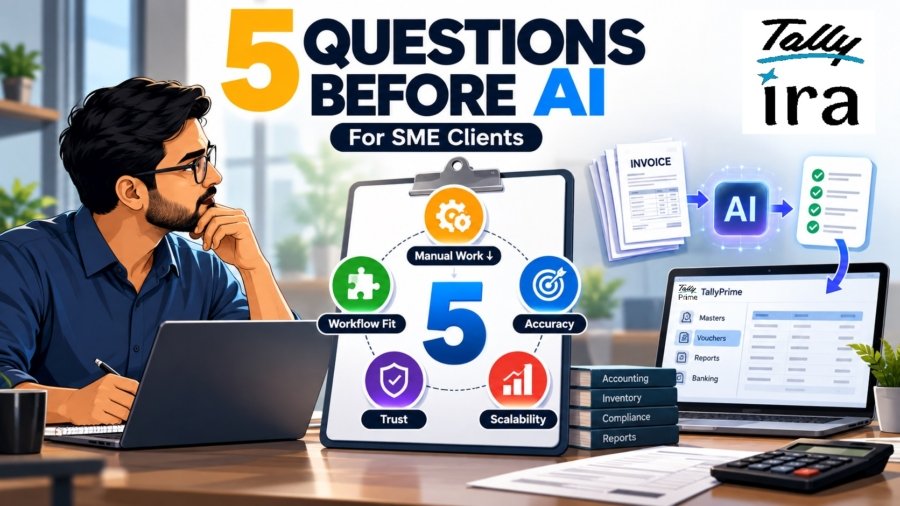
TL;DR
Recommending an AI tool to an SME requires the same rigorous due diligence as a high-stakes financial audit. In my 20 years of advising sectors from manufacturing to pharmacy, I’ve seen that the true value of an investment isn’t found in a demo, but in the Total Cost of Ownership (TCO), which often reaches a 3x to 8x multiplier of the initial quote. I evaluate every tool against five non-negotiable criteria: Labor Reduction, Workflow Fit, Data Accuracy, Trust/Explainability, and Scalability.
Introduction: The SME AI Tool Dilemma
Today, every software vendor slaps an “AI-powered” label on their product, promising overnight digital transformation. This creates massive FOMO (Fear Of Missing Out) for Small and Medium Enterprises (SMEs) who feel pressured to modernize quickly. However, the harsh reality is that not every tool labeled “AI” actually belongs in a client’s workflow.
In my experience across the retail and automobile sectors, buying a software license and deploying an application is the easiest part. The real challenge, and where most businesses fail is ensuring that the tool actually performs under the pressure of real-world capital allocation and messy daily operations. A poorly chosen AI tool doesn’t just waste money; it frustrates your existing staff, creates data silos, and disrupts your core business processes.
As a strategic advisor, my perspective is strictly pragmatic. I don’t care about the latest technological trends, industry buzzwords, or flashy dashboard demos. I care about operational ROI.
The ultimate question for any SME is simple:
Does this system create long-term “technical debt,” or does it drive actual, measurable efficiency? To answer that, we must look past the marketing hype and evaluate every AI tool with a critical, unforgiving lens.
Question 1: Does it provide a concrete reduction in manual work?
The first question I ask is very straightforward: Which repetitive work is taking up your employees’ time today?
For many SMEs, the answer is often accounting-related work. Teams receive purchase bills, sales invoices and other documents and then manually enter information such as:
- Party name
- Invoice number
- Invoice date
- Amount
- GST details
- Item details
- Ledger information
One or two invoices are not a problem. But when a business receives hundreds of documents every month, the same small task becomes a significant workload. This is where AI becomes useful, not because it is AI, but because it can remove repetitive work.
How TallyPrime Fits Here
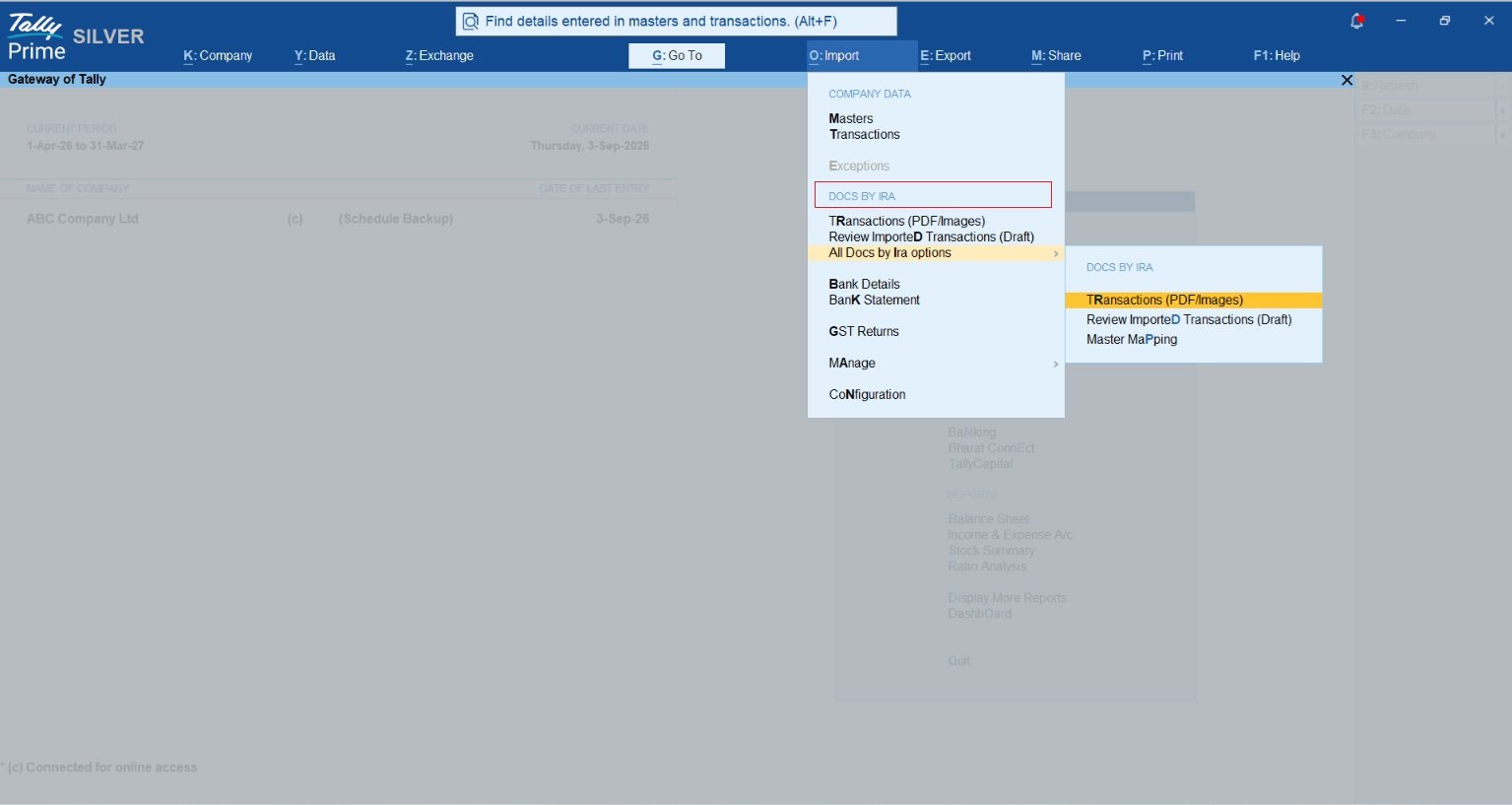
Docs by Ira, an AI-powered capability available with TallyPrime, is designed around this exact problem.
A user can scan or upload invoices and other supported transaction documents. Docs by Ira reads information from those documents and prepares accounting-ready draft vouchers in TallyPrime. The user can then review the information before posting it into the books.Tally says this can save up to 80% of the time spent on manual data entry in supported document-processing workflows.
That is the type of AI benefit I look for. There should be a clear answer to the question: “What work will my team have to do less of after using this feature?” If that answer is difficult to identify, the AI feature probably does not have enough practical value for the business.
Question 2: Does the AI Make the Job Easier Without Changing Everything?
My second question to the client would be: Will this software make your current work easier, or will your team have to learn an entirely new way of working? This is especially important for SMEs.
Most small and medium businesses cannot afford to stop operations for weeks just to implement a new system. They may already have:
- years of accounting data,
- existing ledgers and stock items,
- established billing processes,
- GST workflows,
- bank reconciliation processes,
- and employees who are comfortable with their current software.
If an AI tool requires them to move data repeatedly between different applications or maintain another separate system, the promised productivity benefit can disappear very quickly.
Look for AI Inside the Existing Workflow
This is one reason I prefer AI that works within the business software itself. With Docs by Ira, document processing feeds into TallyPrime’s accounting workflow instead of creating a completely separate accounting process. The AI prepares the voucher, but the user continues working inside TallyPrime and reviews the entry before it is posted.
TallyPrime also brings accounting, inventory, banking, compliance and business reporting together within the same business management system. For an SME, this matters because employees do not have to manage one application for accounting, another for AI processing and another just to move the information between them.
The question I would therefore ask is: “Can this AI improve the software and processes my team already uses, instead of forcing us to rebuild the whole workflow?” For most SMEs, easier adoption is often more valuable than having the most advanced technology.
Question 3: Does it prioritize data accuracy over just speed?
Saving time is useful, but accounting software has another responsibility: The information must be accurate. An incorrect product description in a marketing draft can be edited easily. An incorrect amount, GST value or accounting entry can affect:
- books of accounts,
- tax calculations,
- outstanding balances,
- inventory,
- management reports,
- and business decisions.
That is why my next question would be: How does the AI help reduce data-entry mistakes, and what happens when it is unsure?
AI Should Assist, Not Blindly Post Entries
A useful design in Docs by Ira is that AI-created entries are prepared as draft vouchers. The accountant gets an opportunity to review and approve the information before anything is finally posted into the books. This is important.
Suppose an invoice contains an unclear value or the software cannot confidently match a particular ledger. Instead of blindly accepting the result, the user can check the source document and make the necessary correction. Docs by Ira also supports exception handling, master mapping and duplicate checks during document processing, helping reduce manual entry mistakes and ensuring more accurate transaction details are recorded. This automation also supports the identification of mismatches and errors before GST filing in TallyPrime, giving users an opportunity to review and correct issues before submitting their GST returns.
This combination makes more sense for accounting: AI handles repetitive reading and preparation. The accountant keeps control over verification.
When evaluating any AI accounting tool, I would therefore ask: “Does it help improve accuracy while still allowing my accountant to verify important entries?” That balance is far more useful than simply choosing the fastest automation available.
Question 4: Can My Team Understand What the AI Has Done?
Many business owners are interested in AI, but employees often have a different concern: “What exactly has the software changed or created?” This is a very important question. Employees should not be expected to trust an AI-generated accounting entry just because the software says it is correct. They should be able to review what has been created.
For example, when an invoice is processed, the AI should automatically identify and highlight any discrepancies or doubtful details. Instead of checking every entry manually, the accountant only needs to review the flagged issues and make corrections where required. This reduces unnecessary checking while still keeping the final entry accurate.
Keep the User in Control
Tally describes Docs by Ira around a simple principle: AI prepares the entry, but the user reviews and approves it before it goes into the books. For me, this approach is important for SME accounting. The goal should not be to remove accountants from the process. The goal should be to remove unnecessary typing and repetitive work so accountants can spend more time checking information, handling exceptions and understanding the business.
So the question I would ask the client is: “Will my team understand what the AI is doing, and can they correct it before it affects the books?” If the answer is yes, adoption is likely to be much easier.
Question 5: Does It Give Enough Value for the Money?
The final question is not technical at all. It is the question every SME owner eventually asks:
“Is this actually worth paying for?” AI should not automatically mean higher software costs. A business should compare the cost with the work being saved. For example, think about a company where an accountant spends several hours every week:
- entering purchase invoices,
- checking invoice details,
- preparing vouchers,
- reconciling banking transactions,
- and correcting data-entry mistakes.
If the software can reduce a meaningful part of this repetitive work, the business may recover the cost through time savings and improved productivity. But value is not only about invoice entry. A business management software can provide better value when the same system also handles other important activities.
Looking at the Bigger Picture
TallyPrime combines areas such as:
- Accounting
- Invoicing
- Inventory
- GST and compliance
- Banking
- Cash and credit management
- Business reports
and its connected services include features such as Connected Banking alongside TallyIra’s AI-powered document processing. That changes the value calculation.
Instead of asking: “How much does this AI feature cost?” I would ask: “How much of my daily business work can this software simplify?” For SMEs, the best value often comes from a system that solves several everyday business problems without requiring multiple disconnected applications.
Where TallyPrime’s AI Approach Makes Sense
TallyPrime is a good example of an approach I prefer for SMEs because AI is being added to an existing business workflow rather than becoming a separate system the business has to manage.
With Docs by Ira, the basic process is simple: Upload or scan document → AI reads it → Draft voucher is prepared → Accountant reviews it → Voucher is posted.
This solves two common business problems: repetitive invoice entry and accuracy. With AI-powered invoice processing, details are captured from the source document and possible errors or exceptions are flagged for review before the voucher is posted. This helps the accountant verify the entry and make corrections where needed, resulting in more accurate accounting records. At the same time, the accountant remains in control of the final approval.
Conclusion: Your Strategic Action Plan
When a client asks me whether they should adopt an AI-enabled business tool, I would never recommend it simply because AI is the latest trend. I would first understand how their business works. Then I would ask:
- Will it reduce manual work?
- Will employees find it easy to use?
- Will it improve accounting accuracy?
- Will the team remain in control?
- And will the business get enough value for what it pays?
If a business management software can answer these questions clearly, then AI becomes more than a feature on a software brochure. It becomes useful business automation. For SMEs, that distinction is important.
The objective is not to use more AI. The objective is to spend less time on repetitive work, maintain accurate books and give business owners better control over their operations.
That is also where AI capabilities such as TallyPrime’s Docs by Ira can become practically useful, handling repetitive document processing while keeping the final accounting decision with the user.
Also read Why I Recommend TallyPrime’s AI Features Over Manual Entry for Every New Client
FAQs
How can SMEs reduce AI costs?
SMEs can reduce AI costs by choosing business software that includes useful AI features within the tools they already use, instead of buying multiple separate applications. Starting with practical use cases such as invoice entry, accounting automation, GST checks, or banking can help businesses get value from AI without unnecessary extra spending.
Why is accuracy more important than speed in accounting AI?
A high-speed error in financial workflows scales through the entire organization, creating expensive rework cycles that degrade “Cognitive Trust” among stakeholders.
How does AI in TallyPrime help reduce accounting errors?
AI-powered features such as Docs by Ira capture invoice details directly from source documents, which helps reduce manual data-entry mistakes. TallyPrime also helps identify mismatches and errors before GST filing, so users can review and correct them in time.
Can AI-generated entries in TallyPrime be reviewed before posting?
Yes. Docs by Ira prepares draft vouchers that can be reviewed and corrected by the user before they are posted into the books. This keeps the accountant in control while reducing repetitive manual work.
What is the primary function of Docs by Ira?
It is an AI-powered tool that scans invoices (such as PDFs or JPEGs), even in bulk, and automatically extracts the data to generate accurate draft vouchers for TallyPrime.
How do you import bank statements into TallyPrime?
You can fetch statements directly using the Connected Banking feature (supported for Axis, SBI, Kotak, and ICICI) or press Alt+O to manually import Excel, CSV, or MT940 files.
Is financial data secure when using Docs by Ira?
Yes. The tool is built on strict data privacy principles. Your financial documents are processed securely and are never used to train external AI models.
