

 Cart is empty

TL;DR:
Rapid operational expansion often causes data lags, inventory mismatches, and compliance friction, and higher costs. TallyPrime avoids enterprise complexity by executing heavy background workflows, including rule-based multi-location data sync, real-time multi-company consolidation, automated stock reordering, and direct GST compliance without additional overheads or user retraining.
Is Business Growth Forcing Complexity onto Your Accounting?
In my 20 years working with growing businesses across manufacturing, retail, and distribution, I have watched countless companies hit a predictable friction point. TallyPrime supports expansion without added complexity by preserving simple, intuitive entry screens while running enterprise-grade data engines, auto-concurrency infrastructure, and integrated statutory compliance in the background.
When businesses scale, adding branch locations, launching new product lines, or creating separate legal entities, they frequently fall into the classic “scaling trap.” Accounting software built for basic bookkeeping bogs down under file locking, manual spreadsheet consolidations, and frequent tax portal rejections. Operational leaders often assume the only solution is migrating to costly, complex ERP systems that require months of user retraining and heavy IT overhead.
TallyPrime takes a fundamentally different architectural path. It decouples high-volume background processing from front-end user operations, allowing companies to expand their branch networks, transaction volumes, and corporate structures effortlessly while keeping day-to-day workflows simple and reliable for staff.
How Do You Expand to Multiple Locations Without Losing Central Control?
In my two decades of advising expanding retail chains, wholesale distributors, and multi-plant businesses, I have consistently noticed one major challenge: local branches need fast, uninterrupted billing, while the Head Office needs real-time central control.
When a business grows from a single shop or factory into multiple locations, managing accounts and inventory on separate computers often leads to confusion, delayed reports, and stock mismatches.
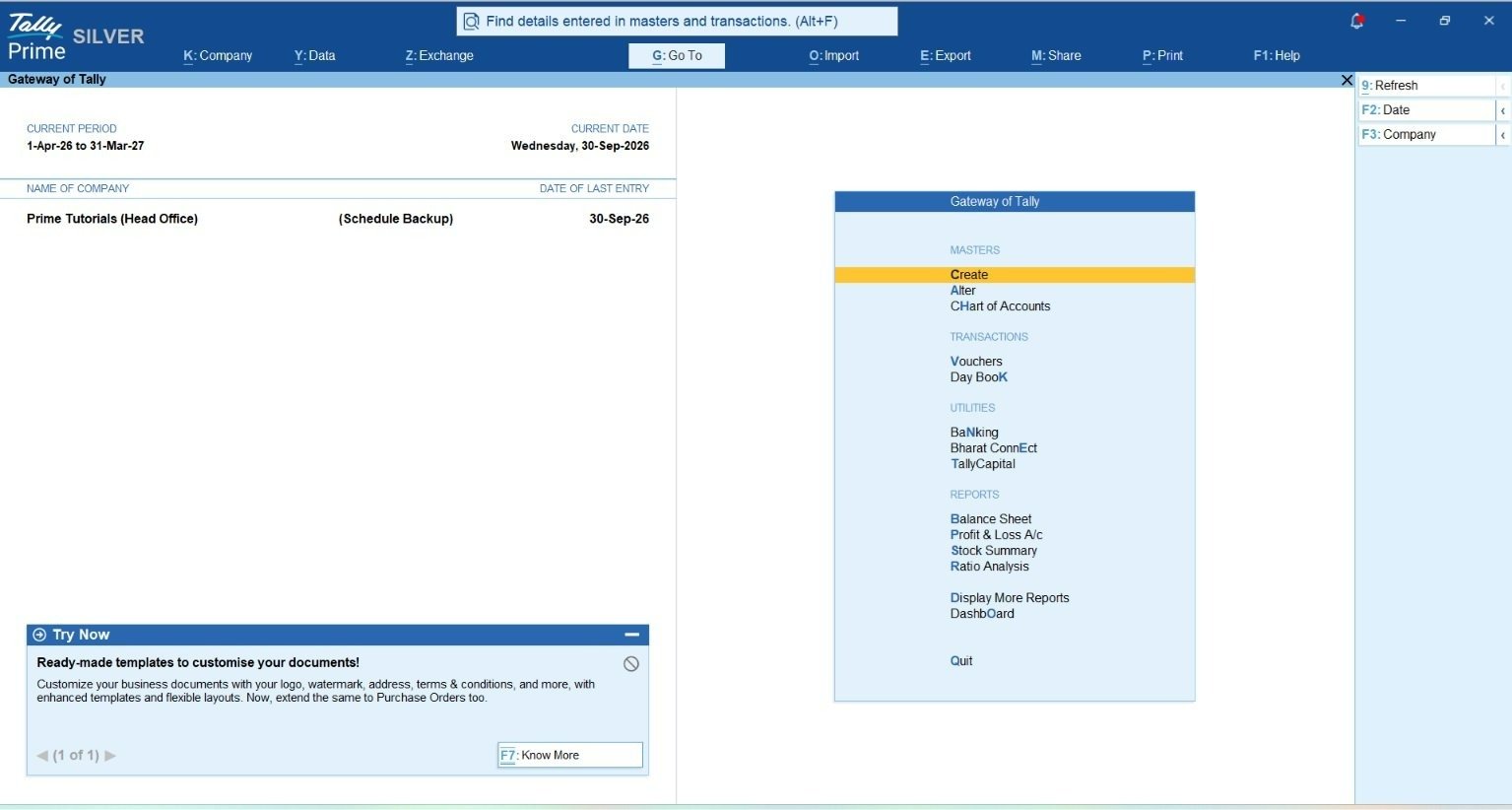
TallyPrime solves this operational balancing act effortlessly by offering two practical approaches: TallyPrime on Cloud and Automated Data Synchronization.
Choose Your Setup: TallyPrime Cloud vs. Data Synchronization
Depending on your internet connectivity and business style, you can connect your locations in two simple ways:
- TallyPrime Cloud Access (Single Live Database): You can host your TallyPrime on a secure cloud server. With this setup, all your branches, warehouses, and the Head Office log in to the same central company data from anywhere. As soon as a branch creates a sales bill, the Head Office sees it instantly—no manual data transfer is needed.
- Automated Data Sync (Best for Offline Speed): If some of your remote branches or godowns have unstable internet, they can run TallyPrime locally on their counter computers for super-fast offline billing. Whenever the internet connects, TallyPrime automatically exchanges data with the Head Office using Tally.NET or a direct IP connection.
How Data Flows Between Branches and Head Office
If you use Data Synchronization, you maintain complete control over how information moves across your business:
- Branch to Head Office: Branches send their daily sales, purchase, and payment entries to the Head Office.
- Head Office to Branch: The Head Office creates standard ledger accounts, price lists, and stock item names, and pushes them down to all branches so everyone follows the same rules.
- Two-Way Sync: Data flows both ways smoothly between locations.
- 100% Data Security: Whether your data is on the Cloud or moving through synchronization, TallyPrime locks it with strong encryption. The data goes straight into the destination database without creating temporary files, keeping your financial records completely safe.
Real-Time Multi-Godown and Stock Tracking
Expanding to multiple locations means your inventory is spread across different factories, warehouses, and retail shelves. TallyPrime’s built-in Multi-Godown feature gives you a clear, live picture of your raw materials, work-in-progress, and finished goods at every location.
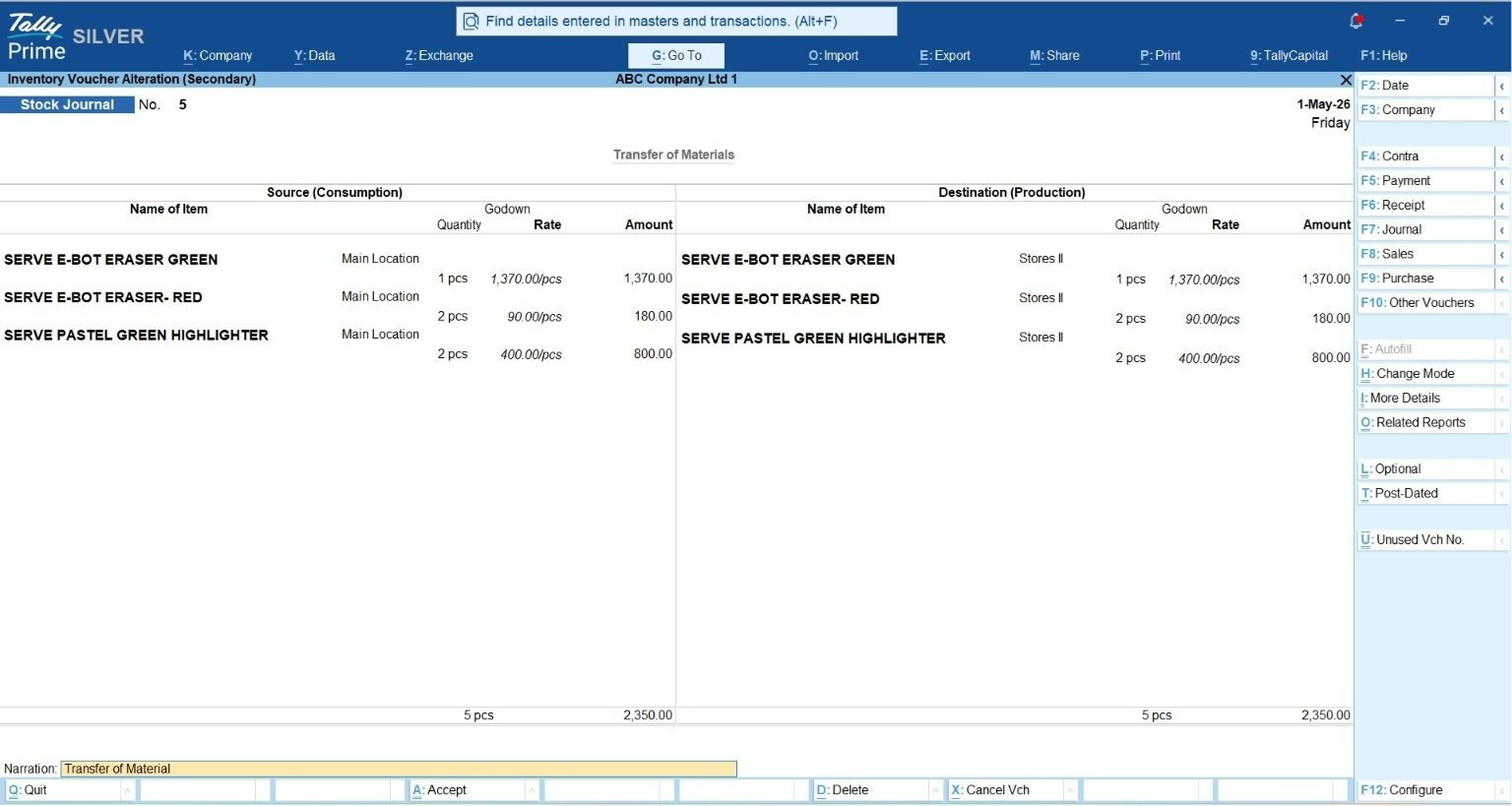
- Easy Stock Transfers: When you move goods from one warehouse to another, you simply record a Stock Journal voucher. TallyPrime automatically reduces stock from the sending godown and adds it to the receiving godown.
- Direct e-Way Bills: For inter-state or long-distance stock transfers, you can generate compliant e-Way Bills directly from TallyPrime at the time of entry, saving hours of manual portal work.
Real-World Field Note
A fast-growing regional distributor was struggling with frequent stockouts and billing mismatches across its branch offices. Because branches were sending data manually at the end of the week, the Head Office never knew the actual stock position in real time. By shifting their core operations to TallyPrime Cloud and enabling automated synchronization with multi-godown tracking for remote counters, the company transformed its workflow. Today, their branch counters enjoy instant, zero-lag billing, while management at headquarters tracks live inventory and branch-wise profitability on a single screen.
Can Financial Consolidation Across Multiple Companies Really Happen Without Excel Chaos?
When I audit client books during mergers or multi-entity expansions, spreadsheet consolidation is almost always where financial reporting breaks down. Establishing standalone legal entities offers distinct tax and administrative advantages, but manual spreadsheet merging introduces severe operational friction and formula risk.
TallyPrime eliminates this spreadsheet chaos through its dynamic Group Company architecture.
Instead of physically combining underlying database files, TallyPrime creates a virtual, non-destructive reporting layer over independent entity books. Finance teams simply load member companies into memory and activate the parent group overlay.
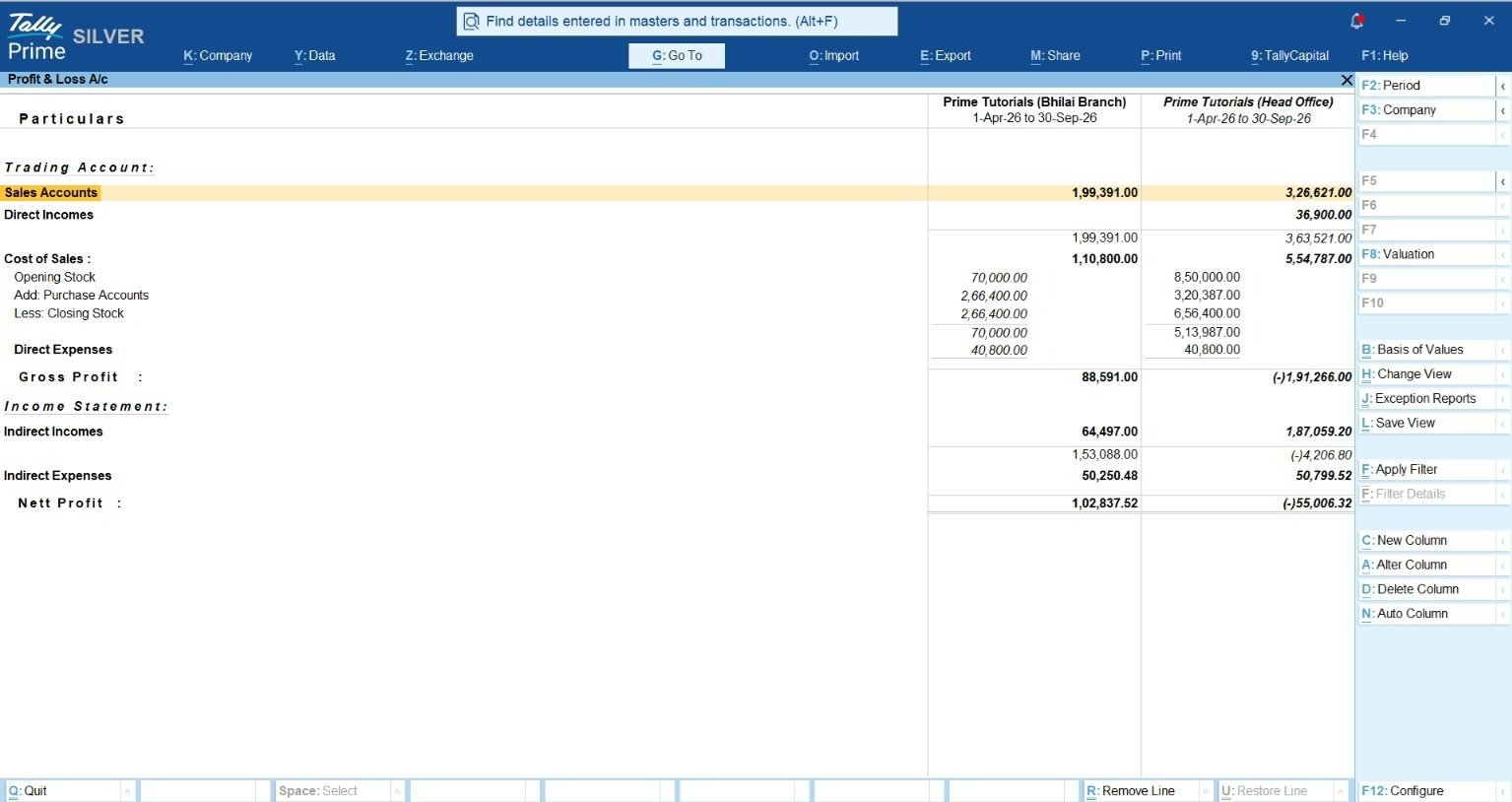
TallyPrime aggregates Profit & Loss statements, Balance Sheets, and Trial Balances in real time while preserving the distinct database integrity, ledgers, and audit trails of underlying entities.
To prevent internal transactions from inflating group figures, finance teams map standardized inter-company ledgers across member units. TallyPrime’s comparative reporting features allow users to display standalone entity metrics side-by-side with net consolidated group figures, netting off intra-group sales, purchases, and outstanding balances.
| Manual Excel Consolidation | TallyPrime Group Company Architecture |
| Data Integrity: Prone to broken formulas and manual copy-paste errors. | Data Integrity: Non-destructive virtual dynamic database overlay keeps standalone entity books isolated. |
| Consolidation Speed: Requires days of manual data collection and spreadsheet validation. | Consolidation Speed: Real-time aggregate P&L, Balance Sheet, and Trial Balance generation. |
| Inter-Company Tracking: Difficult to track and manually net off internal sales/purchases. | Inter-Company Tracking: Mapped intra-group ledgers automatically net off internal balances to prevent revenue inflation. |
| Audit Drill-Down: Static numbers without direct connection to underlying entries. | Audit Drill-Down: Dynamic drill-down from consolidated lines directly to the originating entity voucher. |
| Forex Handling: Manual exchange rate calculations and complex journal adjustments. | Forex Handling: Automated multi-currency engine logs base equivalents and posts real-time Forex Gain/Loss. |
For international operations, TallyPrime incorporates a multi-currency accounting engine. Users can define custom currency masters, log foreign currency vouchers, and automatically calculate exchange rate variations. The platform posts real-time foreign exchange gains or losses directly to designated adjustment registers, streamlining multi-company consolidation and multi-currency accounting software workflows.
What Keeps Inventory & Manufacturing Running Smoothly When Orders Surge?
In my experience with manufacturing clients, surging order volumes quickly strain procurement and production lines if inventory control is disconnected from accounting ledgers. TallyPrime integrates manufacturing control directly into core business ledgers using a multi-level Bill of Materials (BOM).
A BOM defines the precise raw material recipe required to assemble a finished product. For example, assembling an industrial pump requires:
Finished Good (Industrial Pump) :
┌─ Motor: 1 unit
├─ Pump Body: 1 unit
├─ Shaft: 1 unit
├─ Bearings: 2 units
├─ Seals: 2 units
└─ Fasteners: 8 units
When shop-floor teams post a Manufacturing Voucher, TallyPrime automatically calculates raw component consumption according to the BOM, deducts stock from designated godowns, adds finished pumps into available inventory, and updates inventory valuations.
[ Raw Material Godown ] ──(BOM Auto-Deduction)──► [ Manufacturing Voucher ] ──(Finished Goods Added)──► [ Finished Goods Godown ]
Crucially, TallyPrime pairs BOM execution with Material Requirement Planning (MRP) analysis. Before launching a production run, operations teams can evaluate pending sales orders directly against physical raw material stock, identifying component shortages in advance and issuing purchase requisitions to prevent shop-floor downtime.
For regulated industries such as pharmaceuticals or food processing, TallyPrime enforces batch and serial number tracking with First-Expiry, First-Out (FEFO) and First-In, First-Out (FIFO) dispatching logic. The software flags stock nearing expiration during sales invoicing, reducing spoilage losses and supporting regulatory quality mandates. To prevent stockouts without tying up capital in excess inventory, TallyPrime automates reorder point management using a standard operational threshold formula: Reorder Point = (Daily Demand) x (Lead Time) + Safety Stock
If a manufacturing business processes an average daily demand of 20 units, operates with a supplier lead time of 7 days, and maintains a safety stock of 60 units: Reorder Point = (20 x 7) + 60 = 200 units
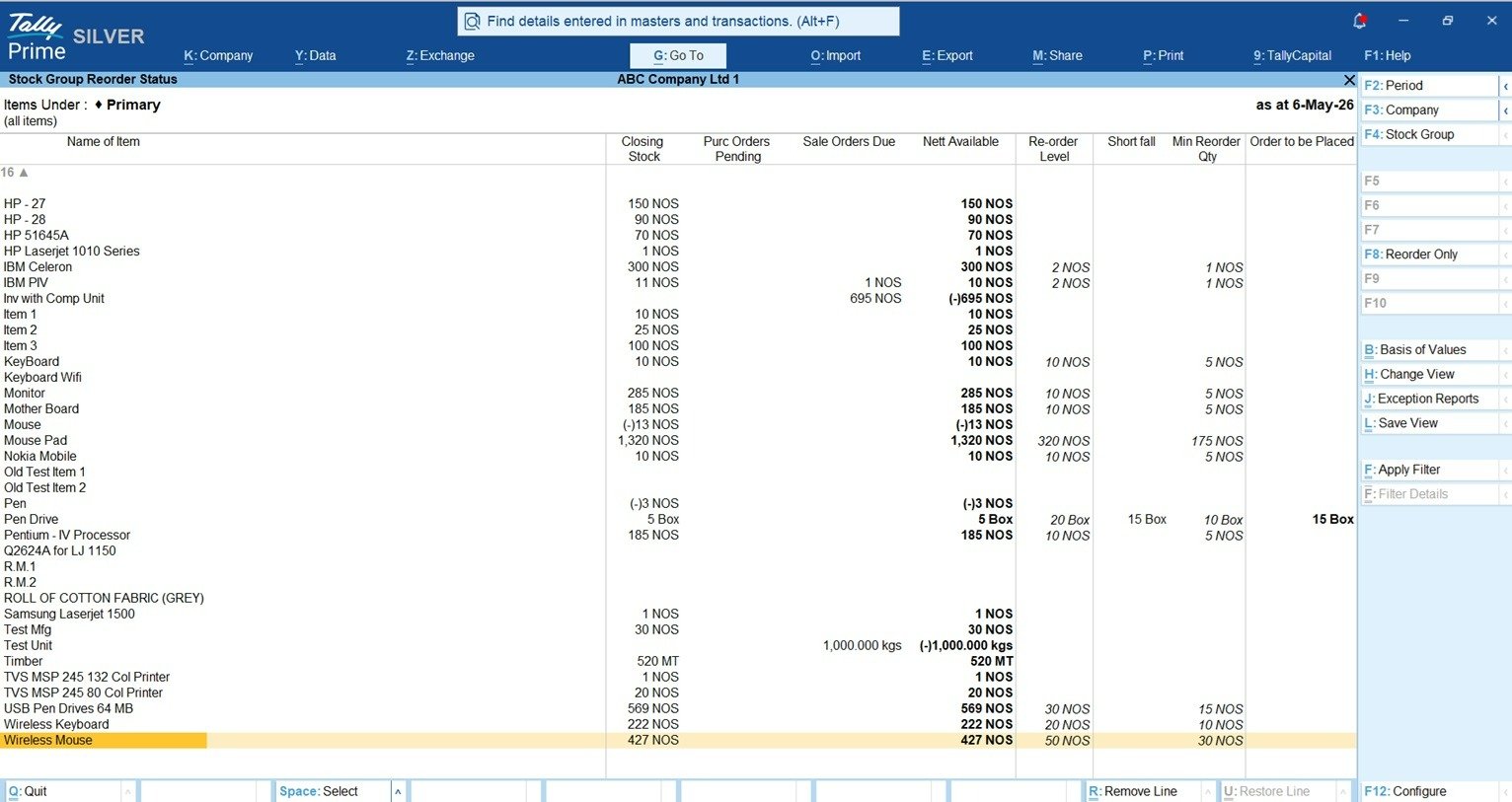
When total physical stock drops to or below 200 units, TallyPrime automatically flags the item inside the Inventory Reorder Status Report, allowing purchasing teams to evaluate incoming stock, pending purchase orders, and sales backlogs in a single view.
How Do You Maintain Flawless GST Compliance and Audit Trails As Volumes Scale?
When client transaction volumes double, manual statutory checks quickly become a dangerous operational bottleneck. TallyPrime reduces compliance risk by validating voucher entries against tax schemas in real time during billing rather than relying on post-entry corrections. The system validates party GSTIN structures, HSN/SAC codes, and tax rates during entry. Transactions containing missing or mismatched information are immediately routed to the Uncertain Transactions workspace. This interface isolates errors into a single screen, allowing finance teams to correct tax mismatches in bulk before generating statutory returns such as GSTR-1, GSTR-3B, and GSTR-9.
- ITC Reconciliation: Finance teams import vendor GSTR-2A and GSTR-2B files directly into TallyPrime. The software matches uploaded data against internal purchase registers, categorizing bills into matched, mismatched, or missing statuses to protect Input Tax Credit (ITC) cash flow.
- Direct API Integration: Users generate e-invoices complete with IRN numbers and QR codes alongside automated e-Way bills directly from the billing screen without intermediate CSV exports or third-party utility software.
- Auditability & Governance: To fulfill Ministry of Corporate Affairs (MCA) audit mandates, TallyPrime features an unalterable Edit Log. The log tracks voucher and ledger creation, modification, and deletion events, logging exact user accounts and timestamps while displaying side-by-side version comparisons highlighting altered values in red.
- Database Security: System-level security is managed via TallyVault, which encrypts company database files using a non-stored password algorithm to protect business data against external binary tampering or direct database file reading.
Enterprise Scale & Governance: Built for High-Volume Growth
As your business scales and the number of concurrent users increases, standard peer-to-peer networks can start to slow down during peak billing and reporting hours. Upgrading to TallyPrime Server transforms your system into a true enterprise-grade client-server setup, allowing dozens of users to enter vouchers, print invoices, and pull complex reports simultaneously without any system lag or screen freezing.
- High-Speed Parallel Processing: Instead of users waiting in a queue to access data files, the server handles multiple requests at the same time, keeping counter billing and back-office accounting running at full speed.
- Zero-Downtime Live Backups: You no longer need to ask your team to log out of Tally just to take a backup. Administrators can run scheduled backups while everyone continues working normally, ensuring business continuity without a single minute of lost productivity.
- Role-Based Security & Control: Protect sensitive financial data by assigning strict user permissions. You can easily control who can view, create, alter, or print specific vouchers and reports, while monitoring active user sessions.
- Permanent Edit Logs for MCA Compliance: For companies requiring strict statutory governance, TallyPrime Edit Log tracks every single change made to masters and transactions. It records a permanent, tamper-proof audit trail showing what was changed, who changed it, and when—making MCA (Ministry of Corporate Affairs) audit compliance effortless and 100% transparent.
Practical Growth Checklist for Expanding Businesses
To implement these architectural capabilities systematically as your operations expand, follow this 4-step execution framework:
- Step 1: Baseline Standardization (Single Unit): Standardize your Chart of Accounts, configure item masters and godowns, enable real-time GST schema validation, and establish baseline statutory reporting rules.
- Step 2: Multi-Location Setup: Use TallyPrime Cloud or activate rule-based Data Synchronization via Tally.NET or direct IP connection, and configure FEFO/FIFO batch expiration controls.
- Step 3: Multi-Entity Structuring: Establish Group Company dynamic reporting overlays over independent entity books, map inter-company elimination ledgers, and activate multi-currency foreign exchange gain/loss auto-posting.
- Step 4: Enterprise Scale & Governance: Upgrade to TallyPrime Server to deploy a dedicated multi-threaded client-server database, enable zero-downtime live backups, enforce role-based access security, and permanently activate Edit Logs for MCA compliance auditability.
“Systemic complexity is not an inevitable tax on business expansion. True enterprise software handles heavy data scaling in the background while keeping daily workflows simple for the end user.”
Scaling Without Operational Overhead
Expanding a business from a single location into an enterprise operation does not mandate adopting complex ERP workflows or incurring heavy IT maintenance overhead. TallyPrime demonstrates that enterprise capabilities, such as multi-threaded database concurrency, automated branch data sync, real-time group consolidation, and direct statutory compliance can exist alongside an intuitive user experience.
The most successful implementations are those that insulate front-line users from back-end technical complexity. By leveraging modular data architectures, growing companies can handle surging transaction volumes, expand branch networks, and launch new legal entities while keeping core business processes simple, fast, and secure.
Frequently Asked Questions (FAQs)
How does TallyPrime handle financial consolidation for multiple branch companies?
TallyPrime creates a dynamic, non-destructive Group Company reporting overlay that aggregates Profit & Loss statements and Balance Sheets in real time while preserving standalone entity database files.
What happens if network connectivity fails at a branch office during data sync?
System disruptions are contained strictly to that local client node. Branch users continue recording transactions locally, automatically re-synchronizing with headquarters when network connectivity is restored.
What is the main benefit of upgrading to TallyPrime Server for large teams?
TallyPrime Server provides a multi-threaded database engine with isolated parallel query channels, enabling high user concurrency, zero-downtime live backups, and zero data locking during heavy reporting.
How does TallyPrime assist with statutory GST compliance and input tax credit?
It validates tax schemas in real time, flags missing data in an Uncertain Transactions workspace, and reconciles imported GSTR-2A/2B portal files against purchase registers to maximize ITC.
Can TallyPrime calculate production costs automatically for manufacturing units?
Yes. By using multi-level Bill of Materials (BOM) mapping within Manufacturing Vouchers, TallyPrime automatically deducts consumed raw components from godowns and updates finished inventory valuations upon entry.
Does TallyPrime comply with government requirements for unalterable audit trails?
Yes. TallyPrime Edit Log records unalterable audit trails tracking creation, alteration, and deletion actions across ledgers and vouchers, logging specific user accounts and timestamps for MCA compliance.
