

 Cart is empty
TL;DR
While Zoho Books feels visually approachable on Day 1 due to its web browser interface, TallyPrime proves significantly faster, easier, and less exhausting for operational teams posting 50 or more entries daily. Its purely keyboard-driven modal engine removes the latency of browser rendering and eliminates the physical fatigue of constantly switching between typing and reaching for a mouse, enabling operators to build intuitive muscle memory for rapid data entry. When supercharged with AI tools like Docs by Ira, this efficiency scales even further by converting digital and handwritten invoices straight into draft vouchers, using exception highlighting and human-in-the-loop verification to eliminate repetitive typing and catch errors before they ever reach the final ledgers.
Introduction
In my 20 years consulting across manufacturing plants, retail counters, e-commerce warehouses, and dealerships, I have observed a recurring operational dilemma: business owners frequently hire non-accountant staff, such as counter billing clerks, inventory managers, and administrative assistants who must enter high volumes of daily transactions without formal accounting degrees.
When choosing software, owners often default to web-based platforms because they look simple on paper. However, while Zoho Books presents an initial visual learning curve, TallyPrime demonstrates superior operational throughput once staff complete a few hours of execution. The true test of accounting software usability is not how intuitive a form looks on the first afternoon, but how many accurate invoices a clerk can process at 4:30 PM without physical exhaustion or data entry bottlenecks.
TallyPrime vs. Zoho Books: Different Approaches to Accounting Efficiency
TallyPrime and Zoho Books offer different approaches to managing accounting operations. While Zoho Books provides a browser-based interface, TallyPrime focuses on an efficient accounting workflow with keyboard navigation, contextual shortcuts, and flexible data entry. For businesses handling frequent transactions and large volumes of accounting entries, these capabilities can make everyday operations more convenient.
Onboarding Without Friction: Instant Day-One Capability
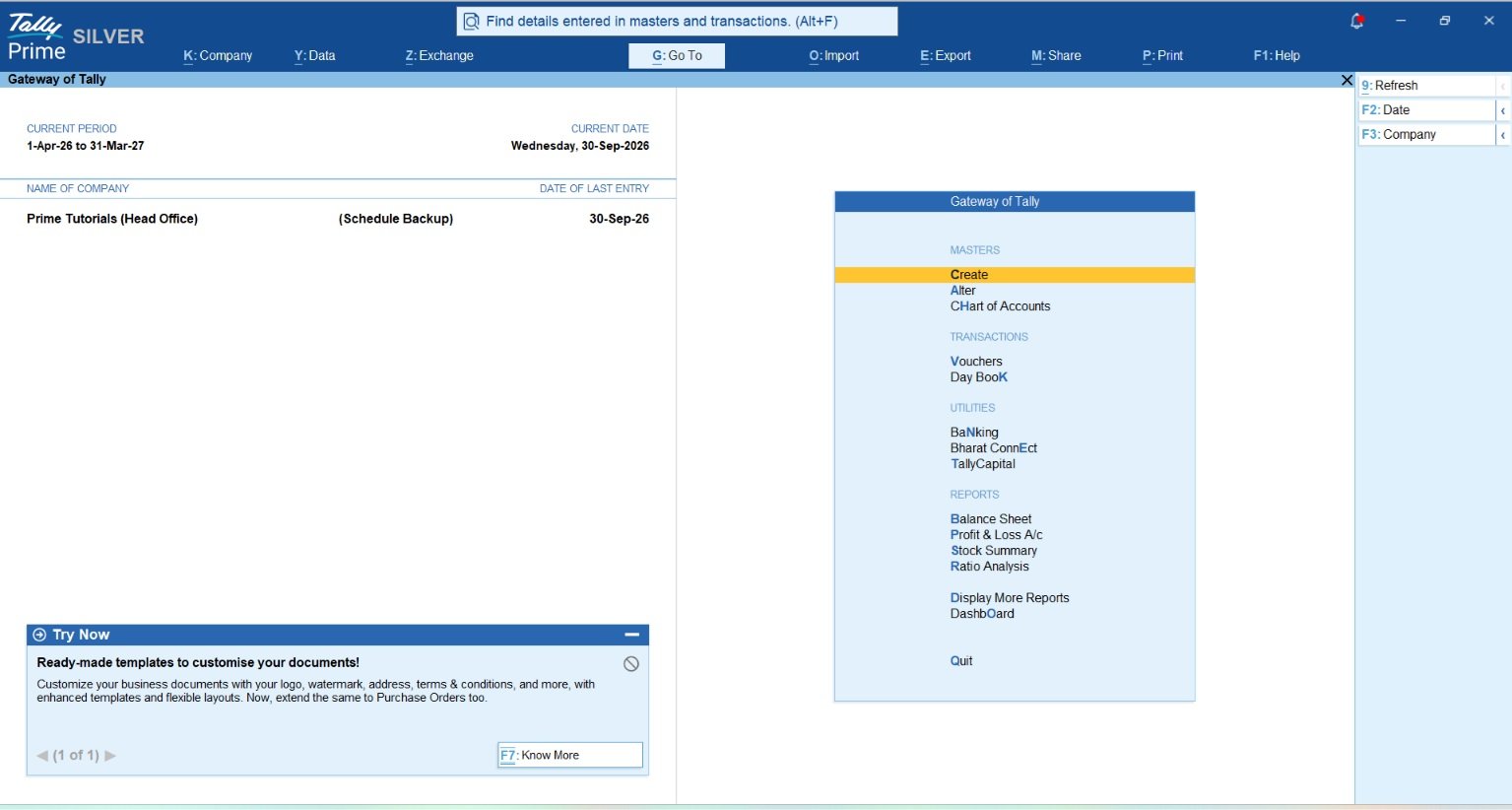
During their initial introduction to the platform, non-accountants with no formal training can navigate TallyPrime with absolute confidence. This ease of use is driven by universal discovery tools like “Go To” (Alt + G). Rather than forcing users to memorize menus or accounting paths, this feature allows anyone to simply type what they need in plain English, be it a payment voucher, stock summary, or report and access it instantly.
By contrast systems like Zoho Books, though visually familiar at a glance, introduce an immediate cognitive and operational drag. They require users to navigate through multi-layered sidebars, complex browser tabs, and tedious dropdown selectors to perform even routine document creation, adding multiple clicks to every single task.
Uninterrupted Keyboard Flow vs. Repetitive Mouse Switching
As operations transition into daily, high-volume transactions, TallyPrime’s keyboard-driven workflow offers a critical advantage over visual-heavy interfaces. It is designed to be operated entirely without a mouse, using logical keystroke sequences that rapidly build muscle memory. Users can fly through multi-line vouchers and ledger entries without lifting their hands, achieving sub-millisecond execution speeds because data is processed locally with zero browser redraw latency.
Contrast this with Zoho Books, where standard data entry forces constant switching between keyboard and mouse to toggle dropdowns, select tax fields, or click save buttons, happening dozens of times an hour. This mouse-heavy dependency, paired with natural cloud network latency, creates physical and cognitive fatigue, higher error rates during peak hours, and severe operational delay over a month of active business usage.
Both platforms offer useful accounting capabilities, but their approaches to everyday operations differ.
| Operational Dimension | TallyPrime | Zoho Books |
| Primary Interaction Model | 100% Keyboard-driven modal flow with option to use mouse | Visual GUI with mouse pointer focus |
| Input Latency per Field | Sub-millisecond (Local execution) | Variable (100ms–500ms DOM/Network delay) |
| Mouse Switching Frequency | 0% required for standard entry | Moderate to high per transaction |
| Interface Navigation Method | Hotkeys, directional keys, “Go To” (Alt+G) | Mouse clicks, sidebar menus, hotkeys |
| Offline Operation Capabilities | Full offline functionality (Native desktop) | Restricted; requires active internet connection |
| Deployment Model | On-premise, Local LAN, or Cloud Access | Multi-tenant Public Cloud SaaS |
Which Approach Works Better for Your Business?
The choice between TallyPrime and Zoho Books depends on the nature of your business, transaction volume, accounting requirements, and working preferences.
TallyPrime offers a structured accounting environment with keyboard-driven navigation, quick access to reports, integrated inventory management, and flexible voucher entry. Importantly, it provides the flexibility of both secure local on-premise control and cloud-enabled access (including remote work and browser-based reporting). These capabilities are particularly beneficial for accountants, businesses handling frequent transactions, and organisations that require detailed accounting and operational flexibility.
Zoho Books offers a visual, browser-based experience that can be convenient for businesses looking for cloud-based accounting and online collaboration.
Rather than measuring productivity through the number of days required to learn a particular software, businesses should evaluate how effectively each platform supports their actual accounting operations.
Operational Workflow Deep Dive: Invoicing, Payments, and Stock Updates
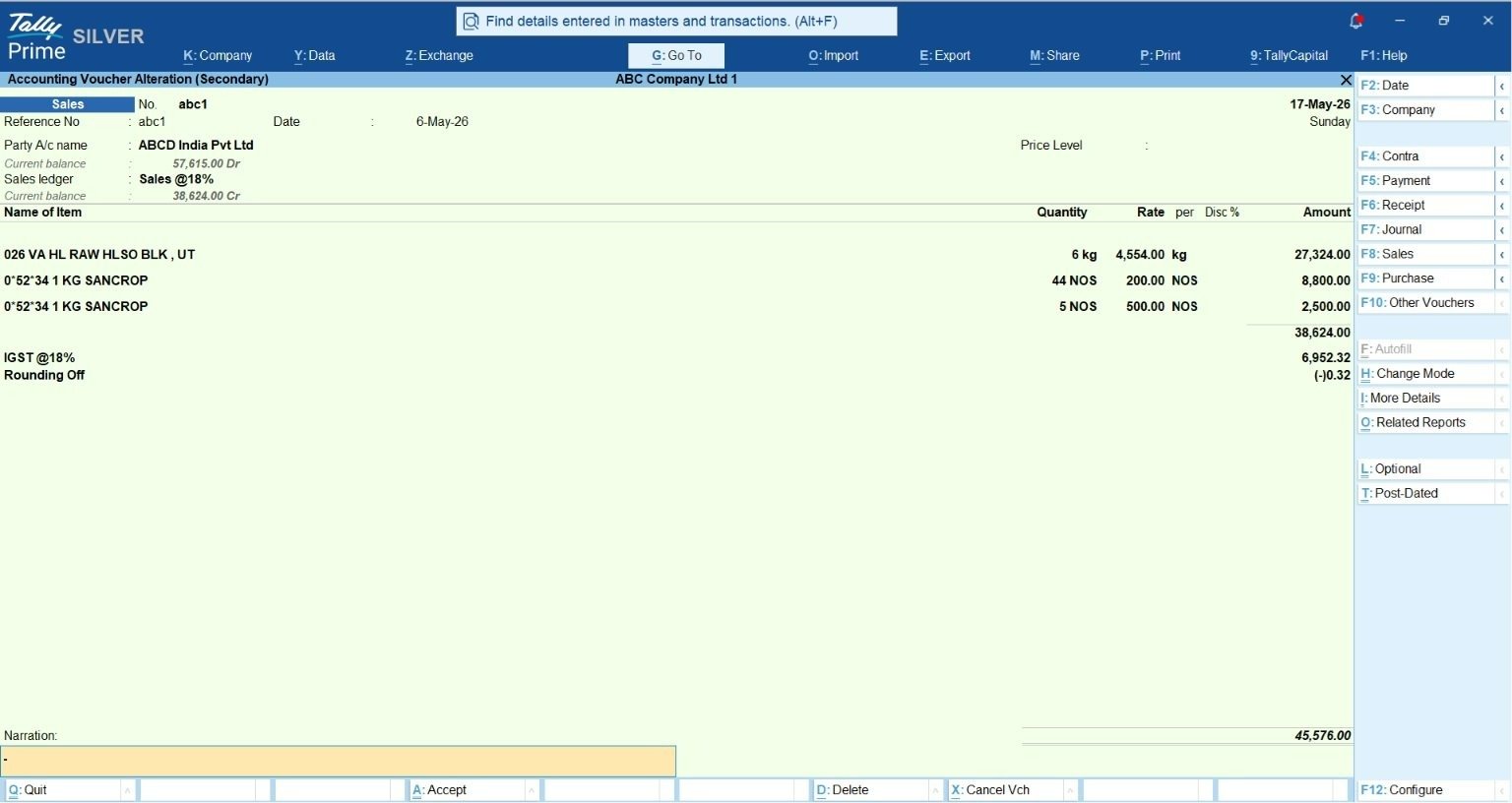
Which System Handles Counter Billing and Invoicing Faster?
At a busy billing counter, processing speed directly dictates customer wait times:
- TallyPrime: Structures invoicing as a unified, single-screen entry. Non-accountant clerks type customer details, line items, quantities, and rates using rapid, sequential Enter key presses. Stock item selection utilizes auto-completing string matching that filters massive inventory catalogs instantly. Pressing Ctrl+A immediately saves and queues the invoice for printing, clearing the screen for the next customer without page reloads.
- Zoho Books: Requires moving through structured web forms. While pressing C+I opens a new invoice screen, selecting customers or line items relies on web component dropdowns that render asynchronously. For counter operations posting 50 to 100 entries daily, waiting for DOM updates and switching between keyboard and mouse creates operational drag.
How Do Staff Manage Payment Entries and Ledger Adjustments?
Recording customer receipts and vendor payments often confuses staff who lack formal debit/credit knowledge:
- TallyPrime: Payment (F5) and Receipt (F6) vouchers function within a unified ledger interface. Staff select the account and party name, and TallyPrime automatically opens a pop-up list of pending bill references. The operator picks outstanding bills using arrow keys and saves. The system handles sub-ledger adjustments behind the scenes without requiring accounting theory.
- Zoho Books: While offering automated bank feeds for cloud-connected accounts, manual entry of physical cash or counter receipts requires navigating modules (Shift+R for Payments Received), picking modes via dropdowns, and confirming modal dialogs via mouse clicks.
How Do They Handle Complex Stock Updates and Godown Tracking?
In retail, wholesale, and manufacturing environments, stock management is critical:
- TallyPrime: Handles complex inventory structures natively within the core screen. When allocating stock across multiple godowns or warehouses, entering batch-wise numbers, or setting manufacturing and expiry dates, TallyPrime opens contextual popups directly over the active line item. Warehouse staff complete multi-godown tracking, batch entries, and multi-stage Bill of Materials (BOM) assembly within a single screen, eliminating cross-module navigation.
- Zoho Books: Handles basic inventory and reorder points well, but advanced tracking (multi-warehouse transfers, multi-stage manufacturing, or deep batch/expiry management) requires integrating external add-ons like Zoho Inventory. Navigating cross-application interfaces adds complexity and potential mapping errors for non-accountant warehouse staff.
Intelligent Automation: Supercharging TallyPrime with Docs by Ira
To eliminate data entry friction, TallyIra introduces an AI-powered document processor called Docs by Ira. This feature transforms manual keying into a rapid, automated review workflow for non-accountant staff.
Automated Ingestion & Invoicing
Non-accountants capture supplier bills, purchase invoices, and receipts in PDF, JPEG, JPG, or ZIP formats via direct desktop import (Alt+O > Transactions under Docs by Ira) or through the TallyIra mobile app. The AI engine reads the document—including English-language digital and handwritten vendor bills—and automatically extracts:
- Supplier/Party Name and GSTIN
- Invoice Number and Transaction Date
- Line-item descriptions, quantities, unit rates, and totals
- CGST, SGST, IGST tax splits and total invoice balances
The AI populates these details directly into a draft transaction, converting manual typists into document auditors.
Human-in-the-Loop Control & Exception Highlighting
Docs by Ira enforces strict safety controls: AI never posts directly to final ledgers. Extracted files appear in the Review Imported Transactions (Draft) report.
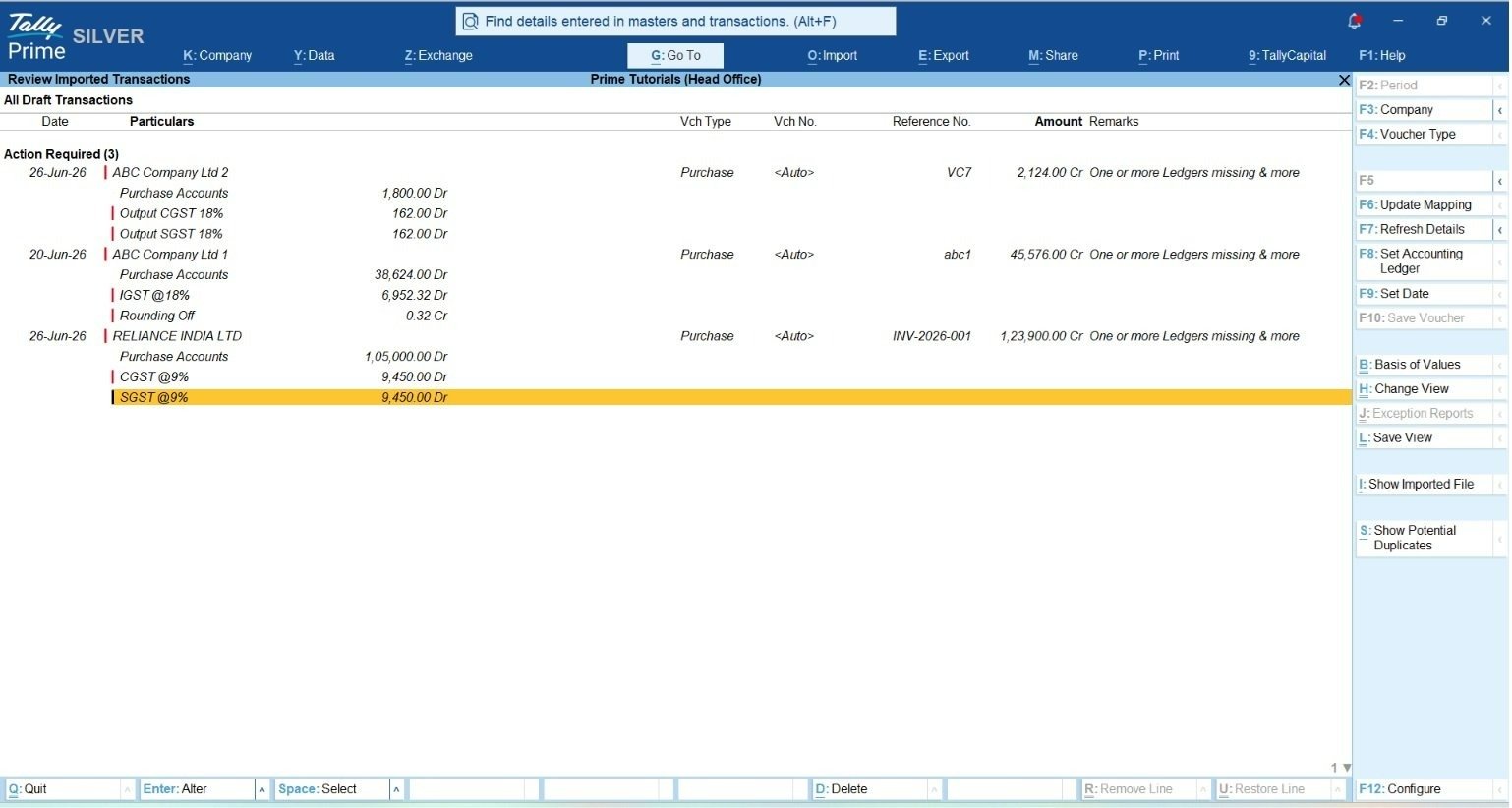
Non-accountants process draft vouchers using a structured step-by-step review flow:
- Open Draft Report: Navigate to the Review Imported Transactions (Draft) report to inspect incoming bills.
- Identify Exceptions: Red visual indicators highlight mismatches or missing details, with explicit notes in the Remarks column (e.g., potential duplicate invoice, unmapped party, or total mismatch). To resolve place-of-supply tax treatment discrepancies, TallyPrime applies a clear hierarchical evaluation: Invoice state \rightarrow Party GSTIN \rightarrow Buyer state \rightarrow Company state.
- Side-by-Side Verification: Press Alt+I to display the original scanned invoice side-by-side with the draft entry.
- Resolve Exceptions:
- Press F6 to map an unrecognized supplier or stock item to an existing master. Crucially, Docs by Ira exhibits master mapping memory—when an operator maps an unrecognized vendor or item once, the system remembers that association for all future bill imports from that supplier, causing staff workload to drop exponentially over time.
- Press F8 to set a common accounting ledger across line items.
- Press F9 to adjust transaction dates when a vendor invoice date falls outside TallyPrime’s active accounting period.
- Press Ctrl+S to review potential duplicate invoice flags and remove duplicate entries before posting.
- Convert Vouchers: Select verified transactions under Ready to Convert and press F10 (Save Vouchers) to officially commit entries to the books.
Practical Real-World Examples & Field Insights
Field Story: Counter Invoicing at Scale
In my work with a wholesale electronics distributor in Raipur processing over 150 purchase and sales entries daily, the back-office clerks were struggling with entry backlogs using web-based software. Each bill took nearly 4 minutes due to dropdown selections and mouse navigation.
After switching to TallyPrime, the staff memorized keyboard entry sequences within three weeks. Invoice processing time dropped from 4 minutes to 1 minutes per bill, cutting total daily data entry effort from 10 working hours down to under 4 hours.
Field Story: Eliminating Vendor Bill Errors
An operational clerk managing raw material purchase bills for a packaging manufacturer in Bawana frequently faced late-month stress due to duplicate supplier invoices arriving via both email PDFs and physical slips.
By implementing Docs by Ira, the clerk uploaded incoming vendor bills in batches. The AI flagged potential duplicate invoice numbers and unmapped GSTINs in red before entries were saved. This workflow caught duplicate bill entries instantly, protecting input tax credit claims and eliminating overpayments without requiring complex accounting knowledge.
Strategic Conclusion & Practical Decision Framework
While Zoho Books is an option for consultants, and business owners, TallyPrime is engineered for operational speed, high-frequency data entry, and robust inventory control for all small and medium businesses.
For non-accountant staff handling day-to-day operations, Zoho Books is initially easier to adopt due to its intuitive, visual interface.
However, for high-volume transactions, TallyPrime’s keyboard-driven workflow, combined with AI document processing via Docs by Ira, delivers significantly greater speed and efficiency.
Decision Checklist for Business Owners
Choose TallyPrime if:
- Your staff process more than 30–50 transactions per desk per day.
- Your operations require multi-godown allocation, batch tracking, or manufacturing BOMs.
- You require flexibility between local access and cloud access.
- You want zero-latency keyboard data entry that is immune to internet drops.
- You handle physical vendor bills and want AI to convert paper/PDFs into draft entries automatically.
Choose Zoho Books if:
- Your business is primarily service-based with low daily transaction volumes.
- You require only cloud accessibility.
“While web interfaces offer immediate visual comfort on Day 1, high-frequency operational accounting requires zero latency and zero mouse dependence, which is why desk operators double their output on TallyPrime by Day 30.”
Also read TallyPrime vs Zoho Books for SMEs: Which Is Easier For Daily Tasks?
Frequently Asked Questions (FAQs)
Why is TallyPrime easier for non-accountants to use?
Non-accountants can easily navigate TallyPrime without formal training thanks to intuitive discovery features like “Go To” (Alt+G), which allows them to find any voucher or report by simply typing plain business terms. Additionally, its consistent keyboard flow and zero-latency desktop architecture eliminate confusing multi-level menus and mouse-switching fatigue, making daily operations straightforward and error-free.
Can non-accountant staff use TallyPrime without knowing debit and credit rules?
Yes. TallyPrime simplifies payment, receipt, and billing workflows using intuitive single-screen interfaces and automatic prompts that handle sub-ledgers and reference adjustments behind the scenes.
How does Docs by Ira prevent data entry errors in TallyPrime?
Docs by Ira extracts invoice data automatically, detects potential duplicates, and red-flags field mismatches or missing details in a draft review report before entries touch the books.
Does Docs by Ira automatically post vouchers into the company books?
No. Docs by Ira creates draft vouchers requiring human verification. Nothing reaches the financial ledgers until an operator reviews the exceptions and presses F10 to approve.
Is TallyPrime faster than Zoho Books for high-volume daily billing?
Yes. This is because Zoho Books requires mouse navigation, web form dropdowns, and browser rendering cycles, creating micro-delays and context-switching fatigue compared to TallyPrime’s rapid keyboard-driven interface.
Can Zoho Books function without an active internet connection like TallyPrime?
No. Zoho Books is entirely cloud-based and requires a continuous, stable internet connection to create entries or generate reports. In contrast, TallyPrime runs natively on the desktop, allowing full offline functionality so daily billing is never interrupted by internet downtime or server latency.
